Participating Frequently
September 8, 2021
Question

How to I combine SEQUENCES

  • September 8, 2021
  • 1 reply
  • 2259 views

Hi,

I'm new to video editing and Premiere Pro.

I have 2 sequences that I want to combine, and I have tried creating a new sequence and dragging each sequence into the timeline in order. This doesn't work! Why not?

How do I do this please? Surely I don't have to export clips first?


Darren

This topic has been closed for replies.

1 reply

Kevin-Monahan
Community Manager
Community Manager
September 8, 2021

Hi Darren,

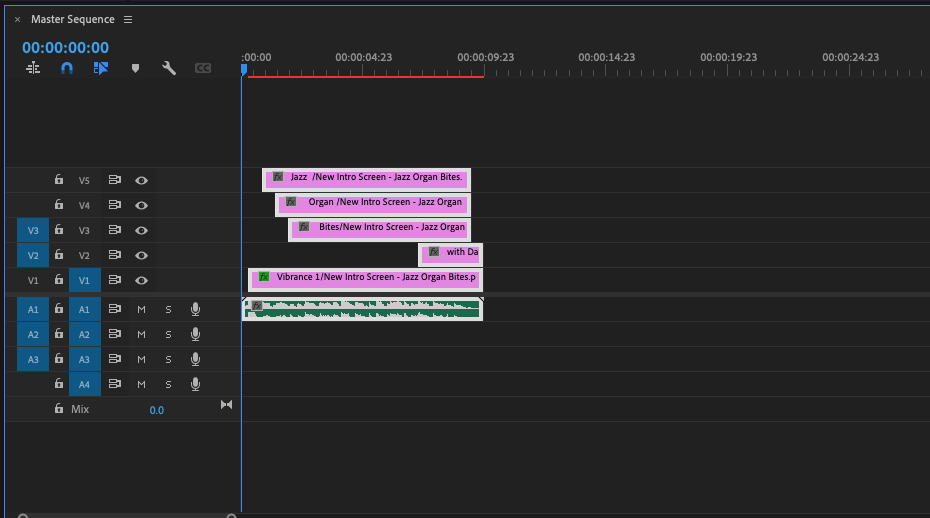
That should actually work. Make sure that your Timeline has V1 and A1 patched properly. Show us a screenshot of what's going on if that won't work either.


Thanks,
Kevin

Kevin Monahan - Sr. Community and Engagement Strategist – Adobe Pro Video and Audio
wdazzjazzAuthor
Participating Frequently
September 8, 2021

Thanks Kevin,

I can sometimes drag Sequence A into the new sequence called MASTER, but when I attempt to drag Sequence B into MASTER only the audio is dropped in.


Is this caused by video resolution perhaps? Sequence A was created via a photoshop import. Sequence B from my camera.

Can this be fixed? I'm not sure I know what you mean by having V1 and A1 patched properly.