
Participant
July 25, 2024
Question

How to insert unwrapped multicam clips onto the timeline?

  • July 25, 2024
  • 2 replies
  • 321 views
I am attempting to use the javascript SDK to insert a sequence that contains multicams onto the timeline.  I want it to be "unnested", in other words not wrapped up in a sequence but rather as individual clips.  When I run my code below, it inserts the sequence with the multicam wrapped within it.  Is there a way to fix this?
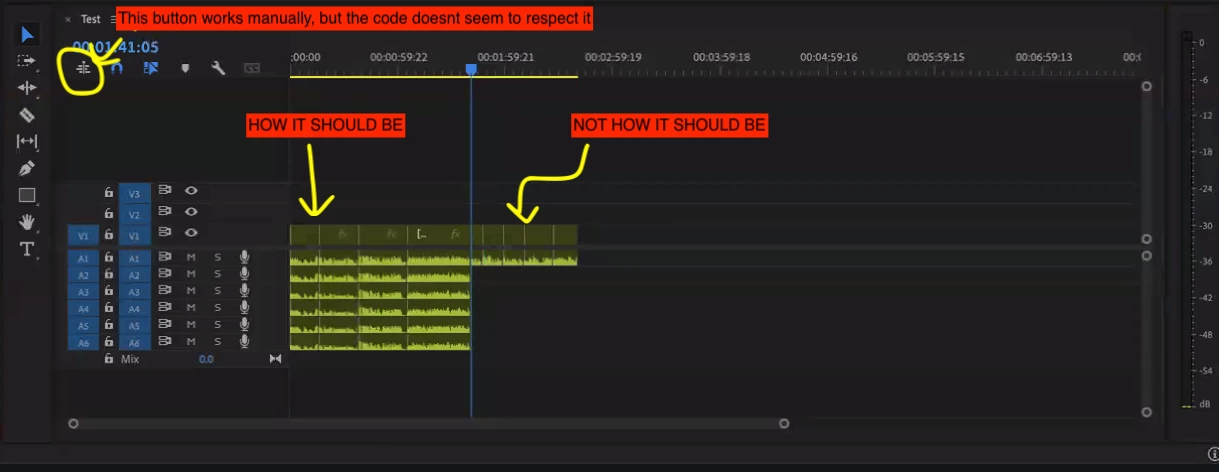


I have code that looks like the following ( modelled after the PPRoPanel plugin )


var seq = app.project.activeSequence;
var vTrack1 = seq.videoTracks[0];
projectItem.setInPoint(instance.start, AUDIO_AND_VIDEO);
projectItem.setOutPoint(instance.end, AUDIO_AND_VIDEO);
vTrack1.overwriteClip(projectItem, now.seconds);​


This topic has been closed for replies.

2 replies

Bruce Bullis
Legend
July 26, 2024

[I've already responded to direct mail, but for those following along]

I've recommended identifying the PPro prefs that do enable the insertion correctly (when using the UI), forcibly setting them, and seeing whether that improves behavior.

Community Expert
July 25, 2024

This is how multi-camera source sequences behave in the latest version of Premiere.

If you want to insert the clips from the multi-camera source sequence, you need to untick Insert or Overwrite Sequences as Nests or Individuals Clips and also click the Timeline context menu and tick Multi-Camera follows Nest Setting.

Cheers,
Paul

djacobs77Author
Participant
July 25, 2024

Thanks! I think our issue is that we want to work from the javascript SDK.  We are able to get it working fine with the buttons you mentioned; but when we use the SDK it doesnt seem to respect those options.  Any thoughts on that?

Community Expert
July 25, 2024

Sorry, I'm not familiar with the SDK.