
or.aparicio
Participant
November 21, 2020
Answered

How to permanently add a LUT to the Export Settings / Effects / LUT list

  • November 21, 2020
  • 4 replies
  • 4788 views

Hi everyone, i wish to add a correction LUT to the effect list on the EXPORT window in premiere pro... i already tried to add it to following folders with no result:


/Users/username/Library/Application Support/Adobe/Common/LUTs/Technical

/Users/username/Library/Application Support/Adobe/Common/LUTs/Creative

/Users/username/Library/Application Support/Adobe/Common/LUTs/Input

/Users/username/Library/Application Support/Adobe/Common/LUTs/Output


At this point i don't really know if that LUTs list is populated from a specific premiere folder or a media encoder folder or from a common folder


i will appreciate if somedy knows how to get this done... leave a screenshot of the list where i want the lut to be available
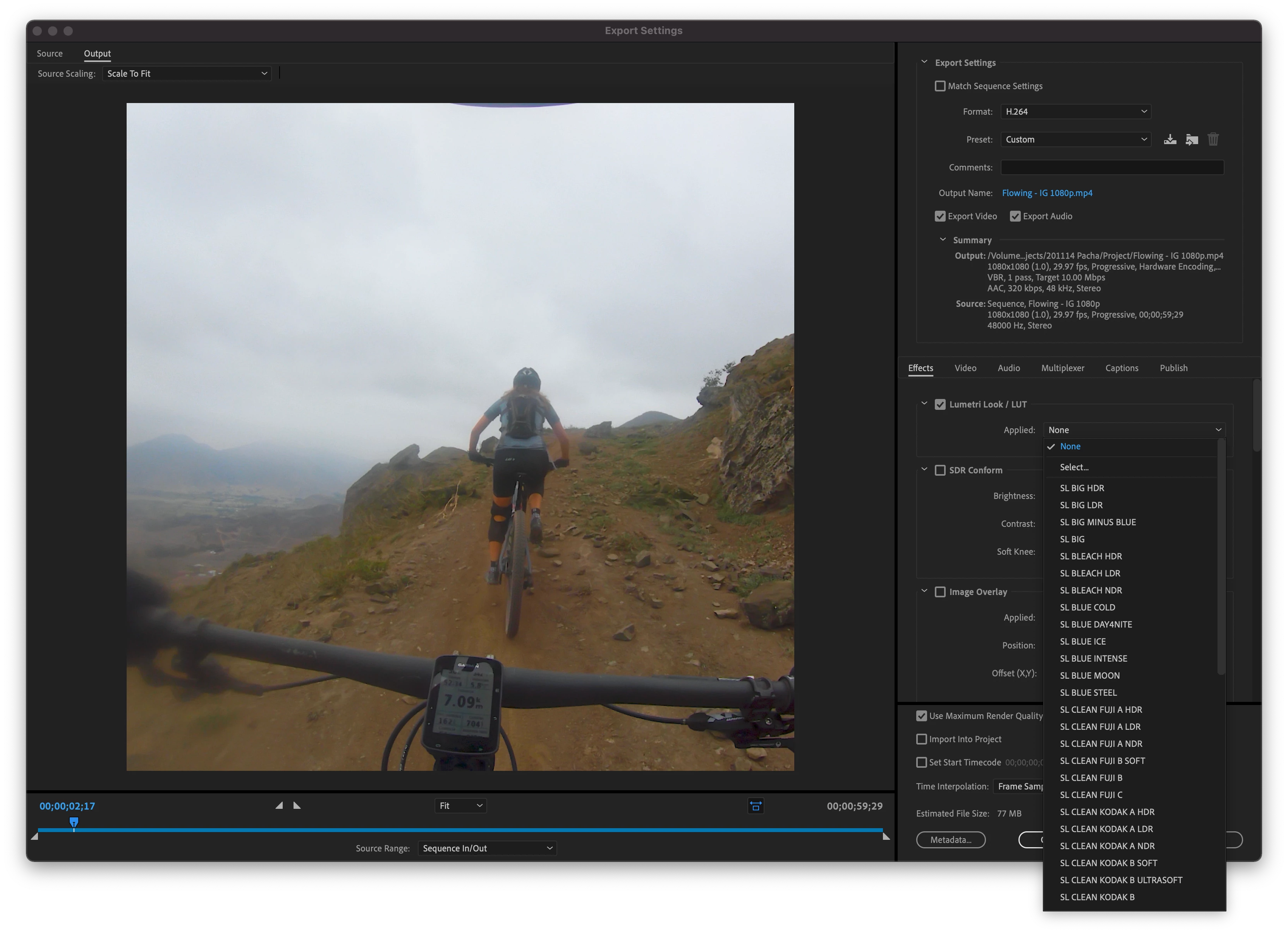


thank you very much!

This topic has been closed for replies.
Correct answer R Neil Haugen

Sadly, it seems to take those only from the included Creative tab LUTs list. And it is NOT advisable to add anything in that spot.


I think this is something that needs to be changed. I'll check on their UserVoice system to see if there is a request filed about this, and if so, post a link to go vote it up.


If not, I'll create one, and post the link to that ...


Neil

4 replies

Participant
March 18, 2023

So this seemingly simple but needed request just gets ignored by Premiere Pro? Da Vinci Resolve is looking better by the day...

R Neil Haugen
Legend
November 21, 2020

Ann,


Thanks for providing the practical current workaround. Yea, you can create presets that would include specific LUTs. Should you have to?


I have LUTs in both my Technical and Creative tab folders, precisely as directed. They show up in their respective folders in the drop-down within the Lumetri panel, just as expected.


But none of them show in the drop-down list in the Export dialog ... that only shows the included LUTs from the Program files Creative folder. Period.


That's what this is about, the ability to add a particular user LUT to the drop-down list in the Export tab.


Yes, one can save a preset ... but there are times when one simply wants to throw a corrective or other LUT on an export, and we could as easily navigate our own LUT folders as the program folder if this was made an option.


Neil

Everyone's mileage always varies ...
R Neil Haugen
Legend
November 21, 2020

I just posted the following request for this over on UserVoice, please go upvote that post.

=======

User LUTs should appear in the Export dialog Effects/LUTs dropdown list!


Currently the ONLY LUTs that appear in the Export dialog's Effects/LUTs dropdown are the ones in the PROGRAM file Creative tab list.


It is NOT safe for users to add to that list. So we have to manually navigate to a LUT on disc every time we wish to add a LUT on export.


We SHOULD be able to add an export LUT from either the Technical or Creative LUT folders we as

users create, directly from that dropdown.


R. Neil Haugen

Everyone's mileage always varies ...
Ann Bens
Community Expert
Community Expert
November 21, 2020

Not save? There is a whole faq on how to add luts.

You add your lut to the creative tab. It will show up in the dropdown menu. Make preset. Done.

Ann Bens
Community Expert
Community Expert
November 21, 2020

Sorry they are in the old Lumtri folder and need to be itx files.

R Neil Haugen
R Neil HaugenCorrect answer
Legend
November 21, 2020

Sadly, it seems to take those only from the included Creative tab LUTs list. And it is NOT advisable to add anything in that spot.


I think this is something that needs to be changed. I'll check on their UserVoice system to see if there is a request filed about this, and if so, post a link to go vote it up.


If not, I'll create one, and post the link to that ...


Neil

Everyone's mileage always varies ...
or.aparicio
Participant
November 21, 2020

Thank you very much for your time to reply my post... i guess i will have to keep selecting the LUT every time i export a video for now... greetings from Lima - Perú!!!

Ann Bens
Community Expert
Community Expert
November 21, 2020

If you make your export settings into a preset there is a checkbox for Save Effects Settings.