
Inspiring
December 20, 2022
Answered

How to place a clip/footage to specific position on the timeline

  • December 20, 2022
  • 1 reply
  • 2083 views

Hello community.


I cannot locate a tutorial for my problem on YT, so Im hoping someone from the community can assist me.


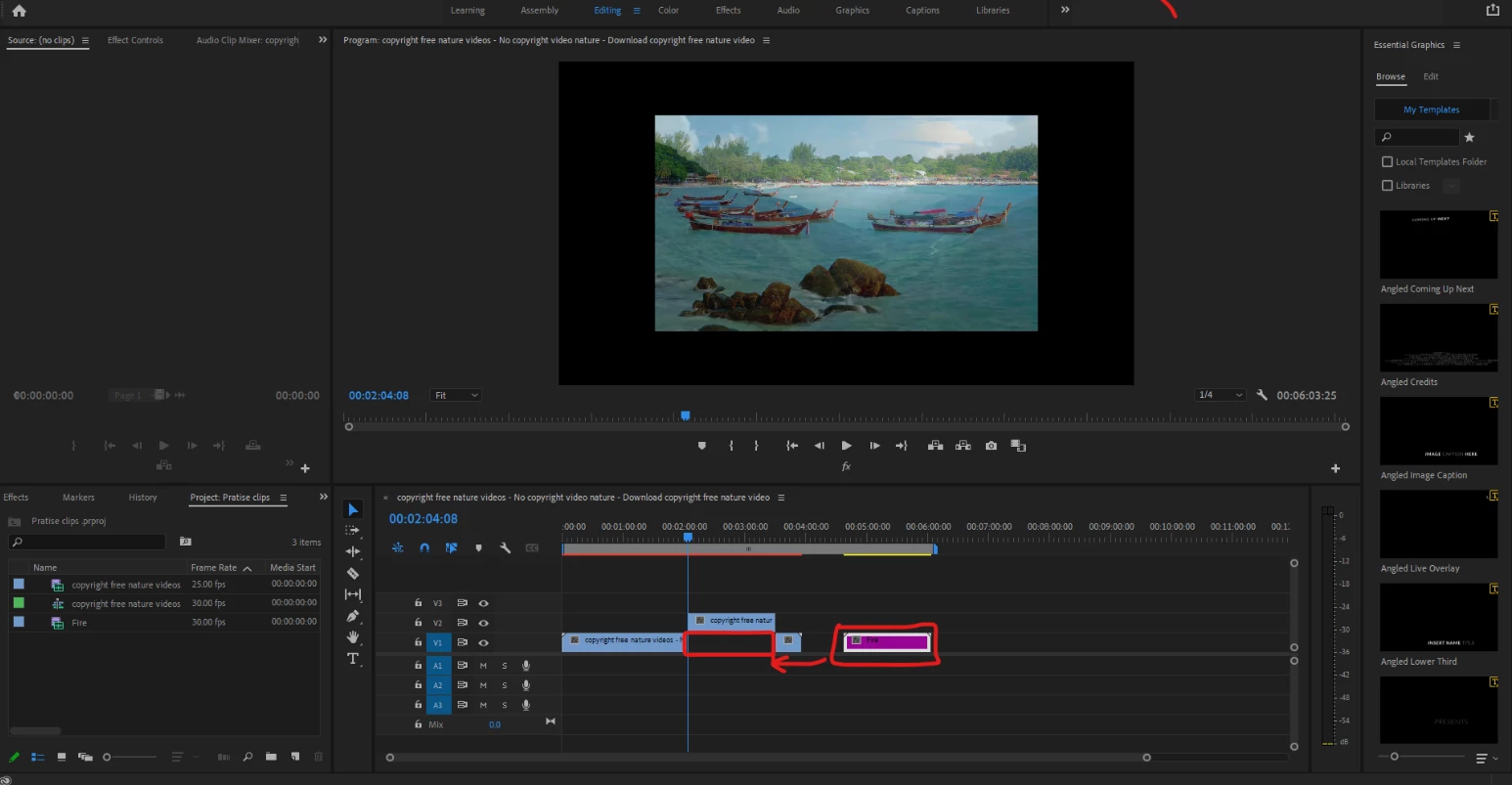
I have a clip I would like to position in the timeline, and can fit perfectly in the gap. Im trying the insert

(comma) short cut, but its not working, ( Im doing something incorrect ). 


So how can I achieve this? I would like the purple clip to be position inbetween the blue clips. but rather than draging it, I'd like the more intuitie method to do so.


Thank you.


This topic has been closed for replies.
Correct answer R Neil Haugen

If moving a clip from a Project panel bin or from the Source monitor using Insert/Overwrite options, you need to have a Source target set.


In your image, see the black areas to the far left on the header block? To the left of the little lock icon?


You need to click that area for V1, so that turns blue. Then Insert should work as long as the playhead is at that spot.


Neil

1 reply

R Neil Haugen
R Neil HaugenCorrect answer
Legend
December 20, 2022

If moving a clip from a Project panel bin or from the Source monitor using Insert/Overwrite options, you need to have a Source target set.


In your image, see the black areas to the far left on the header block? To the left of the little lock icon?


You need to click that area for V1, so that turns blue. Then Insert should work as long as the playhead is at that spot.


Neil

Everyone's mileage always varies ...
Kevin-Monahan
Community Manager
Community Manager
December 20, 2022
quote

Then Insert should work as long as the playhead is at that spot.


Or an In Point. 

Kevin Monahan - Sr. Community & Engagement Strategist – Pro Video and Audio