
Answered
How to remove Effects Presets Bin?
Hello, I just started Premier Pro 2020.
I have one question. Please look at the picture below.
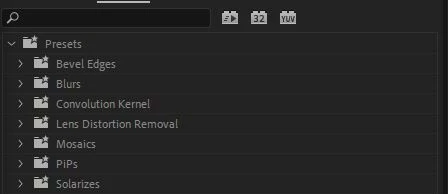
This is my Effects panel presets screen.
After importing and using a preset created by someone else, several folders were created as shown in the picture above.
I just did it for a test, so I don't need that folder anymore.
I want to save only my own presets later.
But the problem is, those folders can't be deleted
Delete key is not activated even if I press the right mouse button.
I've completely deleted Premier Pro, but those folders are still there.
I even used a cleaner tool.
Please let me know the solution.
Thank you!
 AdChoices