Participant
August 19, 2020
Answered

How to set video resolution exporting a video?

  • August 19, 2020
  • 2 replies
  • 1651 views

I want the result video in 640x480p format. But there is no such option. Not for .avi neither for .mpeg4. Only 720x480p

This topic has been closed for replies.
Correct answer Harold Silva

Hello AVI formta is only NTSC or PAL  720*480   720*546
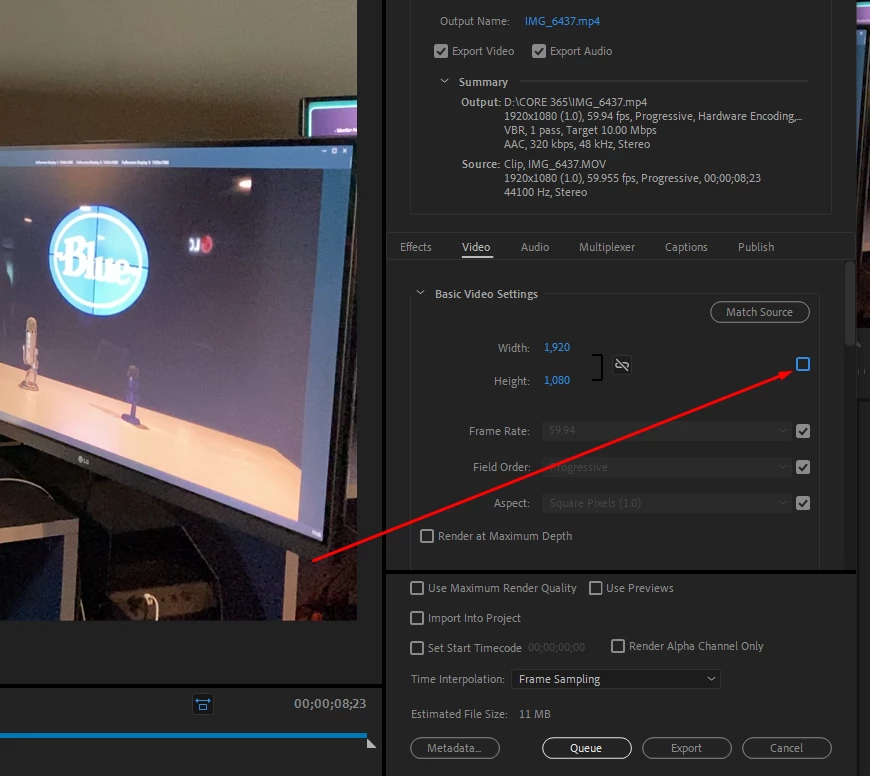
But H264 (MPEG4) yo can change the image size like this:
uncheck opcion and change resolution
2 replies

Harold Silva
Community Expert
Harold SilvaCommunity ExpertCorrect answer
Community Expert
August 21, 2020

Hello AVI formta is only NTSC or PAL  720*480   720*546
But H264 (MPEG4) yo can change the image size like this:
uncheck opcion and change resolution

Harold Silva B.
Legend
August 22, 2020

you can use the vimeo preset for standard def 640x480 square pixels

Mike Dziennik
Community Expert
Community Expert
August 21, 2020

Is your sequence set to 640x480? It doesn't need to be but you will need to do some sort of letterbox/pillarbox/crop when you export if it isn't.

The resolution options differ depending on what format you are trying to export. I recommend you choose H.264 as the format and if you choose Youtube 480p SD then the resolution will default to yoru desired 640x480.