Participant
October 2, 2020
Answered

how to snap clip in timeline???

  • October 2, 2020
  • 2 replies
  • 8442 views

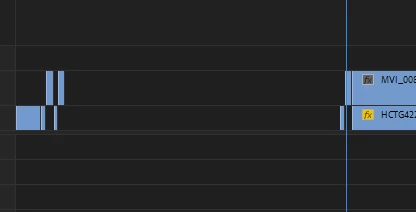
I have video that needs a lot of snipping. Is there a way to automatically snap a selected clip in the timeline to a previous one? at the moment I have to do a lot of zooming out, select, drag.. see photo of what I am trying to do. the right hand clip needs to be dragged to the left

Correct answer Michael Grenadier

That's pretty disappointing 😕😕


I make woodwork videos and out of my 10 minute clips I might only use 2-3 minutes. Would really like this to be a feature. Like a hot key to snap the selected clip to the nearest clip in the time line. Zooming out heaps then trying to drag left can be annoying with an ultra wide monitor. Most the time I don't select the clip and extend it instead 


well here's a thought.  if you have the track involved as the only one on on the record side of the patch panel, select the clip, cut (control-x on the pc, command-x on the mac), hit the up arrow to go to the end of the last clip and paste...  (control-v or command-v).  does that work for you?

2 replies

Ann Bens
Community Expert
Community Expert
October 2, 2020

Legend
October 2, 2020

is "snap in timeline" what your looking for?  It's in the sequence menu.

Participant
October 2, 2020

Hi There,


I am looking to automatically snap the selected clip without dragging all of them to the left

Ann Bens
Community Expert
Community Expert
October 3, 2020

No can do.

Delete gap might be an option.