
Inspiring
September 24, 2019
Answered

How to stretch or squash several clips together to fit a specific length on timeline

  • September 24, 2019
  • 3 replies
  • 4893 views

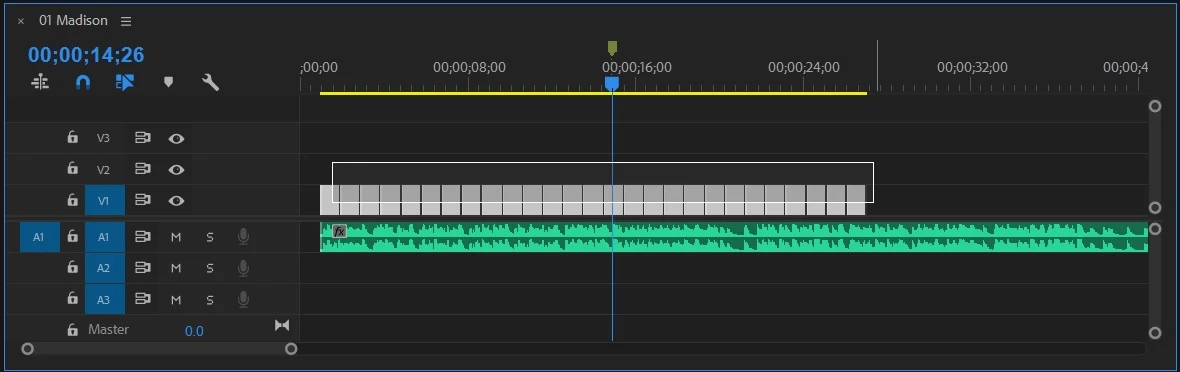
I have 27 jpegs in a sequence. I have a music track beneath. Is there a way to select all the clips and then adjust their total duration so it will fit a specific length of time on the timeline? In screenshot below: how to squeeze all the clips so they fit between the start point and the marker?
 

    This topic has been closed for replies.
    Correct answer Averdahl

    In that situation i check how long the music is and then use the Clip / Duration to adjust all clips. Personally i prefer that method over nesting. I have found nesting+Rate Stretch tool not being brilliant in evenly stretch static media such as photos. Admittedly it was some years ago i used that method so thing may have been fixed.


    Simple example:

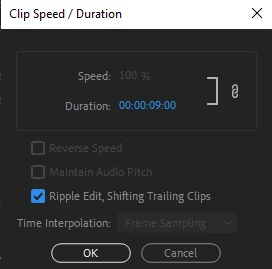
    If the music is 4 minutes and 3 seconds long the total length in seconds are 243 seconds. 243 seconds divided by 27 pictures is 9 seconds. Then i select all clips and press Ctrl+R and type the settings you can see in the picture below.

    3 replies

    Peru Bob
    Community Expert
    Community Expert
    September 24, 2019

    Ann's method works better when the numbers aren't exactly divisible.

    Averdahl
    Community Expert
    AverdahlCommunity ExpertCorrect answer
    Community Expert
    September 24, 2019

    In that situation i check how long the music is and then use the Clip / Duration to adjust all clips. Personally i prefer that method over nesting. I have found nesting+Rate Stretch tool not being brilliant in evenly stretch static media such as photos. Admittedly it was some years ago i used that method so thing may have been fixed.


    Simple example:

    If the music is 4 minutes and 3 seconds long the total length in seconds are 243 seconds. 243 seconds divided by 27 pictures is 9 seconds. Then i select all clips and press Ctrl+R and type the settings you can see in the picture below.

    Ann Bens
    Community Expert
    Community Expert
    September 24, 2019

    Nest and use the Stretch tool to fit.

    JonnyD14Author
    Inspiring
    September 24, 2019
    Worked like a charm! Thanks Ann.