

_keyframer
Community Expert
Community Expert
March 9, 2025
Answered

How to undock the Audio Meters panel

  • March 9, 2025
  • 3 replies
  • 745 views

Sorry but the fact I can't close the Audio Meters panel or even undock it in an effort to close it is frustrating. Yes, I searched the forum and all I see is how this is still a bug after many years. I found a "solution" to hover over the blue line indicating the panel is selected and holding the Ctrl/command key and undocking it but I have tried numerous times with no ability to undock it.

For at least a year after an update the hot tect slider for the X and Y positioning is SLOW! Even with a simple text field, moving it into any position has crazy lag. I'm on a MacBook Pro M1 and Premiere is just so slow. 

Due to a client project I had to use a much much cheaper and popular alternative with so much success, I'm starting to think Premiere is in my rearview mirror after over a decade of use.

What's happening Adobe? Adobe Animate being completely ignored for over a year and now Premiere falling so far behind in so many ways for me. Sorry for the rant - just glaring issues from a devoted long time user 😞
Correct answer Warren Heaton

@_keyframer 

I'm not sure anyone could fault you for thinking, "Wow, this could be easier."

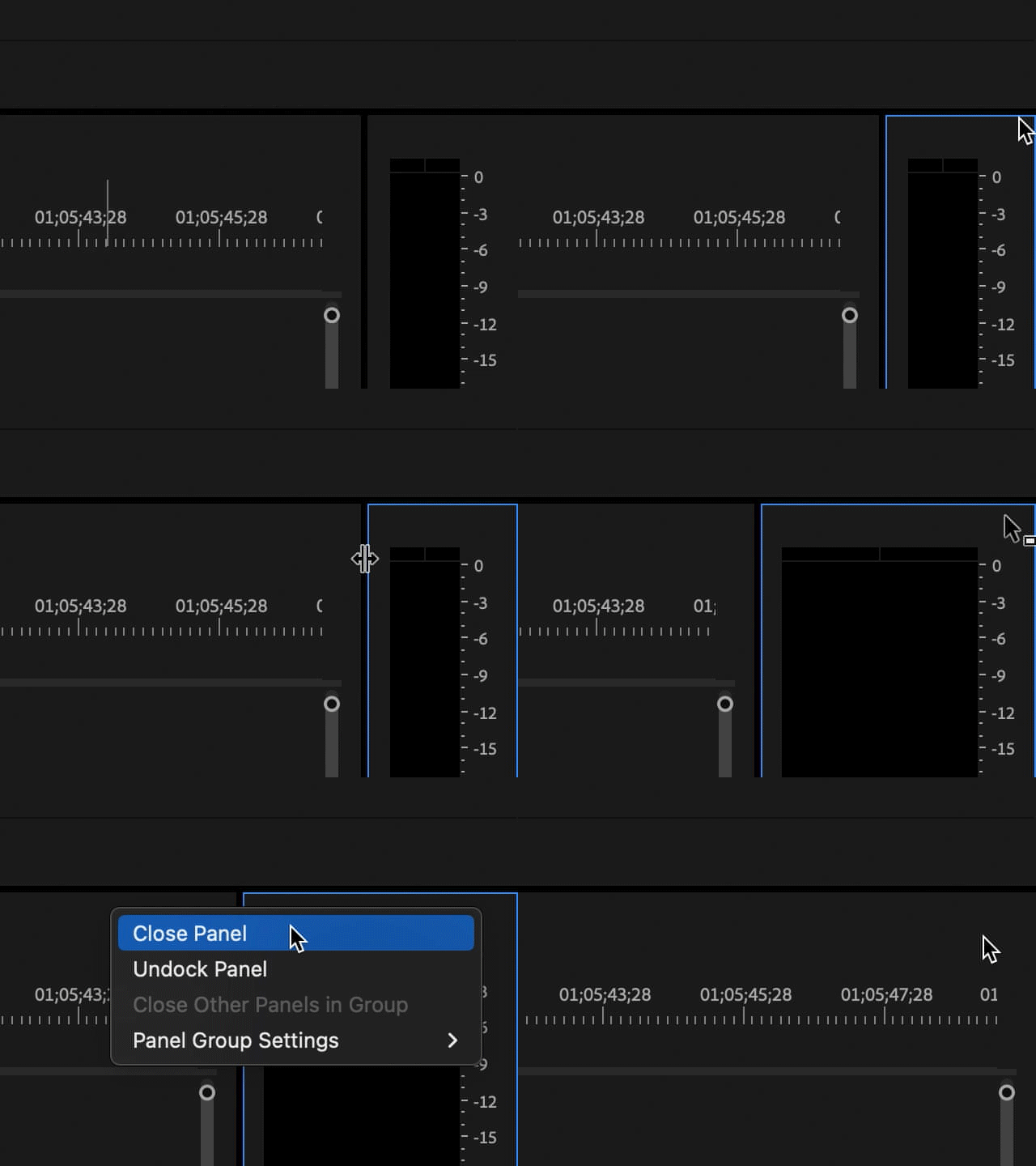
I've found that the Audio Meters panel needs to be set a little wide in order to get the mouse to incidate that we're in the right spot to right-click and close it.  If it's too narrow, we won't be able to close it.


3 replies

Warren Heaton
Community Expert
Community Expert
March 10, 2025

@_keyframer 

The panel options for Audio Meters are a little tricky to find, but they are there.

Here's a screenshot to add to what others have already mentioned.


Animate does seem to be light on new features, but Rig Edit Mode in 23.x was a pretty big.  Of course, Animate 24.x being Apple Silicon native was pretty big on the macOS side.

As far as the 2025 releases go, I think Illustrator may have been the leader of the pack when it comes to exciting new features.


_keyframer
Community Expert
Community Expert
March 12, 2025

thanks!

Animator and content creator for Animate CC
MyerPj
Community Expert
Community Expert
March 10, 2025

Or unselect it from the Window menu.

Community Expert
March 10, 2025

To close the Audio Meter panel, right-click the top of the panel (just below the blue outline) and select Close Panel.

_keyframer
Community Expert
Community Expert
March 12, 2025

I tried that so many times - could be the resolution of my screen forcing me to be extremly precise with my cursor positioning

Animator and content creator for Animate CC
Warren Heaton
Community Expert
Warren HeatonCommunity ExpertCorrect answer
Community Expert
March 12, 2025

@_keyframer 

I'm not sure anyone could fault you for thinking, "Wow, this could be easier."

I've found that the Audio Meters panel needs to be set a little wide in order to get the mouse to incidate that we're in the right spot to right-click and close it.  If it's too narrow, we won't be able to close it.