
Participant
January 1, 2017
Answered

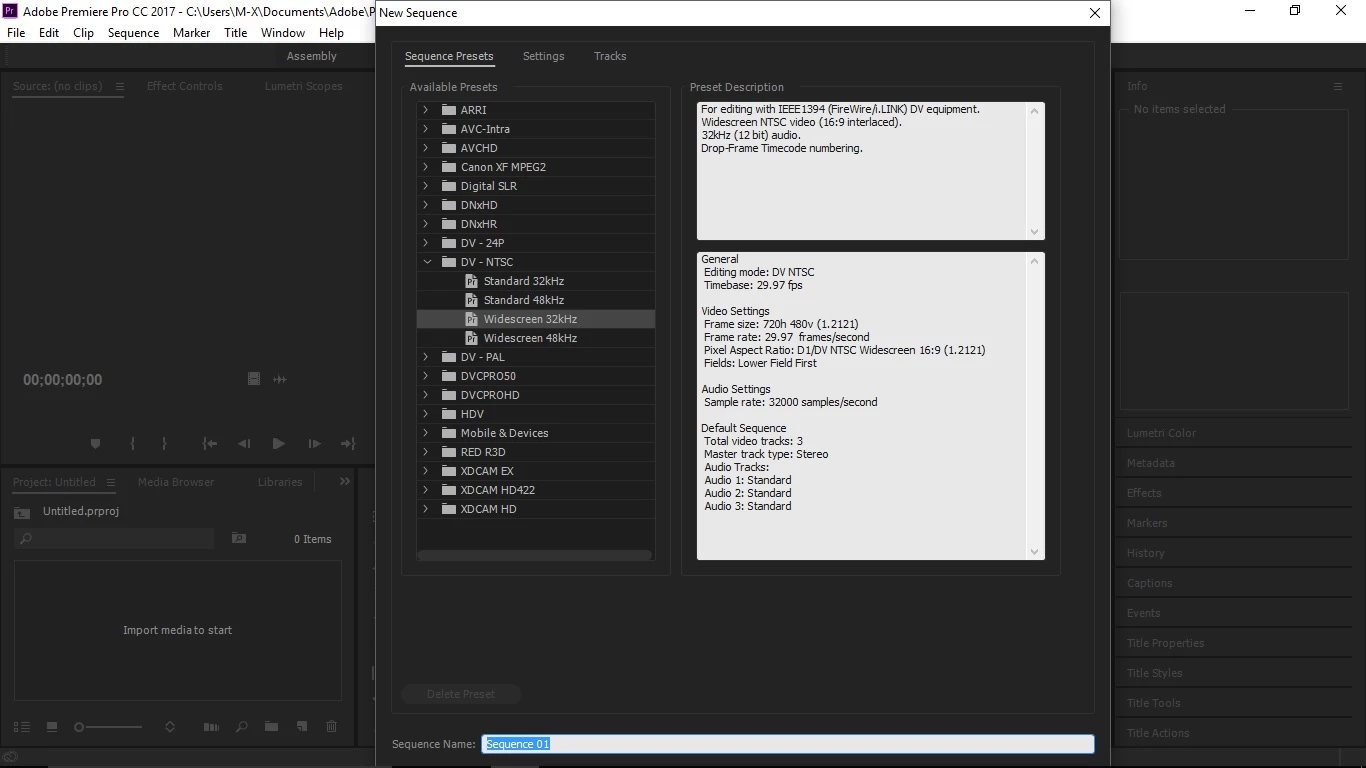
how to view the ok button on new sequence in abode premier pro cc ?

  • January 1, 2017
  • 5 replies
  • 4179 views

everytime i try to open new sequence by using the key cntrl+N the new sequence dialogue box display appears to be very big and i cant even scroll and use the ok and cancel button.please tell me how to fix this problem hw can i view the ok button
    This topic has been closed for replies.
    Correct answer Ann Bens

    mirage basumatary wrote:

    1366*768

    MInimal requirement is 1280x800.

    32 pixels short hence the ok button missing.

    5 replies

    Legend
    January 2, 2017

    please tell me how to fix this problem hw can i view the ok button

    Only run Premiere Pro on a self-built Windows desktop system using a minimum of a 24" 1080p monitor.

    Participant
    January 2, 2017

    1366*768

    Ann Bens
    Community Expert
    Ann BensCommunity ExpertCorrect answer
    Community Expert
    January 2, 2017

    mirage basumatary wrote:

    1366*768

    MInimal requirement is 1280x800.

    32 pixels short hence the ok button missing.

    Participant
    January 2, 2017

    no its nt above 100 %

    Participant
    January 2, 2017

    no its nt above 100%

    Vidya Sagar
    Adobe Employee
    Adobe Employee
    January 2, 2017

    Hi Mirage Basumatary,

    It seems like an issue with the display resolution, What is the resolution of the monitor?

    Thanks,

    Vidya Sagar.

    MyerPj
    Community Expert
    Community Expert
    January 1, 2017

    Do you have your Windows text size above the "default" 100%?

    Participant
    August 2, 2023

    yes brother