Participant
December 10, 2017
Answered

I can't find Adaptive Noise Reduction?

  • December 10, 2017
  • 3 replies
  • 22338 views

I have the latest update but cannot find the Adaptive Noise Reduction in my audio effects. Help?

Correct answer Vishu_Aggarwal

Hi,

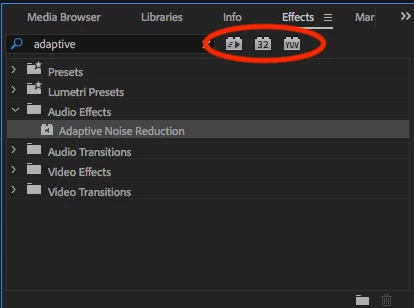
I checked in Premiere Pro CC 2018 ver. 12.0 running on Mac OS X High Sierra 10.13.1, was able to find the  Adaptive Noise Reduction effect.

Did you made sure that filter options (32 bit, YUV, Accelerated Effect) of search are deselected. Than only Adaptive Noise Reduction will appear in Search.
3 replies

Kevin-Monahan
Community Manager
Community Manager
August 1, 2023

Try "Denoise" instead. Does that work OK for you @Tommykvong?


Thanks,
Kevin

Kevin Monahan - Sr. Community and Engagement Strategist – Adobe Pro Video and Audio
Participant
December 11, 2017

Thanks for that but i already tried that. Still nothing.

Vishu_Aggarwal
Vishu_AggarwalCorrect answer
Participating Frequently
December 11, 2017

Hi,

I checked in Premiere Pro CC 2018 ver. 12.0 running on Mac OS X High Sierra 10.13.1, was able to find the  Adaptive Noise Reduction effect.

Did you made sure that filter options (32 bit, YUV, Accelerated Effect) of search are deselected. Than only Adaptive Noise Reduction will appear in Search.

Vishu AggarwalAdobe Certified Instructor, Professional and Expert
Ann Bens
Community Expert
Community Expert
December 11, 2017

Do a search in the Effects: