Participant
June 9, 2025
Answered

I can’t import files to my project

  • June 9, 2025
  • 3 replies
  • 670 views

Hey I'm learning  premiere pro for YouTube and I can't find my files when i go into premiere pro but my files are there when im not in the software . I can import my facecam and audio just not my gamplay.

Correct answer Ishan Y

Hey Mr.Universe,


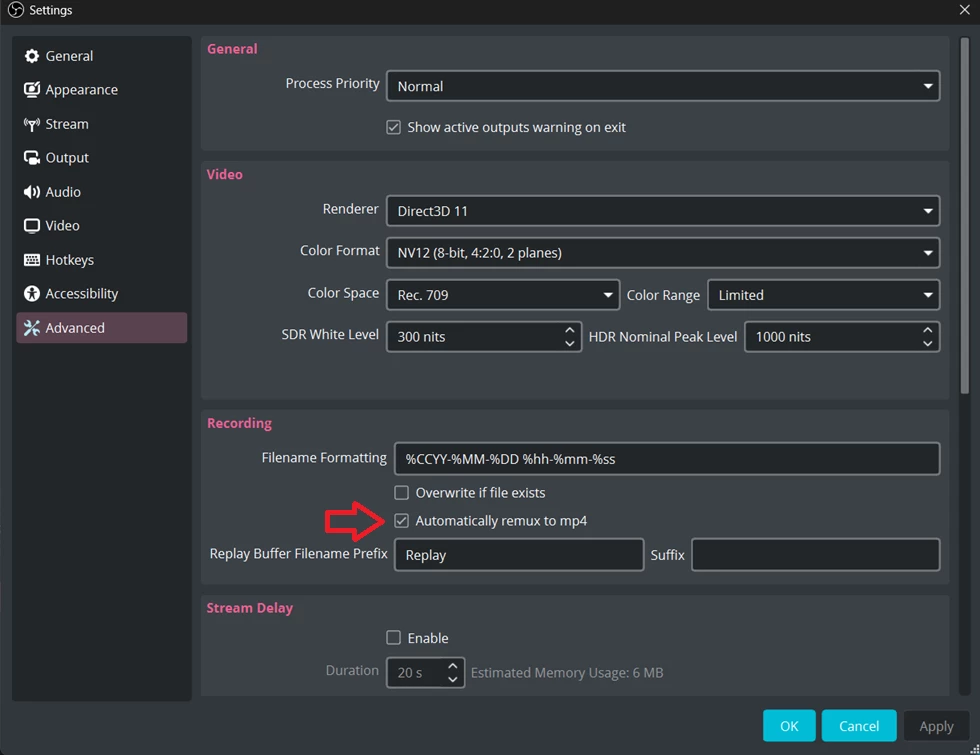
If you're recording MKV footage using OBS, please check the "Automatically remux to MP4" option. That will create your future recordings in MP4 format. You can try transcoding or rewrapping the current files to MP4 or other supported formats as JonesVid suggested.


Thanks,

Ishan

Please tag me (@) in your replies so that it notifies me and helps me respond promptly.

3 replies

JonesVid
Community Expert
Community Expert
June 9, 2025

Hi @Mr.Universe 

Glad you managed to import your files now.

When you have time it's worth downloading the Premiere Beta version to try out .mkv file import directly. It can exist on your PC alongside the current main released version.
Note that the beta version undergoes very regular updates as users feedback any issues and Adobe team add or tweak features. 

Ishan Y
Community Manager
Ishan YCommunity ManagerCorrect answer
Community Manager
June 9, 2025

Hey Mr.Universe,


If you're recording MKV footage using OBS, please check the "Automatically remux to MP4" option. That will create your future recordings in MP4 format. You can try transcoding or rewrapping the current files to MP4 or other supported formats as JonesVid suggested.


Thanks,

Ishan

Please tag me (@) in your replies so that it notifies me and helps me respond promptly.
Participant
June 9, 2025

@Ishan YThank you i appreciate it 🙏

JonesVid
Community Expert
Community Expert
June 9, 2025

This is probably because Premiere does not recognise the format of your files so then can't  import them.

Please confirm video format. If they are mkv files then latest version of Premiere 25.2.3 won't import them.

The latest Beta versions of Premiere Pro can use mkv files so give that version a try if you use mkv files.

Beta versions can be downloaded through the Creative software suite app.

You can also convert the mkv files to mp4 using a third party software utility like Handbrake or Shutter Encoder. 

Participant
June 9, 2025

I changed the format using handbrake to mp4, thank you so much 🙏