 Adobe Community

- Home
- Premiere Pro
- Discussions
- Re: I Cannot preview the video and the size is wro...
- Re: I Cannot preview the video and the size is wro...
I Cannot preview the video and the size is wrong

Copy link to clipboard
Copied
Ok so recently i can not preview my video while editing and the size of the screen is too small as i am about to export it here are some pictures for exemples.
Please help me find a way to fix this as the editor is way harder to use with these isues.



 22
Replies
22
22
Replies
22


Copy link to clipboard
Copied
By the way i did reinstal the proggrame and this happened in the recent updates i think.


Copy link to clipboard
Copied
Try changing the scale of your program monitor to 'fit' instead of 150%. It also looks like you have a mismatch between your video pixel size and your sequence settings, what are the dimensions of the video?
Copy link to clipboard
Copied
idk what the dimensions are how do i change these?
Copy link to clipboard
Copied
idk what the dimensions are how do i change these?

Copy link to clipboard
Copied
idk what the dimensions are how do i change these?
By @Deleted User

Right click on the video in the Project Panel and click Properties. It will show the pixel dimensions.
Copy link to clipboard
Copied
sorry for the spam i thought i could erase the other reply but i can't, also making the screen fit still makes it a small screen it does not fix the issue.
Copy link to clipboard
Copied
update i was able to fix the size of the video but now the previewing is still not available?
Copy link to clipboard
Copied
I'm confused about what you are saying.
Please post more screenshots.
Copy link to clipboard
Copied
No i already posted it its the first picture, there is no play pause fast forward or other options on the video previewing option and when i go to source its not connected to the timeline.
Copy link to clipboard
Copied
Change where it says 150% in the first screenshot to 100% (or Fit).
Copy link to clipboard
Copied
That is not what i meant this is what i meant.

Copy link to clipboard
Copied
Use the scroll bar at the bottom.

or use keyboard shortcuts
| Zoom In | = | = |
| Zoom Out | - | - |
from here:
https://helpx.adobe.com/premiere-pro/using/keyboard-shortcuts.html
Copy link to clipboard
Copied
Uhm nope it does not add in the play pause or rewind buttons...
Copy link to clipboard
Copied
You could also try resizing the source monitor panel.
Copy link to clipboard
Copied
Doesn't work either
Copy link to clipboard
Copied
Reset the current workspace to return to its original, saved layout of panels.
1. Do one of the following:
• Click the Workspace menu icon and select Reset to Saved Layout.
• Choose Window > Workspace > Reset to Saved Layout.
from here:
https://helpx.adobe.com/premiere-pro/using/workspaces.html
Copy link to clipboard
Copied
i am about to give up, this is making me rage right now.
nothing is working
Copy link to clipboard
Copied
ok so as you don't have anymore recomendations i will leave the editor as is and hopefuly it won't happen to somoen else but thanks for helping me fix the screen issue.
Copy link to clipboard
Copied
Did you reset the Workspace like Peru Bob suggested?
Copy link to clipboard
Copied
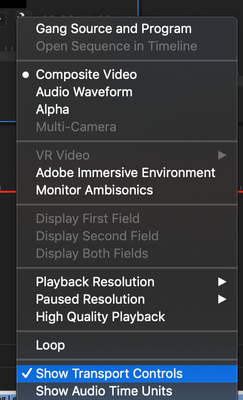
If your play buttons are missing, resetting the workspace should fix it. If not, click the Wrench icon and enabled Show Transport Controls
Copy link to clipboard
Copied
Thanks it worked!
Copy link to clipboard
Copied
Thanks it worked!
By @Deleted User
Which solution?


 AdChoices