
Nardieloni
Inspiring
October 10, 2019
Answered

I have an issue with the type tool
  • October 10, 2019
  • 6 replies
  • 1186 views

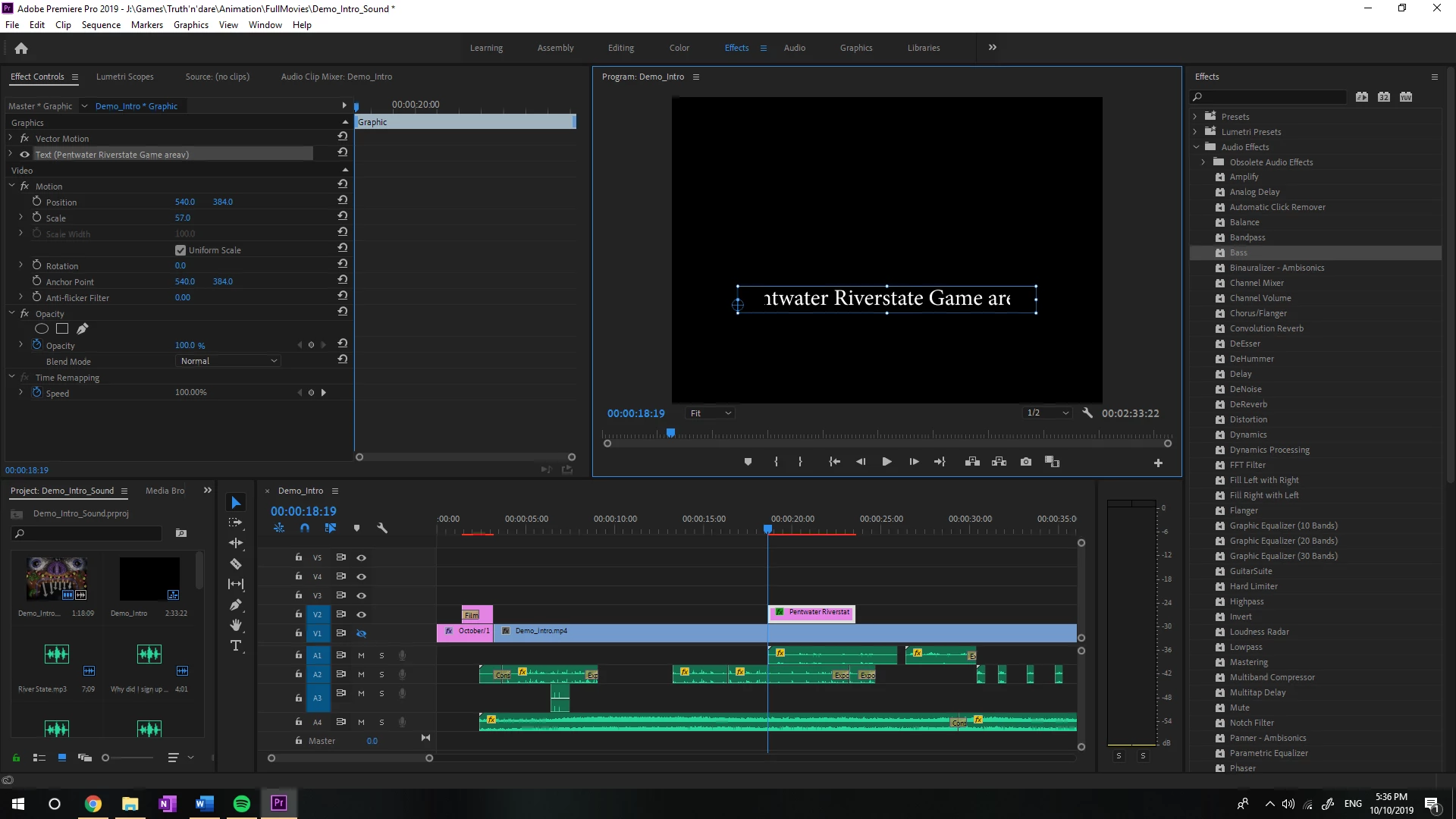
I never encountered this issue before, as you can see in my preview. It's like the text is hitting a black border because it won't display the full text. Can someone explain to me what is causing this? 

    This topic has been closed for replies.
    Correct answer Ann Bens

    You need to set the Motion parameters in the Effect Controls to default; especially scale which is set to 57 and probably causing your issue.


    6 replies

    jstrawn
    Community Manager
    Community Manager
    October 11, 2019

    Ann is right about the scaling. Use Vector Motion > Scale in the future to avoid that sort of unintentional cropping.

    Brainiac
    October 11, 2019

    ===========

    Thanks for the help, I know you asked for a picture of the parameters, but I fixed it messing around with the effect control. 

    =======

    My browser shows this post as a FEATURED post... which means what ? It will be at the top of all posts for eternity ?  As it was solved by poster, is there any way to mark it answered and get rid of it ?? 


    [Moderator warning: A section of this post needed to be removed. Please do not threaten forum contributors, including Adobe Employees, it is against Adobe community policy.]


    Ann Bens
    Ann BensCorrect answer
    Community Expert
    October 10, 2019

    You need to set the Motion parameters in the Effect Controls to default; especially scale which is set to 57 and probably causing your issue.


    Nardieloni
    Inspiring
    October 10, 2019

    Thanks for the help, I know you asked for a picture of the parameters, but I fixed it messing around with the effect control. 

    Community Expert
    October 10, 2019
    You uploaded an image capture from the Effects Control panel but on the Motion tab, not Text.
    Byron.
    Community Expert
    October 10, 2019

    Show us Text options in Effects Controls panel, but please, also put the playhead in the middle of the text clip in V2 timeline.

    Byron.
    Ann Bens
    Community Expert
    October 10, 2019

    Go into the effect controls and check the parameters.