
Madtown
Participant
April 22, 2019
Question

I updated Premiere and there are no default Keyboard Shortcuts

  • April 22, 2019
  • 5 replies
  • 5751 views

Hello.

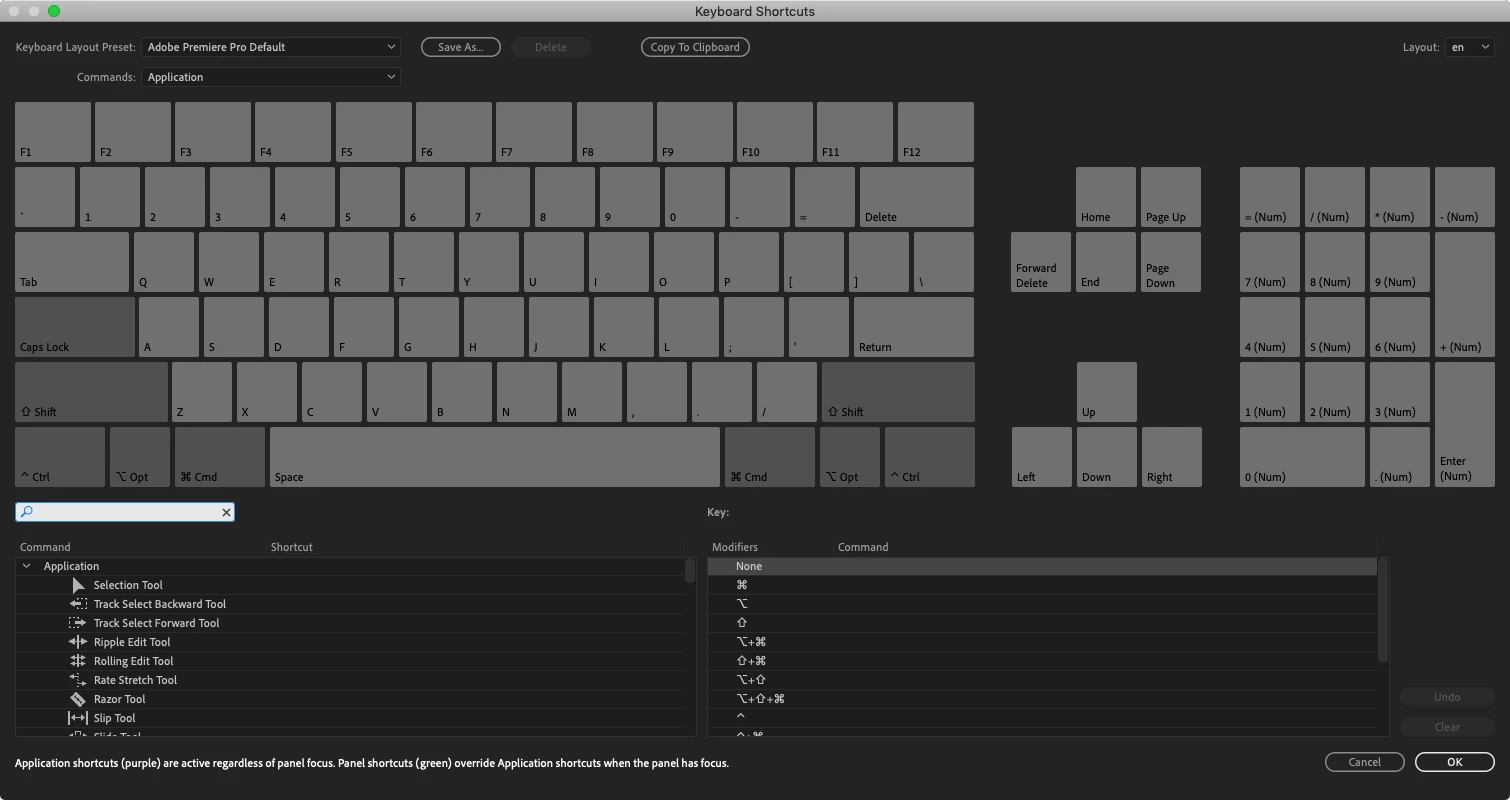
I recently update Premiere Pro to the most recent version and there are no default Keyboard shortcuts. When I select the Keyboard Shortcut menu item under Premiere Pro heading the keypad is all in grey. I can't even save my own custom key commands. Does anyone know how to fix this?
    This topic has been closed for replies.

    5 replies

    Participant
    June 22, 2020

    I managed to solve this same problem (Mac OS).


    I normally switch back and forth between two keyboard layouts (US keyboard and Latin American) because I need to write in spanish comfortably, but also program which is easier with the default layout. The way I fixed it was:


    - Quit Adobe Premiere Pro

    - Switch to English keyboard (through the menu bar)

    - Start Adobe Premiere Pro


    ... that did it. Apparently starting Premiere with the Latin American keyboard cleared out all the presets.

    Participant
    June 6, 2020

    Hey everyone i faced the same issue and i came up with a simple solution , i asked my friend who have the same version of premiere pro and his program works perfectly to save a costume file of keyboard layout and then i paste the file in my computer and the problem solved if you know any one you know just ask them for help or i will provide this file link to download : 

    https://www7.zippyshare.com/v/pOw7KLEZ/file.html

    for me i placed in this folder :

    C:\Users\ASUSS\Documents\Adobe\Premiere Pro\14.0\Profile-ASUSS\Win

    search for something like that on your PC

    then in the premier pro just go to keyboard shorcuts and select adobe keyboards like this :


    tell me how this works for you and if it worked don't forget to help others who have the same issue 🙂


    Participant
    June 6, 2020

    Coincidentally, I again run into the same problem today, with latest version 14.2.


    Adobe knows about the problem and the solution for more than half a year internally, but there is no bug fix yet...?

    They sent me the keyboard config file once in a support chat session, and there are other threads with problem description and solutions.

    It looks like the keyboard config files are not saved in user profiles correctly.


    Short solution, download this tool here: https://www.blackmagicdesign.com/products/davinciresolve/


    Participant
    August 12, 2020

    THANK YOU I LOVE YOU FOREVER 

    Participant
    November 7, 2019

    Same problem here with English Language United States and German Keyboard, in both latest Premiere Pro 2019 and 2020.

    There are not keyboard shortcut bindings at all.


    Looks like a critical show stopping bug that needs fixing within 24h?

    I already hear you laughing 😉

    Participant
    November 7, 2019

    Is there any support for this product?


    My advice: go through the process to cancel the subscription and you can lower the monthly fee, or directly change to Blackmagic DaVinci Resolve.

    Participant
    May 15, 2019

    I got this problem now and found a workaround. Try changing Language Preferences, here is how it turned out for me.

    • Keyboard shortcuts gone: English display language with Swedish keyboard.
    • Keyboard shortcuts working: Swedish display language with Swedish keyboard.

    I can live with Swedish Display language while editing, I don't have to reboot the computer after changing, just restarting Premiere is enough.

    /Magnus

    Averdahl
    Community Expert
    Community Expert
    May 15, 2019

    I can live with Swedish Display language while editing, I don't have to reboot the computer after changing, just restarting Premiere is enough.

    If you use this setting in the Language settings in Windows you can have English display language. I don´t know if it will fix the issue you are facing, but this setting works for me.

    Participant
    May 15, 2019

    Awesome thanks. By demoting English in the list its working. Somehow it thought that "Windows Display Language" was tied to the language in top of that list.

    /Magnus

    Inspiring
    April 22, 2019

    I would try trashing preferences:

    FAQ: How to reset (trash) preferences in Premiere Pro?

    MtD

    Madtown
    MadtownAuthor
    Participant
    April 22, 2019

    Thanks Meg, but that didn't work. I appreciate the tip.

    Peru Bob
    Community Expert
    Community Expert
    April 22, 2019

    Uninstall, use the Cleaner Tool, and reinstall:

    Use the Creative Cloud Cleaner Tool to solve installation problems