
BRANDONRUTTY
Participant
June 14, 2017
Answered

Import a video and the audio is out of sink with the footage

  • June 14, 2017
  • 2 replies
  • 537 views

Hello Adobe,

- I have tried changing  the file type, didn't work

- I have tried matching the audio with the footage but later on, in the timeline, it slowly goes out of sink aging as if the footage is going slightly faster than the audio.

- It works with some mp4 files, like my facecam, but not others.

- it's not a quality issue because my facecam is 1920 by 1080 30fps, but my footage is the same stats.

Please help,

Brandon
    This topic has been closed for replies.
    Correct answer R Neil Haugen

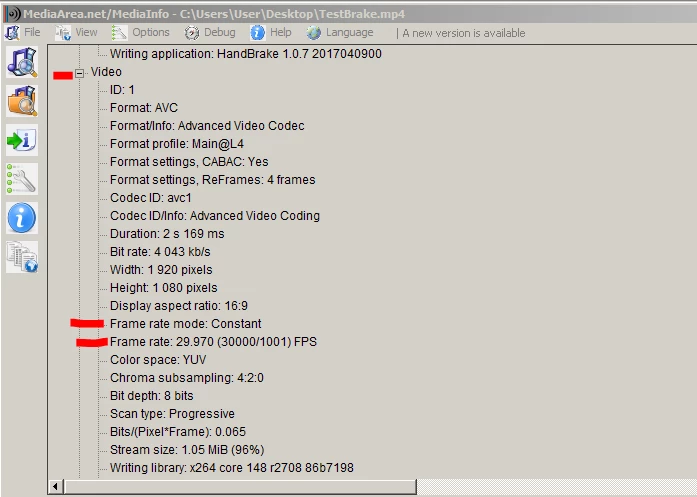
    It sounds like the problem is the nature of your media ... I'd guarantee from your comment you're using VFR .. variable frame-rate media. To check, download/install MediaInfo. Drag & drop a file onto the icon on your desktop, go into MediaInfo's 'Tree View' and see if it list it in the video tab as CFR or VFR.

    Media Info:        https://mediaarea.net/en/MediaInfo

    I can set my Samsung phone to "30fps" but the files it produces will vary from 15-35 actual frames per second throughout a clip.

    If your media is VFR, then the best way to handle this is to batch process using the Queue in HandBrake. Note: you need to both choose a specific frame-rate number (rather than using the "auto" or "same as source" settings) ... and check the CFR radio-box, in order to get HandBrake to export VFR media.

    HandBrake download page:  https://handbrake.fr/downloads.php

    PrPro works best with CFR media.

    Neil

    2 replies

    BRANDONRUTTY
    Participant
    June 14, 2017

    Thanks you so much for your help

    R Neil Haugen
    R Neil HaugenCorrect answer
    Legend
    June 14, 2017

    It sounds like the problem is the nature of your media ... I'd guarantee from your comment you're using VFR .. variable frame-rate media. To check, download/install MediaInfo. Drag & drop a file onto the icon on your desktop, go into MediaInfo's 'Tree View' and see if it list it in the video tab as CFR or VFR.

    Media Info:        https://mediaarea.net/en/MediaInfo

    I can set my Samsung phone to "30fps" but the files it produces will vary from 15-35 actual frames per second throughout a clip.

    If your media is VFR, then the best way to handle this is to batch process using the Queue in HandBrake. Note: you need to both choose a specific frame-rate number (rather than using the "auto" or "same as source" settings) ... and check the CFR radio-box, in order to get HandBrake to export VFR media.

    HandBrake download page:  https://handbrake.fr/downloads.php

    PrPro works best with CFR media.

    Neil

    Everyone's mileage always varies ...
    BRANDONRUTTY
    Participant
    June 14, 2017

    Under the Video tab the format says that it is AVC

    R Neil Haugen
    Legend
    June 14, 2017

    Please look again at my screen-grab of MediaInfo's Tree View above.

    I'm not suggesting you look at the format.

    It's the frame-rate mode.

    As high-lighted in red.

    Neil

    Everyone's mileage always varies ...