Participant
October 23, 2017
Answered

import photoshop timeline in premiere

  • October 23, 2017
  • 1 reply
  • 6488 views

I have a video project that consists of lots of photographs and a few video clips in a slideshow of still (with pan and zoom effects) and moving images.

This whole project was made in photoshop in a timeline and is therefore saved as a psd file.

Now I have the following question: Is there any way of importing this project (timeline and all image, video and audio files) into premiere pro to continue the work there?

Thank you for any ideas
    This topic has been closed for replies.
    Correct answer R Neil Haugen

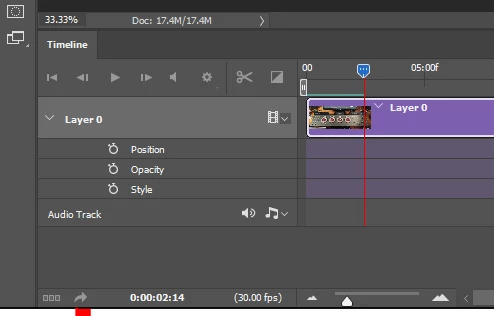
    First ... back in Photoshop, in the Timeline controls lower left, there's an arrow icon that is the "render" icon for a P-shop video file. Underscored in red here:

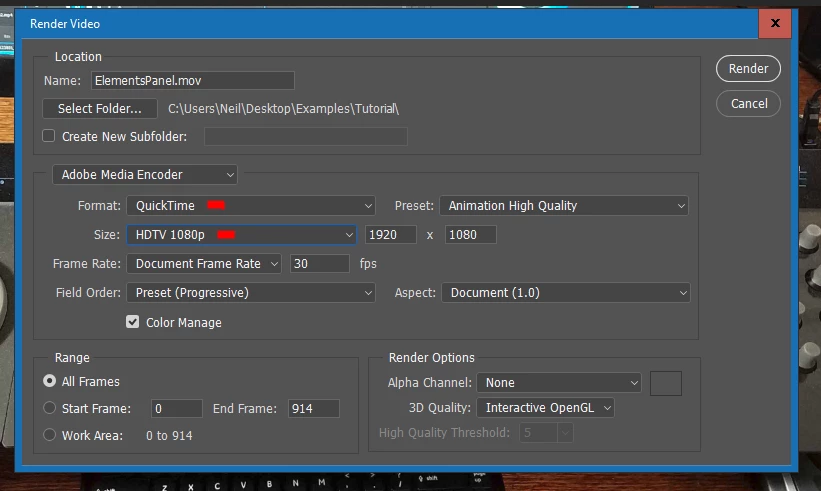
    Click that, and from the following dialog, choose either the Quicktime option as shown below ...

    ... and note I chose also the HDTV 1920x1080 size. This would get an mov file ... or use the H.264 as below ...

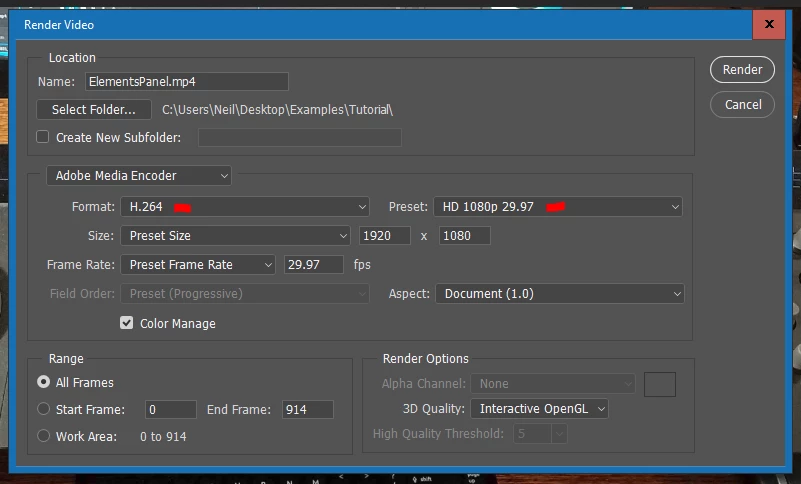
    ... and in this one, I chose H.264 and the HDTV 1080p 29.97 preset, just to fit my normal working practice.

    Then you have proper video media to bring into PrPro, either mov or mp4.

    Neil

    1 reply

    R Neil Haugen
    R Neil HaugenCorrect answer
    Legend
    October 23, 2017

    First ... back in Photoshop, in the Timeline controls lower left, there's an arrow icon that is the "render" icon for a P-shop video file. Underscored in red here:

    Click that, and from the following dialog, choose either the Quicktime option as shown below ...

    ... and note I chose also the HDTV 1920x1080 size. This would get an mov file ... or use the H.264 as below ...

    ... and in this one, I chose H.264 and the HDTV 1080p 29.97 preset, just to fit my normal working practice.

    Then you have proper video media to bring into PrPro, either mov or mp4.

    Neil

    Everyone's mileage always varies ...
    mw771Author
    Participant
    October 25, 2017

    Thanks a lot, Neil, for this quick answer.

    However, my question, which I probably phrased wrongly, was more if there's a way to import the whole video project which I created in Photoshop (the wrong place for this to begin with, I know now) in Premiere Pro as a sequence in such a way that I can still work on it, rearrange individual still images or clips, transitions, layers, video and audio tracks etc.

    Is that possible?

    Thanks

    Michael

    Kevin-Monahan
    Community Manager
    Community Manager
    October 25, 2017

    Hi Michael,

    However, my question, which I probably phrased wrongly, was more if there's a way to import the whole video project which I created in Photoshop (the wrong place for this to begin with, I know now) in Premiere Pro as a sequence in such a way that I can still work on it, rearrange individual still images or clips, transitions, layers, video and audio tracks etc.

    Is that possible?

    No, Photoshop video timelines are not supported via Dynamic Link. You have to export the file as Neil indicated.

    Thanks,
    Kevin

    Kevin Monahan - Sr. Community and Engagement Strategist – Adobe Pro Video and Audio