
Inspiring
January 23, 2023
Answered

Importing a DNxHR 444 with alpha channel from Resolve - "error retrieving frames" problem

  • January 23, 2023
  • 4 replies
  • 4332 views

My team has just come across a problem and we can't figure it out. A colorist has provided us with a DNxHR 444 export from Resolve with alpha channel (unfortunately can't export ProRes from Resolve), and we are having problems importing it back into Premiere.


When we import the DNxHR, this is what we are seeing:
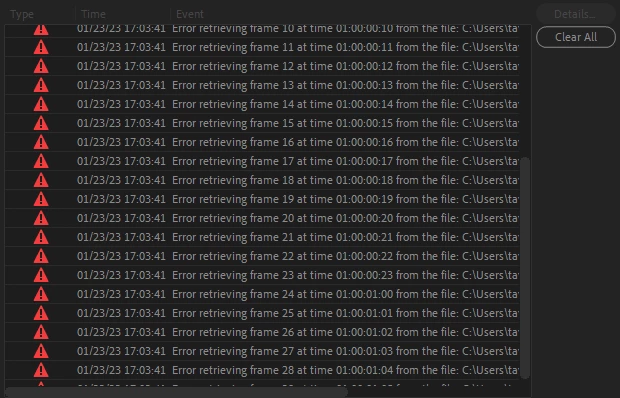
 

This happens on .mov's and .mxf's. If alpha channel is NOT enabled, it works fine. It's only if alpha is enabled.

Anyone know what the problem is here? Is this a problem on Premiere's end or on Resolve's end? What is the best way to get a high quality color export with alpha into Premiere from Resolve?
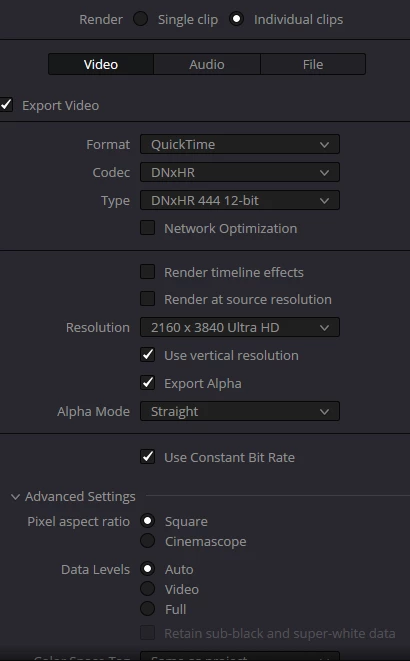
Correct answer harit33959153f287

guys i figured it out! simply change your "alpha mode" to "straight" from "pre-multiplied" that seems to be the problem and along with that i also turn off my "enable flat pass". and then no matter what codec you render from i.e. MXF or Quicktime, IT WILL ALWAYS WORK!

4 replies

harit33959153f287Correct answer
Participant
January 20, 2025

guys i figured it out! simply change your "alpha mode" to "straight" from "pre-multiplied" that seems to be the problem and along with that i also turn off my "enable flat pass". and then no matter what codec you render from i.e. MXF or Quicktime, IT WILL ALWAYS WORK!

Participant
January 20, 2025

Was this ever solved? It is still an issue.

Participant
January 21, 2025

check out my reply, i figured out a method


Participant
March 15, 2023

Hey! I have been struggling with this too, but found a workaround!

Export in Cineform RGB 16-bit with alpha. That will open in PR and ME.

Waldorf & Statler
Inspiring
March 15, 2023

Cineform what?

Do you mean DPX?

Participant
March 15, 2023

Quicktime GoPro Cineform.

Inspiring
January 26, 2023

bump

Kevin-Monahan
Community Manager
Community Manager
January 26, 2023

taylor,

Sorry about the error. To proceed with troubleshooting, please give full details about your computer system. Kindly include info about CPU, GPU (+driver version, if on Windows), RAM, and your drives (and how they are connected to your system). With that info, we may be able to solve the issue.


Cheers,

Kevin

Kevin Monahan - Sr. Community and Engagement Strategist – Adobe Pro Video and Audio
Inspiring
January 26, 2023

taylor,

I have requested sample media from the Premiere Pro product team. If they can't locate any, I'll try to reproduce the steps in my studio.


Thanks,
Kevin


Hey Kevin actually I just went ahead and exported a sample clip for you. I tested importing this in Premiere and got the same result - frame retrieving errors. Here is a link to the file on my Google Drive.


https://drive.google.com/file/d/1AjP114WLn6elWOHAybMpMeHHEqr0BsI1/view?usp=sharing