
Answered
Importing portrait phone clips into a 1080p project in Premiere pro cc
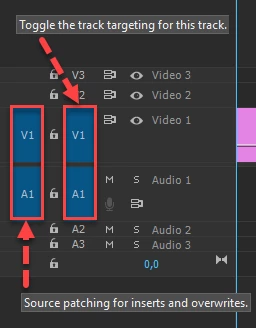
I'm trying to use clips from my phone recorded in portrait as screen grabs in a 1080p project, so that I can have them move around on the screen. I can import the clips together and they play fine, but it sets the sequence to the dimensions of the phone clips. If I set the sequence to 1080p dimensions, then import the phone clips, when I drag the clips into the sequence, only the audio in the clip goes across, I can't drag the clip to a video channel. Has anyone had this happen? It's going my head in! It can't be codec as if I import the clips using the 'create' but when starting the project, they play fine! Any help would be much appreciated!
cheers, Steve
 AdChoices