
Participant
March 5, 2024
Answered

In Essential graphics, why don't I see manage additional folders

  • March 5, 2024
  • 2 replies
  • 3442 views

In Premiere Pro 2024 PC version. When I right click Essential Graphics Manage additional folders doesn't show Please help

Correct answer Theresa Rostek

Hi @Randy56 

It's been moved from being hidden in that menu. Click on the plus symbol on the right side of the browser.
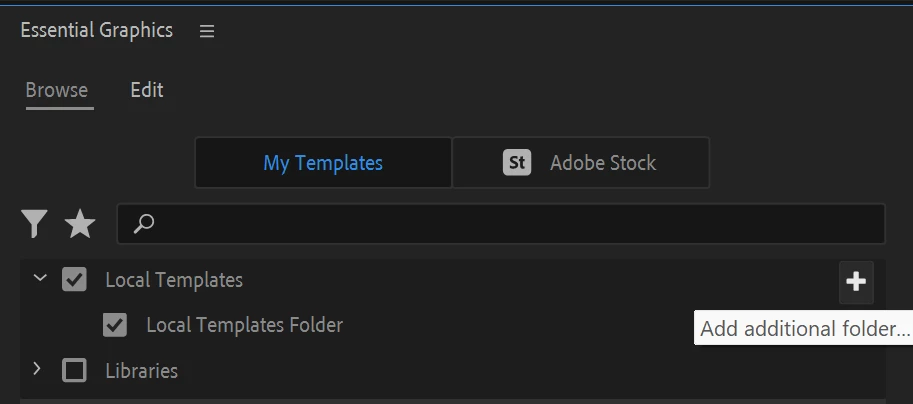


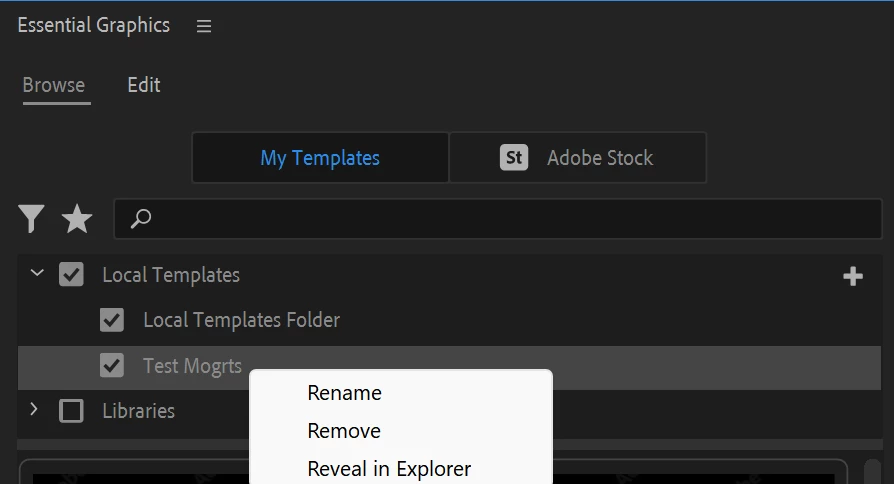
Once you have additional folders added, you can right click on the folders for some options to Rename the folder, Remove it from your view, and find the folder on your computer.
 

Cheers,

Theresa


2 replies

Participant
November 1, 2024

I can't see the plus symbol itself lmao.


Theresa Rostek
Community Manager
Community Manager
November 1, 2024

Hey @aniruddha_dilip_1490 

Sounds like you're using an older version of Premiere Pro then. You can access "Manage Additional Folders" by selecting the hamburger menu next to Essential Graphics.


The plus symbol workflow was added in Premiere Pro 2024.

Theresa


Participant
February 21, 2025

Just to let them know i have 25.1 version and the "manage additional folders" is not available,  today Feb/20/2025 the option to choose local templates just sucks.... 

Theresa Rostek
Community Manager
Theresa RostekCommunity ManagerCorrect answer
Community Manager
March 5, 2024

Hi @Randy56 

It's been moved from being hidden in that menu. Click on the plus symbol on the right side of the browser.


Once you have additional folders added, you can right click on the folders for some options to Rename the folder, Remove it from your view, and find the folder on your computer.


Cheers,

Theresa


Okan5CA7
Inspiring
June 21, 2024

It doesn't work. Still can't see additional folders. 
Plus icon or other icons let me able to import mogrt files one by one. I want to add mogrt files as it used to be.

Okan5CA7
Inspiring
June 21, 2024

Okay, now i've understand.