
Known Participant
April 3, 2018
Answered

Incompatible audio codec found in the preset

  • April 3, 2018
  • 10 replies
  • 13549 views

I've seen a bunch of topics similar to this, but all the ones that I've found have to do with the video codec. My issue - according to the error log generated by AME - is an "Incompatible Audio Codec." When using a preset that I've used for 5+ years today, I got the error below.

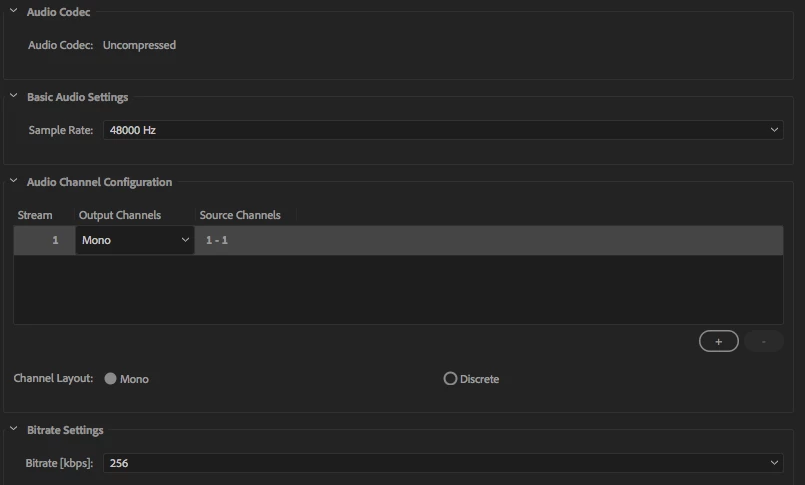
It's the "master codec" that I use to encode all the final versions of all the videos I do for my company (there are lots), and like I said, I've been using the same one for 5+ years. The issue started right after upgrading to version 12.1 of all CC apps (premiere and AME, included). I'm sure that's part of the issue, but wtf? Screenshot of the audio tab of the preset is also below.

Anyone have this issue? Any way to fix this?

------------------------------------------------------------

- Encoding Time: 00:00:00

04/03/2018 02:15:07 PM : Encoding Failed

------------------------------------------------------------

Export Error

Incompatible Audio Codec found in the preset. Preset load failed.

Exporter returned bad result.

Writing with exporter: QuickTime

Writing to file: /Users/xxxxxx/...title of movie.mov

Around timecode: 00;00;00;00

Component: QuickTime of type Exporter

Selector: 9

Error code: 28

------------------------------------------------------------
This topic has been closed for replies.
Correct answer billybillya2w45we5sydrt

I love being an unwitting Beta tester for Adobe... and paying money to them for my testing. Seriously, the only reason why I went from 12.0 to 12.1 was crossing my fingers that the open bin in the new window (that's off screen which I can't access) bug would be fixed. It wasn't... and now I can't export ProRes masters for a client. Now costing me time, money and my sanity. WTF.


I HAVE A QUICK SOLUTION! So, it's still really low rent that we have to arrive at the solution this way to simply export a ProRes master in 12.1 but here goes. First choose your ProRes preset of your choice. Then choose under preset option: "Match Source (Rewrap)". For me anyways, this keeps my ProRes settings for my video but now the correct options show up under my audio tab including the "sample size" field which defaults to 16 bit and I can export properly to an uncompressed audio codec using ProRes for the video. So... silly... thanks for the extensive testing on 12.1 before shipping.

10 replies

Jon Barrie ANZ
Adobe Employee
Adobe Employee
September 4, 2018

Making a new preset from scratch will allow for all of the audio options to become available.

play swap out the answer here with the correct answer which is to use the preset made previously as a reference point to make a brand new preset with the latest version of Premiere Pro and media encoder.

gidi29
Participant
December 12, 2018

This did not work for me. In both PP 12.1.2 and Encoder, I tried creating new presets. As soon as I select Quicktime, the audio codec reverts to Uncompressed and is not change-able.

Participant
August 7, 2018

Same problem. Reverting back. Someday i'll learn to stop updating Premiere for about a month after it's released.

Participant
June 22, 2018

Ugh, my project settings at for the 4K video I shot and ProRes doesn't support 4K, so rewrap won't work...

garrettgibbons
Known Participant
May 5, 2018

Thanks to everyone for the workarounds. I hope that this is addressed extremely soon. The fact that the workaround still require uncompressed audio is deeply problematic (I'm sending TV spots to stations that require AAC audio compression).

Since 12.1 broke ProRes, I've been finishing in Davinci Resolve – I'm leaning heavily towards abandoning Premiere and Adobe if the tools break like this. This is unacceptable for a major company to destroy fundamental functionality like this.

Participant
May 2, 2018

Hi all,

Found a slightly different solution that suited my workflow...

• Select 'Format: Quicktime'

• Then choose one of the standard presets (I used 'Preset: PAL DV')

• Go down to the 'Video' tab, and select 'Video Codec: Apple ProRes 422'

• HIt the 'Match Source' button

• Boom

Hopefully Adobe will fix this issue soon.

apolk1331
Participant
May 2, 2018

This also worked for me.  And...I was able to save the preset and it held.  THANKS!

kirshy
Participant
April 20, 2018

Here it is April 20th and I just updated to the new version and I'm having the same issue. Going back to 12.0 for now. Will try again in a month. Fingers crossed they get their act together and fix this pronto.

On a related note, does anyone know why you can't put the quality on pro res 422HQ to 100%? It is greyed out at 90% always. Just wondering.

Thanks!

Known Participant
April 5, 2018

after on hold with Adobe for 1 hr and 30 minutes, i was told to just roll back to the previous version for now and check again after a week or so. of course the current project is not backwards compatible, so i'll hold off on rolling back until i'm in between projects. in the meantime i'm sure hoping i don't need to render using one of those presets.  smh

and or the record, most of my error messages say "incompatible video codec..." not audio codec as my previous reply said.

Legend
April 5, 2018

You shouldn't have a bitrate option with Uncompressed audio.  You should have Sample Rate and Bit Depth.

Something is off with the preset.  My best recommendation would be to just recreate it.

billybillya2w45we5sydrt
Inspiring
April 5, 2018

Nope, any setting with "uncompressed" for the audio gives me the error. I can confirm, downgrading back to 12.0 does indeed "fix" the issue... but I've lost a days worth of work across several projects :/

Legend
April 10, 2018

Latest update I've tried...I tried recreating the preset from scratch as Jim_Simon suggested in both in the old version and the new version of CC with no luck. I tried what mattgoudey suggested - changing to DNxHD - to no luck. Basically, no matter what codec I make the Quicktime file, it won't let me change the audio codec to anything aside from uncompressed in 12.1 (whereas in 12.0, I could select from roughly a dozen different options). I'm 99% sure this is where the problem lies, but have no fix for it yet.


Many of the compressed QuickTime options are no longer supported.

Future versions of Premiere Pro will no longer support Quicktime 7 era formats and codecs

billybillya2w45we5sydrt
Inspiring
April 5, 2018

I too have the same issue, just began since my switch to 12.1.0 (Build 186). I'm on a mac, High Sierra 10.13.3. It's with any "uncompressed" audio codecs. I'm trying to export ProRes masters for a large client and am in a huge rush, they need these today for distribution across tons of platforms. NEED A SOLUTION ASAP!!!!!!!

Known Participant
April 4, 2018

Since I updated last night, I've been having the same issue.  Only most of the custom presets I've made are coming up with that message. "Incompatible Audio Codec found in the preset. Preset load failed."

I'm sure hoping I can roll back if this isn't address very soon!

Adobe?