
Copy link to clipboard
Copied
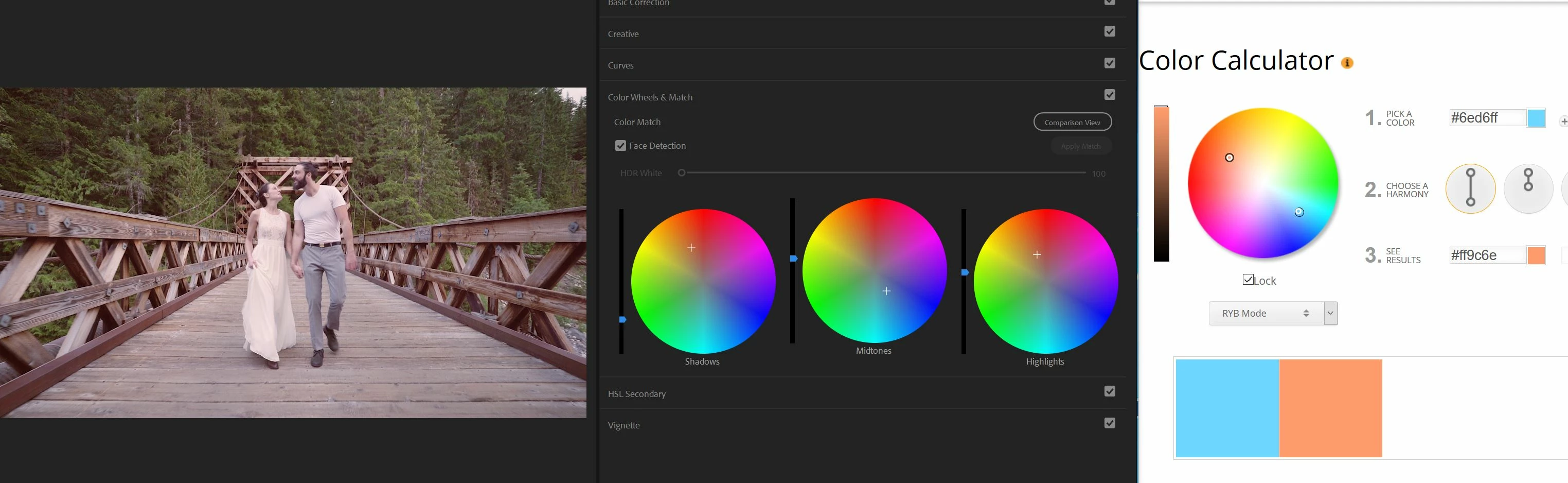
Hey! I am wondering if there is a way to use color values (say this green #67ff9d and this red #ff7467 for example) and input those into your color wheels in Premiere Pro? It would be amazing to get exact values in the wheels! - Nick
No, that's not possible currently. You might be able to accomplish that with one of the other color effects though, so do check the Video effects for what's there. Also look in the Legacy or Obsolete, whatever they cal the old ones.
Neil
Copy link to clipboard
Copied
Can you explain what it is you are trying to do?
Are you trying to tint the scene to a certain color value?
MtD
Copy link to clipboard
Copied
I would like to be able to take specific color values (like from a color wheel calculator like this Color Wheel - Color Calculator | Sessions College and then take the exact color value #s and input them into my color wheels (shadows, midtones, highlights). In the screen shot I shared you can see an approximate representation of the output from the color calculator. But I am hoping to not have it be approximate, but exact.
I don't think it's a feature that is in lumetri, but maybe?
And yes the end goal is to color the shot to the specific color value.
Copy link to clipboard
Copied
No, that's not possible currently. You might be able to accomplish that with one of the other color effects though, so do check the Video effects for what's there. Also look in the Legacy or Obsolete, whatever they cal the old ones.
Neil
Copy link to clipboard
Copied
Thanks Neil! Good to know! I will explore those options also to see what can be played around with.
Copy link to clipboard
Copied
What exactly are you trying to achieve?
Remember, the color wheels are adjusting the values of whatever is already in the image. If you push bluish values towards blue you will get VERY blue values. Push yellow values by the same amount and they might come out more neutral.
What part of the image are you trying to make a specific exact value? Because using the color wheels wont make any part of the image a specific color value.
Copy link to clipboard
Copied
Mike I just wanted to experiment with exact color values in the color wheels. I didn't have a specific goal for a particular grade just thought it would be cool to have that level of control and information
Get ready! An upgraded Adobe Community experience is coming in January.
Learn more