
JFaz
Participant
June 22, 2022
Question

Installing In Incorrect Location

  • June 22, 2022
  • 3 replies
  • 4273 views

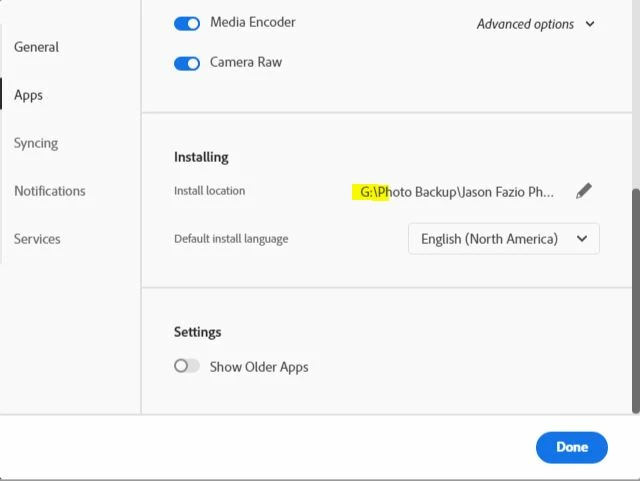
My Premiere Pro will not install where I've told my Adobe programs to do so. Is there a way to uninstall and force the program to move to the correct drive? I've attached screenshots of the error highlighting where the program is trying to install vs where I've told the programs to install.

3 replies

MyerPj
Community Expert
Community Expert
March 10, 2024

After my recent cleaning out, I've just recently got my c: drive down to 130gb. I have about 5gb of stuff I'm going to move to my sata SSD, but I have to change a the links to there, but that's just a couple hours work now, and less hassle going forward. 

After you've uninstalled everything, run the Adobe Cleaner, which I linked above.

Participating Frequently
March 9, 2024

I have exactly the same Problem, except: It installs all my Updates on D instead of C. This is sooooo annyoing.

Like, everytime I make an update, it creates a new folder on D and installs the software there. Than I manualy put the folder over to my C drive. And yeha, it s so dumb, cause my D is an HDD super slow (mainly use it for Backups) and my system does not recognize that I have the software, so I can't open files directly and have to first launch illustr and others than select open file form within.

This problem gets on my damn nerves since months!!

Community Expert
June 23, 2022

Is the reason why you're trying to install on a different drive is that your C drive is full?

-------------------------------------------------------------------------JVK | Editor/Designer/Software Instructor. Pr, Ae, Ch, Ps, Ai, Id
Participating Frequently
March 9, 2024

I tried uninstalling everything even creative cloud, and this problem still persist. There has to be a file somewhere that tells Creatice Cloud that i want to install it on D but I can't find it. I never had big issues with adobe, but damn this is nerve wracking as it keeps me from working efficiently since months. Making updates involves half a day of waiting now as I have to manualy move adobe software folders to my C drive after each update. and they get installed on my oldass Backup HDD. moving folders right now of 4 software and it says: wait 15h omg.

Participating Frequently
March 9, 2024

With all due respect, but if you would install everything on C where it belongs, you would not be having a nerves breakdown and having to wait 15h to continue work.

Every update will install like a breeze.


The only clue i have, is that I updated my C from a 1tb to a 4tb SSD, cupple motnhs back. I believe since than, my creative cloud is a complete mess.