
Insufficient System Memory
This is the second time i have posted about this issue.
Here is the initail post: https://community.adobe.com/t5/premiere-pro/insufficent-system-memory-error/m-p/11288713?page=1#M283048
I'm posting again as i have since contacted Adobe and had a tech look at my computer. They renamed an old Prem folder (i had updated but kept the old version as a back up) in the C drive. I restarted Prem and it didnt appear again so they thought that was that.
However i had mentioned that closing and reopening the program "fixes" the issue. I say "fixes" as its not a fix. Its just a delay to it happening again.
Here is a screenshot which includes my Task Manager:
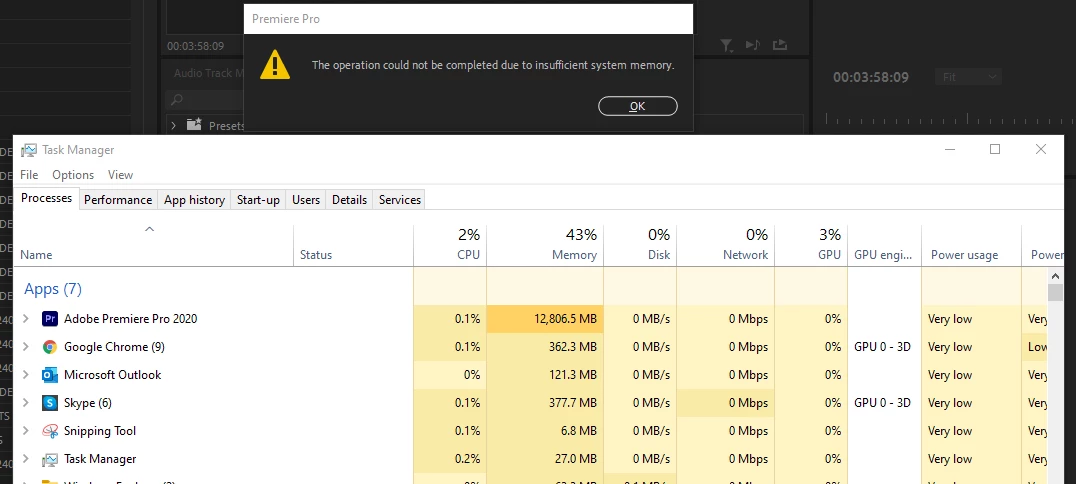
This never happend when i was using Prem 2019 or below. I can understand people saying "well just go roll back" but thats not really the issue is it. This is not a low spec'd computer, so i cannot see why this is occuring.
Can someone please give me an insight.
System Specs:
Processor - Intel Core i9-9940X CPU @ 3.30GHz
RAM - 64GB
Graphics - Quadro RTX 5000
Windows 10
 AdChoices