
Participant
December 19, 2020
Question

Intel HD Graphics 530 Unsupported Video Driver

  • December 19, 2020
  • 2 replies
  • 7790 views

Not able to work thru "Fix" provided as I get the following message. 
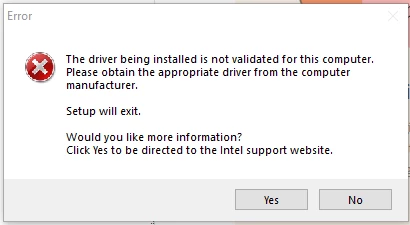
 

In went ahead and disabled the Intel HD Graphics card under Display Adapter and restarted, but I still get the same message. Is there any recourse for my situation?
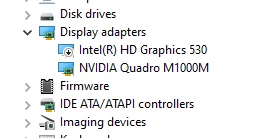


I am on a Thinkpad P50. Thanks in advance.


-Sri


This topic has been closed for replies.

2 replies

Legend
December 20, 2020

Have you ever updated the graphics driver(s) from Lenovo's Web site at all? If you didn't, then there is a new update dated October 4, 2020 for that laptop. The P50 does not support DCH drivers at all - only legacy drivers, as configured. That's why the Intel DCH driver installation failed. And please note that this software updates both the Intel and the Nvidia (in your case, the Quadro M1000M) GPUs.


And the Quadro M1000M and other first-gen Maxwell GPUs that have Compute Capability 5.0 have now had their CUDA support depreciated in newer Nvidia drivers: Version 440 introduced CUDA 10.2, which began locking down CUDA support for the GM1xx GPUs (including your Quadro M1000M) to CUDA 10.1 compatibility levels, and this support continued into CUDA 11.0, 11.1 and 11.2 (introduced with the 450-, 455- and 460-series drivers, respectively). Thus, as time goes forward, your laptop's Quadro M1000M will no longer be usable for CUDA GPU acceleration in a future Nvidia driver release.


And do not rely on Microsoft Update for the graphics drivers! Microsoft Update checks only the Microsoft Web site for the driver, and the most recent driver that is compatible with your hardware that's available from the Microsoft site just now happened to be more than a year old.

alexird62758493
Participant
February 20, 2021

if you have dedicated GPU disable your integrated GPU and work with one GPU or update your Intel gpu manually go to device manager uninstall your intel driver click delete soft ware then restart you computer after restarting go back to device manager check your display driver if your intelhd 530 driver is change into a basic display driver right click and update driver automatically then you will get an updated driver that that compatible for the premiere pro 2020-2021.. 

Participant
April 20, 2021

Thank you so much!!
Finally it worked! but don't could on Intel to find the right driver, I suggest you download it manually "Version 27.20.100.8681" because first I let intel download it automatically and it gave me version 24

John T Smith
Community Expert
Community Expert
December 20, 2020