

Bed30321077z973
Inspiring
February 6, 2024
Answered

Is it possible to create a transition EFFECT between 2 videos located in 2 DIFFERENT videoTRACKS?

  • February 6, 2024
  • 2 replies
  • 1065 views

Hello

I would like to create a transition video between 2 videos NOT LOCATED in the same video track.

Would it be possible somehow?

What if I put "half" an effect in the video above and the other "half" in the video below (lower track)?

Do you have any idea how I could implement this?
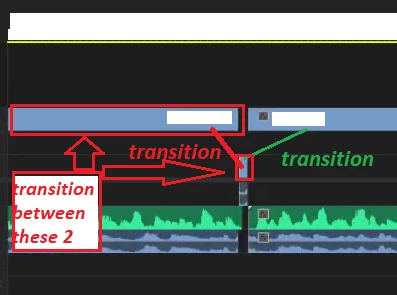
 

And no I don't want to simply move the clips to make them stay at the same track, I want to keep them separated like this, but apply anyway some type of effect related to video transitions effects.

Any ideas?
This topic has been closed for replies.
Correct answer JayB80

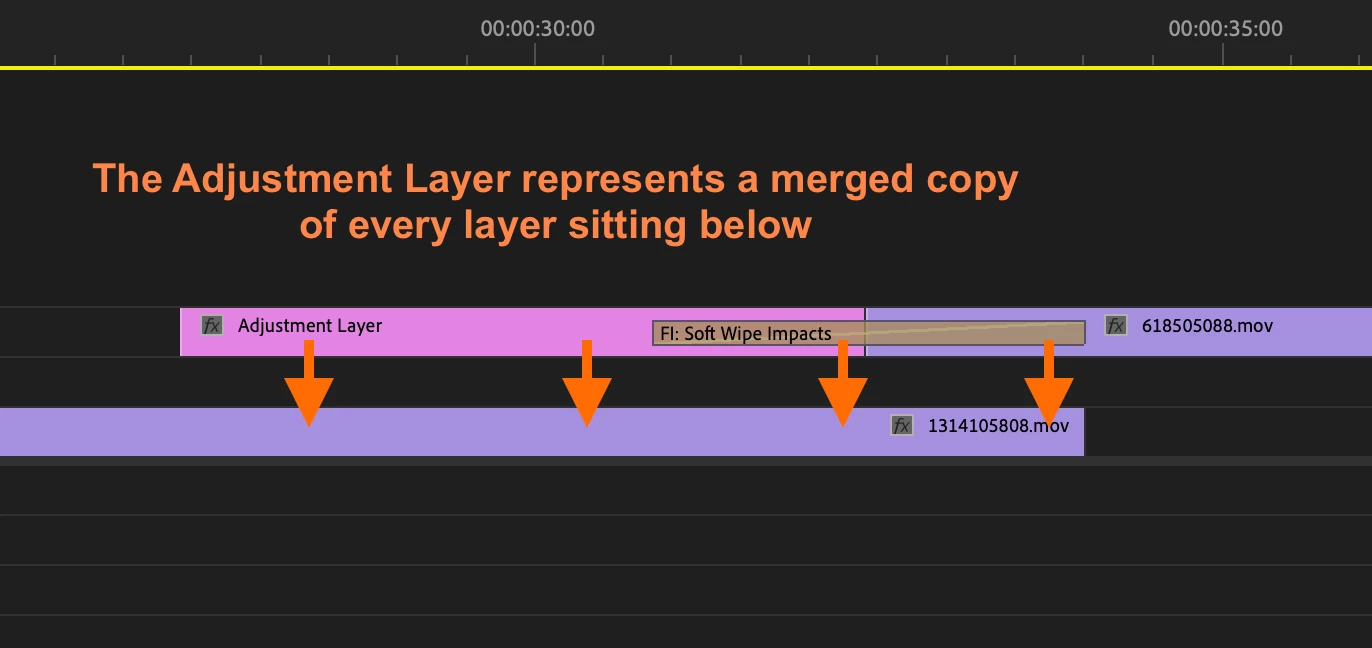
This is possible with adjustment layers. 
Put the Adjustment Layer next to the clip sitting on the highest track. 
This adjustment layer represents a merged copy of every layer sitting below.
Make sure the bottom layer has enough length till the transition ends.
This is what it looks like:

This will transition perfectly between clips 1314105808.mov and 618505088.mov

2 replies

JayB80Correct answer
Participating Frequently
February 6, 2024

This is possible with adjustment layers. 
Put the Adjustment Layer next to the clip sitting on the highest track. 
This adjustment layer represents a merged copy of every layer sitting below.
Make sure the bottom layer has enough length till the transition ends.
This is what it looks like:

This will transition perfectly between clips 1314105808.mov and 618505088.mov

Bed30321077z973
Inspiring
February 6, 2024

That's awesome, do you know if it can be added with the API?

Mathias Moehl
Community Expert
Community Expert
February 6, 2024

I think it is not possible. If you want to create a transition from a clip A to a clip B on different tracks (for whatever reason), you could cut clip A at the point where the transition should start and move that last bit of A into the track of clip B. Yes, then you again have both on the same track, but that's how transitions work - they require both clips to be on the same track.

Mathias Möhl - Developer of tools like BeatEdit and Automation Blocks for Premiere Pro and After Effects
Bed30321077z973
Inspiring
February 6, 2024

Thanks, that's actually an interesting idea, moving a portion of the clip A to clip B, then only applyting the effect on one track

I noticed that transition actually "kinda work" on one single videos, and can have some use, .. sometimes