
Participant
July 1, 2020
Question

Is it possible to drag and drop a project (A) onto a different project (B)'s timeline?

  • July 1, 2020
  • 4 replies
  • 539 views

Before I go and jump off a bridge, can this be done? TL;DR - was cleaning up and organizing footage on a long timeline. Accidentally deleted the portion of the timeline that housed my actual short film (~22 minutes of VERY edited stuff). Found a different save file that has that film. I need to have that film living on the same timeline as my other footage for organization sake. (Tried 'importing project,' but that only brings a folder with the files from the project, not the actual timeline). Is it possible to import the timeline from project A and drop it onto project B's timeline?! Thank you, I love you.


Edit: From project A, I want this:
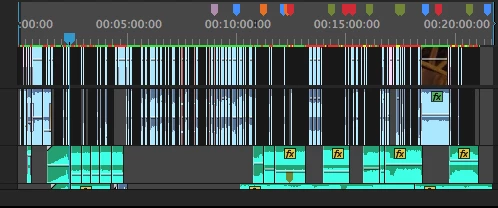
To be copied/pasted onto this open space in project B:
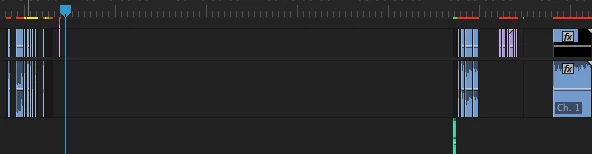
This topic has been closed for replies.

4 replies

R Neil Haugen
Legend
July 1, 2020

The new Productions form of working in Premiere is ideal for this ... and is actually ideal even for small shops like mine.


I have ONE production for the year. Within that Production panel in Premiere, I have subfolders for my main categories of work, and within each of those subfolders I have either particular clients or major jobs.


When you call for a new Production in Premiere, it creates an acutal folder where you tell it to on your machine. Within that folder in Premiere's Productions panel, you create subfolders for your projects. Within each project's subfolder, you create your project files.


It's a good idea to create an overall folder on your machine, and within that, add your Production folder and an assets folder for your media on the machine.


And any media in any project of that overall production can be accessed and used in any other project without creating duplication of media files in multiple project files, and it can all run much "lighter" on your computer's resources as it never opens up any more and loads it to RAM than what it needs at the moment.


Neil


Everyone's mileage always varies ...
Ann Bens
Community Expert
Community Expert
July 1, 2020

Yes: its called pancake editing.

Open project A

Now go up to File and open project B (Premiere can have multiple projects open).

Now set up a pancak timeline: one timeline for each project.

Select clips from one timeline and drag into other timeline.

Community Expert
July 1, 2020

If you import the project using the Media Browser you should get this option:


Just select the correct sequence to import and then insert to the required sequence in Project B. Iwould duplicate the project B sequence first in case anything goes wrong.

MarekMularczyk
Community Expert
Community Expert
July 1, 2020

I don't think you can drop a Project onto a Timeline of another Sequence (Project is just a .prproj file) but you can drop a Sequence onto another's Sequence Timeline.

Adobe Community ExpertAdobe Certified Professional