Participant
January 25, 2017
Answered

is it possible to update from Premiere Pro CC 2015.1 Release to 2015.3 Release?

  • January 25, 2017
  • 2 replies
  • 1560 views

I teach at a college and they have PP 2015.3. At home I have PPCC 2015.1 Release so I would like to update to PPCC 2015.3 Release. the same as College.  I don't want PPCC 2017. Is there any way of updating to 205.3? If so where do I get the update?
    This topic has been closed for replies.
    Correct answer davescm

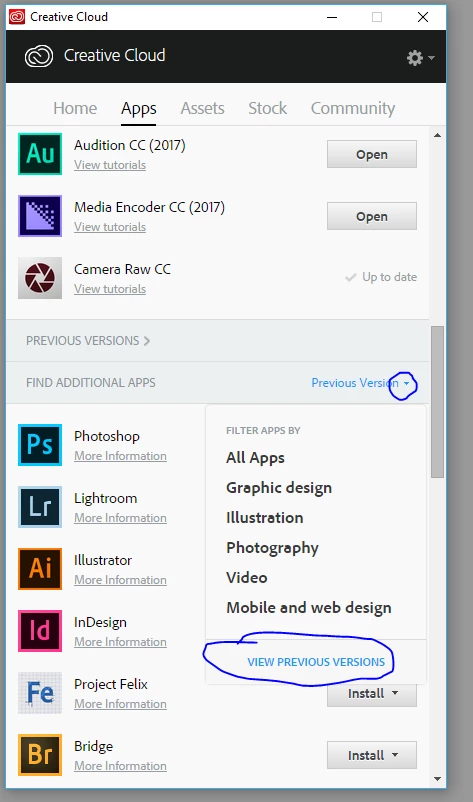
    From the creative cloud desktop app go to Find Additional Apps - and set it to Previous Versions (note this is different to the main "Previous Versions" heading which shows previous versions already installed

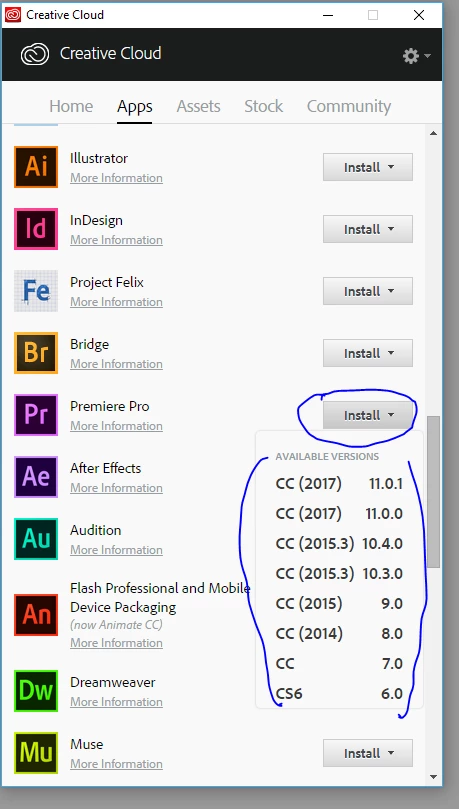
    Then go to Premiere Pro - click install and choose from the list:

    Dave

    2 replies

    Salman Khan Ghauri
    Participant
    January 25, 2017

    Hi Chicodallinha​,

    You can download the offline installers from the links below (Win or Mac), however these are just installers and you will need an active Creative Cloud membership for it to work.

    All Adobe CC 2015 Updates: The Direct Download Links for Windows | ProDesignTools

    All Adobe CC 2015 Updates: The Direct Download Links for Mac OS | ProDesignTools

    I hope it helps.

    -best

    Salman.

    Participant
    January 25, 2017

    Hi Salman,

    You and Dave helped me greatly with the update.

    Thank you very much

    Chico

    davescm
    Community Expert
    davescmCommunity ExpertCorrect answer
    Community Expert
    January 25, 2017

    From the creative cloud desktop app go to Find Additional Apps - and set it to Previous Versions (note this is different to the main "Previous Versions" heading which shows previous versions already installed

    Then go to Premiere Pro - click install and choose from the list:

    Dave

    Participant
    January 25, 2017

    Hi Dave and Salman,

    I have used a mix of your suggestions and it worked. My only problem now is that I have and hear audio in Premiere

    but whenever I export the final film, the file has no audible audio. Any thoughts on it?

    Very grateful to you guys.

    Chico

    Salman Khan Ghauri
    Participant
    January 25, 2017

    Hi Chicodallinha,

    Great, I'm glad that it worked.

    As for audio:

    A): Make sure that when you "export media", it has both audio and video checked on

    B): (If it still doesn't solve the problem) Click on queue to render it using Adobe Media Encoder (AME), you will have to adjust the similar setting in the AME as well though.

    I hope it helps.

    -best

    Salman.