
Inspiring
March 21, 2024
Question

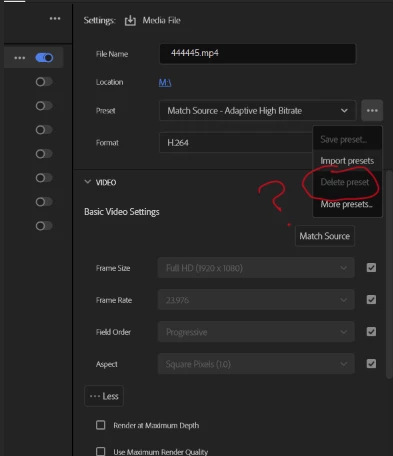
is there a way to remove these presets from favorites in the exporter? or how to get rid of them?

  • March 21, 2024
  • 1 reply
  • 255 views
I was able to delete a bunch of them by digging in the program folder but I cannot find these presets and they drive me nuts. I never use them, never will use them and only want my custom presets there for efficient use and these things bug the hell out of me. Anybody know where these are located or how to get rid of them?


This topic has been closed for replies.

1 reply

mattchristensen
Legend
March 25, 2024

@DestinyPatterson Yes you can do this. Click "More presets..." there in your screenshot, then in the Preset Manager window click the star to show only favorites, and then you can click the star next to each of them to un-favorite them. You can favorite your own presets and then only they will show up in the main drop-down of the Export settings.