

Bed30321077z973
Inspiring
February 5, 2024
Answered

Is there a way to TURBO speed up premiere pro even more by making it use more GPU?

  • February 5, 2024
  • 1 reply
  • 1464 views

So I am performing lot of tasks right now, inserting numerous items to the tracks,

But I don't find it fast enough for me.

I want it to become REALLY REALLY insanely fast, be it if that meant HUGE use of GPU.

In the following screenshot I am showing what a machine is diplaying in term of GPU, CPU and RAM usage when running extendscript, I have another machine with more gpu than this one but in both cases the usage of GPU is not thaat important:
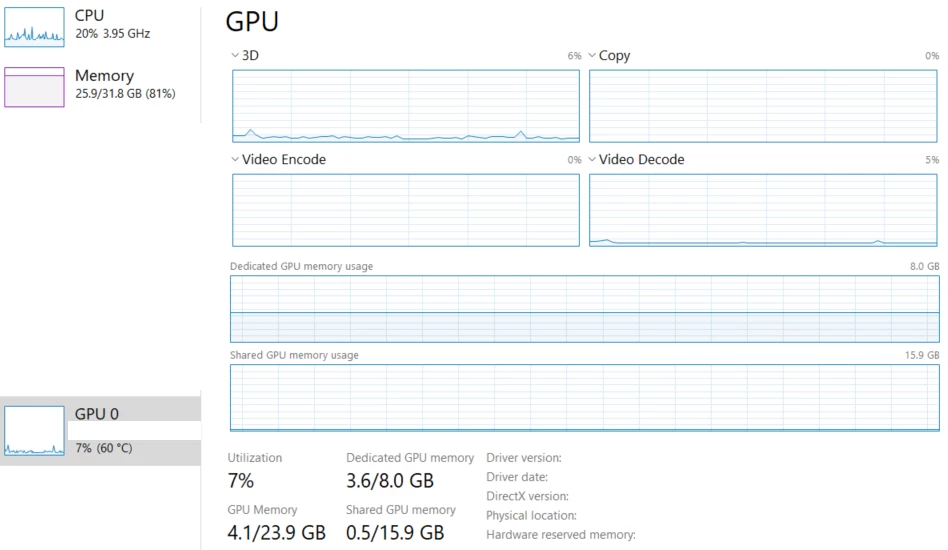
 

Something like pytorch (used in machine learning) something similar that would boost Premiere pro by using more GPU?

Maybe the slowness comes from javascript itself? Or both Premiere pro not being optimized for heavy use + javascript slowness?

This topic has been closed for replies.
Correct answer Bruce Bullis

ANOTHER theory (confirmed) is:

The more there are items on the tracks, the slower inserting new tracks get!

I know it because I did the experiment:

Added 100 items to a project had numerour other items before, is slower than adding 600 items to a project that has no items, even if its has bigger in and outs (they have no effect on performance), and even if we are at advanced times of the timeline (as long as there is no item BEFORE). (I did not experiment for items present AFTER, i mean, lets say we have numerous items at the end of the timeline and we want to add 100 items BEFORE them, I wonder if it will still get slower or not).


One solution would be to open multiple projects at once, and having items added to multiple timelines, so reduce number of items within one timeline,

But I have no idea if we can run the code on multiple projects at once or not, and if the performance will split or not.


Interesting speculation.

As before: If you can provide the actual ExtendScript you're using, a project w/media, and (IMPORTANT!) step-by-step instructions that reliably reproduce the behavior, we'd be glad to pursue it further.

1 reply

Bruce Bullis
Community Manager
Community Manager
February 5, 2024

Without seeing your ExtendScript code, there's no way to provide any meaningful feedback on what might speed up its execution. Currently, there is no reason to think that moving to GPU processing, or machine learning(?!), would help anything.

Bed30321077z973
Inspiring
February 5, 2024

Importing the same item from media library to tracks multiple times. I want it to be WAY way faster.

That's the code essentially.

Bruce Bullis
Community Manager
Bruce BullisCommunity ManagerCorrect answer
Community Manager
February 7, 2024

ANOTHER theory (confirmed) is:

The more there are items on the tracks, the slower inserting new tracks get!

I know it because I did the experiment:

Added 100 items to a project had numerour other items before, is slower than adding 600 items to a project that has no items, even if its has bigger in and outs (they have no effect on performance), and even if we are at advanced times of the timeline (as long as there is no item BEFORE). (I did not experiment for items present AFTER, i mean, lets say we have numerous items at the end of the timeline and we want to add 100 items BEFORE them, I wonder if it will still get slower or not).


One solution would be to open multiple projects at once, and having items added to multiple timelines, so reduce number of items within one timeline,

But I have no idea if we can run the code on multiple projects at once or not, and if the performance will split or not.


Interesting speculation.

As before: If you can provide the actual ExtendScript you're using, a project w/media, and (IMPORTANT!) step-by-step instructions that reliably reproduce the behavior, we'd be glad to pursue it further.