
BMcCarty
Known Participant
October 30, 2020
Answered

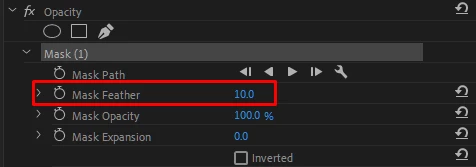
Is there any way to set the Opacity Mask Feather default to Zero?

  • October 30, 2020
  • 2 replies
  • 1164 views

Does anyone know of a way to change the default value for the "Opacity", "Mask Feather" setting? 

I use opacity masking a lot, and I very rarely have the need to feather the mask. The "Mask Feather" default setting is a value of 10, which means I need to take the extra step of setting it to zero, if I want a well-defined mask edge. That may seem trivial, but it becomes tiresome if I'm creating a lot of masks. 
Granted, there are a many instances where having a feathered edge won't really cause a problem, but there are also many times when I need a well-defined edge to a mask.  


Thanks!


This topic has been closed for replies.
Correct answer Ann Bens

Either dropping a preset or setting the feather: both is an extra step.

2 replies

R Neil Haugen
Legend
October 31, 2020

Gerik's got the best available answer. They don't give a user-option to set most default settings, and yea, most of us would choose something other than 10 pixels. Maybe another request on their UserVoice system ...


Neil

Everyone's mileage always varies ...
gerikp
Community Expert
Community Expert
October 31, 2020

You could save your most often Opacity mask settings as a preset. I would get the mask in general how you want it, with Mask Feather set to zero. Then right-click on the Opacity and select "Save Preset..." You could make a whole bunch of different ones and then organize them in the Presets folder under the Effects tab.

Ann Bens
Community Expert
Ann BensCommunity ExpertCorrect answer
Community Expert
October 31, 2020

Either dropping a preset or setting the feather: both is an extra step.