Participant
December 20, 2017
Answered

Is there anyway to fix this bad capture from VHS

  • December 20, 2017
  • 6 replies
  • 7783 views

I have recently ripped some old home movies from VHS tapes to Digital Copies,

I have an issue with one of the rips, It looks like the original tape was damaged, and the video is showing a split footage (sorry I don't know if there is a correct term for it).

I have attached a 2.30 minute sample to show what I mean.

Is there anyway that it can be corrected with Premiere Pro ? and if so are there any guides to how it can be done.

Regards

Mick

Bad VHS Tape Footage - YouTube

    This topic has been closed for replies.
    Correct answer SAFEHARBOR11

    Here's how to "fix" the footage. The top of the image is currently at the bottom of frame, and bottom is at the top, so we need to reverse that.

    Put clip on timeline track V1

    Put same clip directly above first on V2

    Using Adobe Motion effect on V2, move clip down using vertical Position control so that bottom of image is now at bottom of screen.

    Using Motion effect on V1 clip, move that clip up so that top of image is at top of screen. Adjust to align them together as good as possible.

    This kind of works, and I say kind of because in reality, there is a narrow band of video missing in your source clip, where the two pieces need to join together. I guess you'd just splice the two parts together and put up with the slight mismatch between upper and lower. Better than what you have now. Or maybe leave the black gap, your choice.
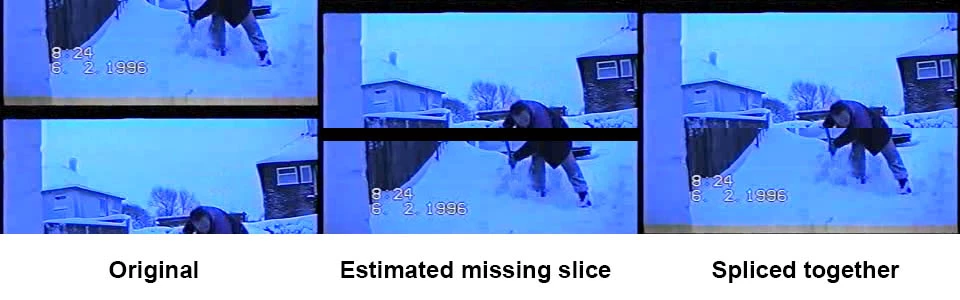
    As the position of the break changes throughout the clip, what you do every time it jumps is use the Razor tool and make a CUT through clips at that point, then just use Position on both segments to right of cut to re-adjust. Do that at each jump. You might color correct the clips before cutting them up, reduce that blue tint.

    Last tip - I downloaded your clip from YouTube, and rather than .mp4 it came as .3gp, which is for cell phones. You may have exported using the MPEG-4 option. Never use that, is very low-quality meant for older phones. 320x234 resolution in your case, less than half of what the quality the source clip ought to be. Use the H.264 export format, and choose YouTube SD as the preset.

    I don't know which country you are in, but your clip is 25fps which is PAL for European countries. The US would be NTSC at 29.97fps, so keep that in mind when editing and exporting.

    Ultimately, if you can find a local video editor that might have a pro or semi-pro VHS or S-VHS deck with adjustable tracking or better yet, a Time Base Corrector (TBC) in it, they may be able to get decent playback and recapture the footage without the issues, unless it is part of the recording in which case you may be stuck with this.

    Good luck with this project

    Thanks

    Jeff Pulera

    Safe Harbor Computers

    6 replies

    Mick_E_PAuthor
    Participant
    December 23, 2017

    Thanks Jeff, your advice worked, as you said, I lost the footage where the black bar was, I decided to keep the black bar, as removing the bar, in certain scenes did not work. The result is a lot better than the original, at least it is watchable now, Ive managed to put a few caption/titles on a few of the black bars, so at least it utilises them . Thanks again for everyones input on this.

    Regards

    Mick

    Mick_E_PAuthor
    Participant
    December 22, 2017

    Thank You Jeff, for the detailed answer and the tip at the end about the quality, I appreciate the time you have taken with your explanation, I will give it a go, sometime over the weekend,

    Thank you

    Regards

    Mick

    Mick_E_PAuthor
    Participant
    December 21, 2017

    Thanks for your help Guys

    I've tried re-ripping the tape, and adjusting the tracking,but with the same result, Good Idea about the cutting and copying, but I think I would lose too much of the video, (there's probably about 8 mins of faulty footage)

    I think i might have to go down, the route suggested by Chuck, although I was thinking, it will take me quite a while, if I have to do it frame by frame, unless there is an easier/quicker way.

    Thanks again for your help

    Mick

    Ann Bens
    Community Expert
    Community Expert
    December 21, 2017

    Use a nest to adjust the frames all at one: assuming they are next to each other.

    SAFEHARBOR11Correct answer
    Participating Frequently
    December 21, 2017

    Here's how to "fix" the footage. The top of the image is currently at the bottom of frame, and bottom is at the top, so we need to reverse that.

    Put clip on timeline track V1

    Put same clip directly above first on V2

    Using Adobe Motion effect on V2, move clip down using vertical Position control so that bottom of image is now at bottom of screen.

    Using Motion effect on V1 clip, move that clip up so that top of image is at top of screen. Adjust to align them together as good as possible.

    This kind of works, and I say kind of because in reality, there is a narrow band of video missing in your source clip, where the two pieces need to join together. I guess you'd just splice the two parts together and put up with the slight mismatch between upper and lower. Better than what you have now. Or maybe leave the black gap, your choice.

    As the position of the break changes throughout the clip, what you do every time it jumps is use the Razor tool and make a CUT through clips at that point, then just use Position on both segments to right of cut to re-adjust. Do that at each jump. You might color correct the clips before cutting them up, reduce that blue tint.

    Last tip - I downloaded your clip from YouTube, and rather than .mp4 it came as .3gp, which is for cell phones. You may have exported using the MPEG-4 option. Never use that, is very low-quality meant for older phones. 320x234 resolution in your case, less than half of what the quality the source clip ought to be. Use the H.264 export format, and choose YouTube SD as the preset.

    I don't know which country you are in, but your clip is 25fps which is PAL for European countries. The US would be NTSC at 29.97fps, so keep that in mind when editing and exporting.

    Ultimately, if you can find a local video editor that might have a pro or semi-pro VHS or S-VHS deck with adjustable tracking or better yet, a Time Base Corrector (TBC) in it, they may be able to get decent playback and recapture the footage without the issues, unless it is part of the recording in which case you may be stuck with this.

    Good luck with this project

    Thanks

    Jeff Pulera

    Safe Harbor Computers

    Chuck Uebele
    Community Expert
    Community Expert
    December 20, 2017

    You might be able to duplicate that part of the clip, and re-position and mask them, so that they blend together.

    Legend
    December 20, 2017

    That looks like bad tracking on the VCR.  Many models came with an adjustable tracking control.  You'd have to get the image correct during playback and recapture.

    Peru Bob
    Community Expert
    Community Expert
    December 20, 2017

    Make cuts and crops.