
Issue with changing opacity within clip in timeline in version 25.0.0 (build 61) windows
Hi,
Have got this issue in the new update. When moving around clips in the timeline with a mouse I keep acciedentally grabbing the bar that changes opacity within the clip itself. It used to be that the default height of the video tracks was such that you didnt get a bar coming up unless you increased the size over a certain height. However when you double click on the track to reset it to default height it goes to a height which still shows the opacity changing bar and allows you to easily and acciendiently click it when moving clips.
The only way around this is to manually change the height of the video track so that the bar dissappears but this seems much to small for me and its annoying to have to do this everytime, whereas before you could just double click to revert to a normal size without the bar that changes opacity (etc.)
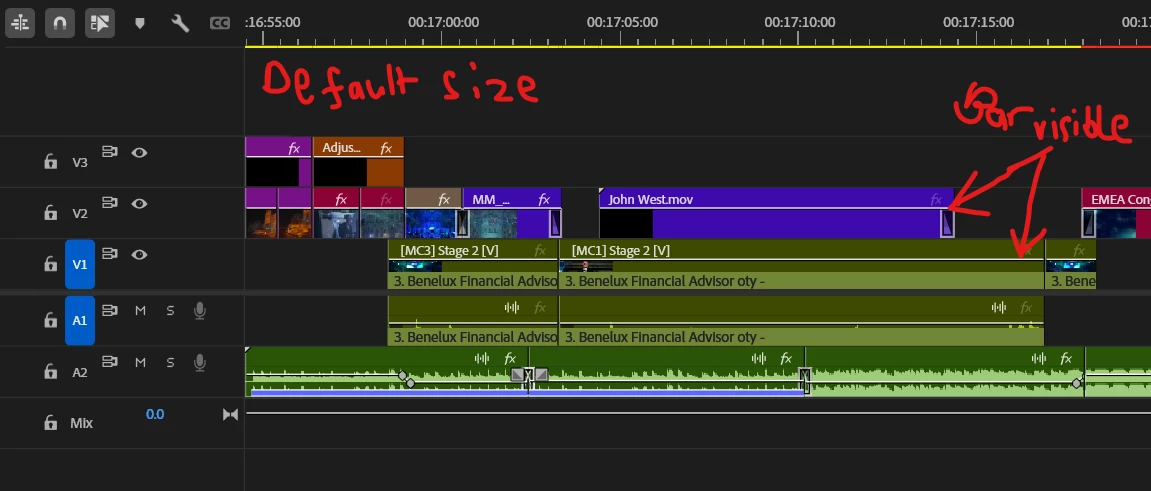
Does anyone know a a way of maybe removeing the bar, or changing the default size of the double clicked video track? Or maybe its just an issue specific to me.
Thanks,
Matt
am on Windows 10, amd ryzen 7, 64 bit
 AdChoices