
Tantroniq
Participating Frequently
August 26, 2018
Beantwortet

Just want to author a dvd in Premiere Pro CC 2018 without encore.. can I?

  • August 26, 2018
  • 7 Antworten
  • 7173 Ansichten

Hi all: Silly me. I took an advanced used on their word that a link from adobes site to download Encore CS would be accurate and allow me to proceed with a tutorial.

Boy was I wrong.

I have a finished project in Premiere. I'm a beginner user but I do have a completed project that just needs to be burned to a DVD to be played. This SHOULD be possible with CURRENT versions of Adobe products. Shouldnt it?

Where can I find a tutorial on how to author a DVD using my current version of Premiere Pro WITHOUT having to follow non existent links to downloads to an old version of Encore?

Tearing my hair out over here in disbelief that I cant find that information.

Thanks in advance.
    Dieses Thema wurde für Antworten geschlossen.
    Beste Antwort von Ussnorway7605025

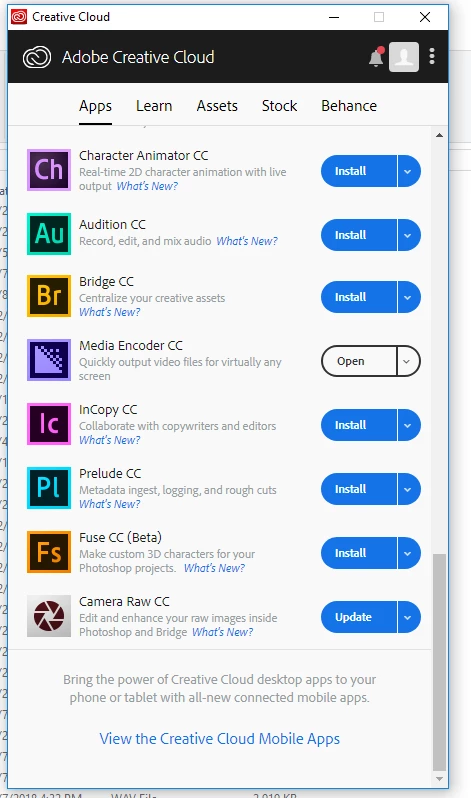
    here is what is at the bottom of the Apps tab!! Argh!


    yes the setting was moved to preferences | apps sub tab

    7 Antworten

    Legend
    August 26, 2018

    Amendment….

    when I said use dvd R I meant the one you want to give to someone.

    If you absolutely KNOW that your computer drive can play dvd RW.. then use those to test stuff, cause even when you choose 'finalize' you can still overwrite the thing with next effort at creating disc.  Otherwise you could be using a lot of DVD R's as windchimes or those things you put under glasses on the table.

    Legend
    August 26, 2018

    I don't have cc version, only cs6. Encoder has nothin to do with doing stuff once you export for DVD from your CC thing.

    You choose settings for SD ( dimensions, frame rate, field order ( or none), etc... when you export for DVD from CC.

    It makes 2 files.

    You put those in encore.

    Now you're into the gate of hell... you have a choice... burn DVD or export ISO.

    I prefer the latter.

    whether stuff gets messed around with to get the SMPTE standard ( and copyrighted DVD specs ) has nothin to do with you.

    Legend
    August 26, 2018

    Now that you are in the gate of hell... here's another fun fact....you might want to get into later, once you are experienced and actually start playing around with Encore.

    Most stuff now is 16:9. Or wider. 1 85, 1 39, (anamorphic) , whatever. It's NOT 4:3.

    So how to you FORCE letterbox doing DVD ???  That will be fun !

    hehe..  I hope you do this cause it's really fun to make DVD and BD stuff... so you can send to people you like etc.

    Legend
    August 26, 2018

    I want to be absolutely sure before I open that particular gate to that particular corner of hell.

    hehe...

    This isn't a gate. It's more like the off ramp ( exit off nice highway) following sign that says, "Encore this exit."

    Once you actually GET encore and begin to try and figure out how THAT works...you will have gone through the gate.

    Tips: use single layer DVD R   ( I forget the best brand to buy but there is one )

    Otherwise MANY DVD players will not be able to play the thing.

    Use the most simple and dumb settings to do your first project... ( settings for remote controls, etc. )

    When you export for DVD (using CC you have ) it will create 2 files. Those are the things you put into encore.

    SUGGESTION: export and ISO instead of using encore to 'burn disc'. Then use another nice simple program like IMGBURN to copy the ISO to disc. That would NOT be a data disc, it would be copy ISO to disc. Finalize disc.

    hehe, you have a ways to go before you get to the gate of hell.

    Legend
    August 26, 2018

    That was nice of you to do screen shots, Neil. Now, if you could just do a screenshot of the encore screen where you have to pick basic settings … using auto play when dvd is inserted, automatically start over at beginning when it reaches end, and those other crazy settings it needs... that would be cool !

    hehe...

    and whatever you do, don't hook up your phone to the DVD player !

    R Neil Haugen
    Legend
    August 26, 2018

    and whatever you do, don't hook up your phone to the DVD player !

    Um ... no comment ... other than I chuckled for a while ...

    Encore is an app from a certain ... era ... age ... Zeitgeist ... something. It took me a while to figure out it's completely obvious organization model ... or maybe ... it was just ...

    Ladies and gentlemen, may I present for your consideration...

    There is a fifth dimension, beyond that which is known to man. It is a dimension as vast as space and as timeless as infinity. It is the middle ground between light and shadow, between science and superstition, and it lies between the pit of man's fears and the summit of his knowledge. This is the dimension of imagination. It is an area which we call ...

      ... The Adobe Zone.

    Everyone's mileage always varies ...
    Tantroniq
    Participating Frequently
    August 26, 2018

    I found the problem with the instructions. Here it clearly shows you are to scroll to a section "FIND NEW APPS" in the "APPS" tab.

    There is no "FIND NEW APPS" section in the "APPS" tab that you "scroll down to". Nor is there a "Filters and Versions" drop down menu.

    This is whats on Adobe's site right now.

    Thanks for posting the screen shot- I found what I was looking for.

    Legend
    August 26, 2018
    Legend
    August 26, 2018

    Oh, one more thing... don't burn DVD from encore, but export an ISO (image) instead, and use a free program like IMGBURN or something to make the ISO ...it will burn the disc better, and finalize the disc even it it's RW.

    Would be fun to find out how you made out...so come back and let me know.

    Legend
    August 26, 2018

    John's links are probably up to date sorta... or you could just search on google for encore cs6 maybe... I have cs6 and recently loaded that stuff onto a laptop via discs but then upgraded some stuff via internet. So, it's still there somewhere.

    So, you can export using CC you have, for BD or DVD, take those files and stick em into encore, and so the most fundamental stuff to just get started... For example, tell the remote control what to do when pressing play, stop, etc... and what to do when you get to the end of the video ( go back to chapter 1 usually ). It's not very intuitive using encore, which is partly why the stopped supporting it. Add to that the fact that there's tons of hardware out there.. and most DVD players built into TV's don't like double layer DVD, or RW DVD's, and it was a tech mess for adobe to support the thing.

    I would get it and just rush through a basic DVD ( no fancy chapter markers and all that ) just to see what quality you end up with, etc.  And it's free with your CC subscription.

    John T Smith
    Community Expert
    Community Expert
    August 26, 2018

    How to get Encore using a Cloud subscription https://forums.adobe.com/thread/2372985

    -an option to check to see more previous https://forums.adobe.com/thread/2426726

    -and more on previous versions https://forums.adobe.com/thread/2389056 see reply #3

    -and even more on previous versions https://forums.adobe.com/thread/2409527 see reply #1

    Somewhat dated now, but still some good information for CS6 (Encore)

    PPro/Encore tutorial list http://forums.adobe.com/thread/1448923 has tutorial links to help learn

    Tantroniq
    Participating Frequently
    August 26, 2018

    Thank you John for your response. Before I spend even more time tracking down OLD versions of Adobe products (because as I mentioned, I already tried that) I really want to know if in all seriousness Adobe expects its customers to use OLD versions of software to do things when they have a paid subscription to the current versions.

    That makes no sense. There must be a way to use current versions of Adobe to author a DVD.

    Legend
    August 26, 2018

    I really want to know if in all seriousness Adobe expects its customers to use OLD versions of software to do things when they have a paid subscription to the current versions.

    yes