
October 15, 2019
Answered

Key to Automatically cut where the current frame is

  • October 15, 2019
  • 2 replies
  • 1439 views

Transfering from sony vegas to premiere. In vegas i hit the s key and it automatically puts a cut or split dividing the current frame from the previous. I know you can do this in premiere by using the razor tool(c) but you actually have to do 2 extra steps than in sony vegas, this ruins my work flow as if im already on the frame i want to split then why have me go with the mouse to the frame and left click? I get its useful for other things but its faster for me to just hit a key and it automatically splits. Been searching for a week now on youtube and cant find anything. Closest thing i found was q and w for ripple delete but i just want a ripple that splits the current frame and on from whats before it. Anyone know of a way to do this. Really appreciate any feedback.
    This topic has been closed for replies.
    Correct answer MyerPj

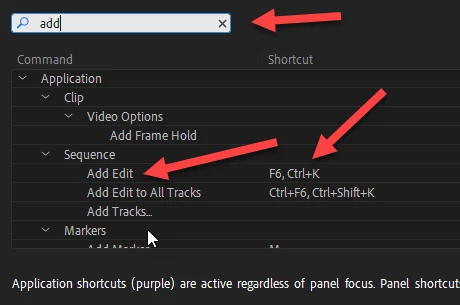
    It's a good time to learn about shortcut keys in PP. You can change or add a hotkey to the 'Add Edit' command, like for instance "S" which is currently mapped to "Snap in Timeline". You could either change that one or give it a new shortcut (or just use the horseshoe/magnet in the timeline). Then assing Add Edit to the key "S".


    In the picture is the ctrl-k hotkey (default as Neil mentioned) and the F6, which I assigned.


    2 replies

    MyerPj
    Community Expert
    MyerPjCommunity ExpertCorrect answer
    Community Expert
    October 15, 2019

    It's a good time to learn about shortcut keys in PP. You can change or add a hotkey to the 'Add Edit' command, like for instance "S" which is currently mapped to "Snap in Timeline". You could either change that one or give it a new shortcut (or just use the horseshoe/magnet in the timeline). Then assing Add Edit to the key "S".


    In the picture is the ctrl-k hotkey (default as Neil mentioned) and the F6, which I assigned.


    Roland Kahlenberg
    Legend
    October 15, 2019
    And there's a Complementary Shortcut/Command - Add Edit TO ALL Tracks (all unlocked Tracks) - very useful too.
    Very Advanced After Effects Training | Adaptive & Responsive Toolkits | Intelligent Design Assets (IDAs) | MoGraph Design System DEV
    R Neil Haugen
    Legend
    October 15, 2019

    Ctrl/Cmd-K.


    Neil

    Everyone's mileage always varies ...