
Inspiring
September 8, 2024
Answered

Keyboard Shortcut layout not showing num pad.

  • September 8, 2024
  • 4 replies
  • 932 views

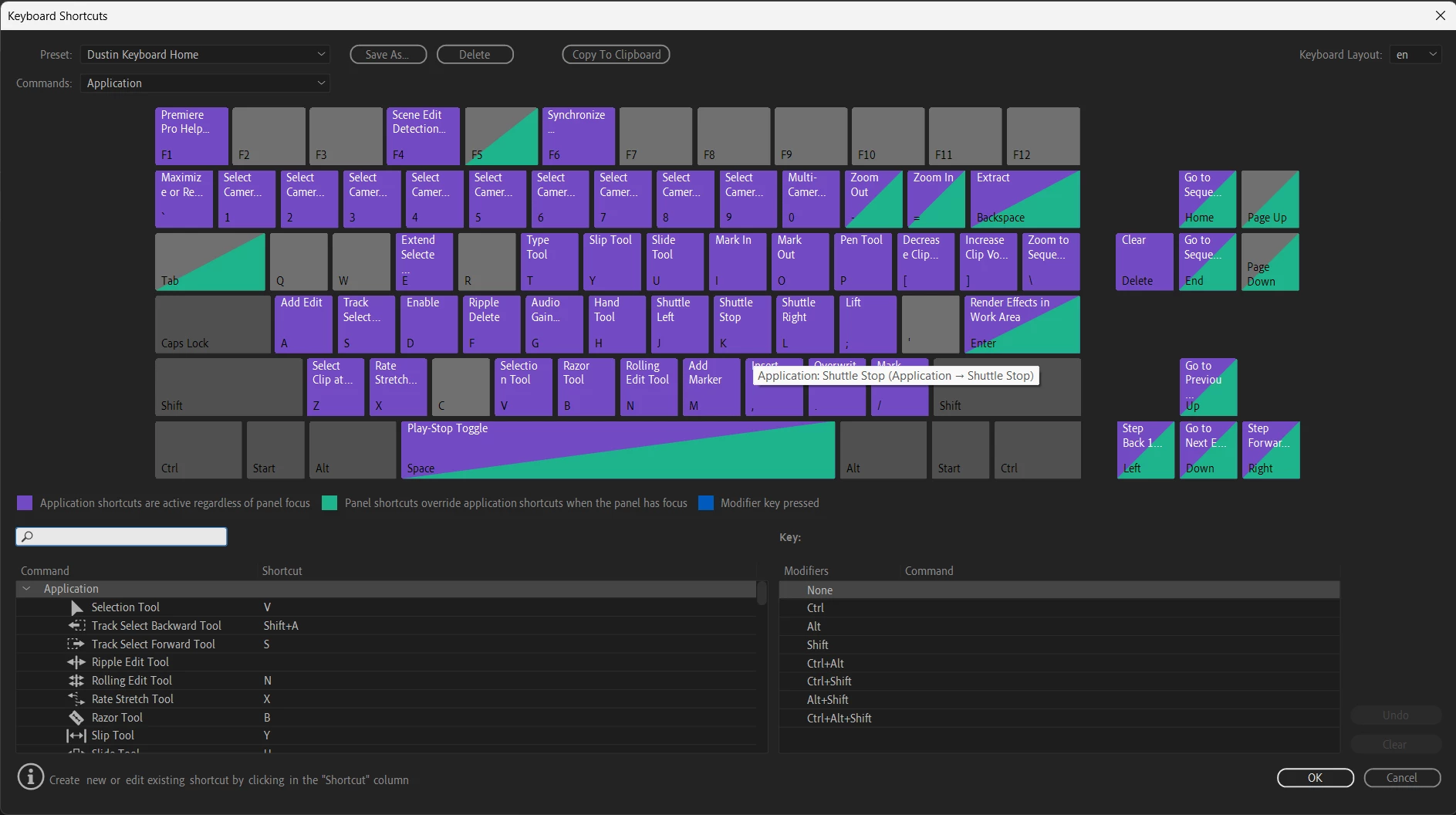
I can't for the life of me figure out why my premiere pro at home won't display the num pad in keyboard shortcuts. It shows up on my work systems both PC and Mac, but not my home one. Anyone know the reason for that and how to fix it? I've attached an image of what my shortcut layout looks like. There should be a numpad on the right hand side to map shortcuts to. 
This topic has been closed for replies.
Correct answer Ann Bens

Expand the panel to the right.

4 replies

Ann Bens
Community Expert
Ann BensCommunity ExpertCorrect answer
Community Expert
September 15, 2024

Expand the panel to the right.

Inspiring
September 16, 2024

I can't beleive that was the issue. Why would it not just display the full keyboard when I open up the shortcuts panel. Thank you!

MyerPj
Community Expert
Community Expert
September 16, 2024

Too funny, nice call @Ann Bens 🙂

MyerPj
Community Expert
Community Expert
September 15, 2024

Is it really a Logitech keyboard? I'm using a Steelseries Apex 350 with no issues. I didn't know Logitech was involved?


MyerPj
Community Expert
Community Expert
September 9, 2024

That's a strange one. Do you have another keyboard you can plug in to try?

Averdahl
Community Expert
Community Expert
September 8, 2024
quote

I can't for the life of me figure out why my premiere pro at home won't display the num pad in keyboard shortcuts. It shows up on my work systems both PC and Mac, but not my home one.


By @mcydg49648199


Dumb question maybe, but do you have a numpad on your keyboard on your home computer? 


If yes, close Premiere Pro and hold down the Shift-key while launching it again. This will bring up the Reset options dialog. Check Reset app preferences and click on Continue. When Premiere Pro is open, press Ctrl+Alt+K. Do you see the numpad now in the Keyboard Shortcuts dialog?


If no and if you are on Windows: If you launch the On-Screen Keyboard in Windows, do you see the numpad there?


Inspiring
September 9, 2024

Hey Thanks for replying, I do have a numpad on my keyboard and while I did what you suggested it still didn't work. And when I pull up the virtual on-screen keyboard it too doesn't have a numpad.

Averdahl
Community Expert
Community Expert
September 9, 2024
quote

Hey Thanks for replying, I do have a numpad on my keyboard and while I did what you suggested it still didn't work. And when I pull up the virtual on-screen keyboard it too doesn't have a numpad.


By @mcydg49648199


So it seems that it is an issue with your keyboard and/or computer/OS installation. What keyboard do you have today, any special brand?


If you press Win-key+M to open the Device Manager, do you see any exlamation marks anywhere or is it clean as it is in the second/bottom image here?


How to fix: Yellow Exclamation mark next to a device in Device Manager (thewindowsclub.com)


EDIT: As @MyerPj wrote, try another keyboard if you have one.