
Participant
July 22, 2020
Question

Keyboard shortcuts do not work with Premiere Pro Windows when IME is activated (Japanese & Korean)

  • July 22, 2020
  • 2 replies
  • 1641 views

Symptom

All keyboard shortcuts, including fundamental shortcuts like “J / K / L”, SpaceBar, and so on, does NOT work with Premiere Windows if IME (input method editor) is activated on Windows.


Why this bug is severe

For people in Japan / China / Korea, IME is used to input Japanese / Chinese / Korean texts on Windows, and it’s quite natural for Premiere uses in such countries to activate IME because of searching media files in Media Browser, creating Japanese text by Type Tool in Essential Graphics, etc.
As you know, the keyboard shortcuts is very important for professional video editors, who is Premiere’s main target users obviously, to create video clips efficiently.
Inability to use keyboard shortcuts with IME really frustrates professional video editors, and it severely damages their workflow efficiency.


Steps to reproduce

  1. Install IME on Windows.
  2. Launch Premiere Pro.
  3. Turn on IME.
  4. Put a video on timeline.
  5. Hit “J” or “L” key or SpaceBar on keyboard. And, you’ll see these shortcuts doesn’t work. See the attached screenshot.
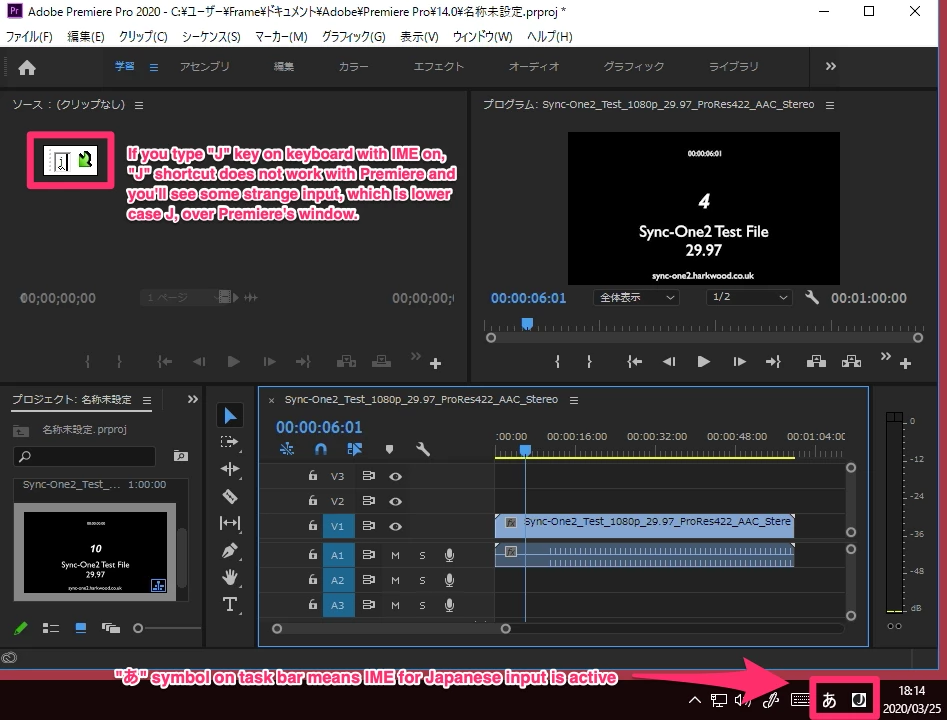
 

Useful website to know how to use IME

You can refer the below website to know how to install IME and type Japanese on Windows. Japanese JIS-layout keyboard is NOT necessary to input Japanese text.
https://www.coscom.co.jp/learnjapanese801/install_ime.html


Additional Information

Photoshop and Illustrator has a shortcut, which is invoked by pressing SpaceBar, to activate Hand tool. The shortcut DOES work even when IME is on.

2 replies

hyeon wooc4678952
Participant
November 14, 2022

애플 mac으로 사용중인 유저입니다

업데이트 후 불편한 점 2가지

첫 번째 한글로 작업을 하다 단축키를 활용하려고 하면 한/영 전환버튼을 눌러주고 단축키 활용 후 다시 한/영 버튼으로 전환해야 하는 번거러움이 있습니다.


두 번째 파일을 불러오거나 저장할 장소를 찾는 창에서 방향키를 누르면 창이 종료가 됩니다

방향키로 이동 불가능 - 마우스로만 이동 가능합니다


수정부탁드립니다

Kevin-Monahan
Community Manager
Community Manager
November 15, 2022

Hi Hyeon,

Sorry. If I'm not mistaken, The team should have fixed the typing bug in the past version. @jstrawn, can you take a look?


Thanks,
Kevin

Kevin Monahan - Sr. Community and Engagement Strategist – Adobe Pro Video and Audio
Known Participant
May 27, 2023

@Kevin-Monahan I have used Premiere Pro from 2019 up to 2022(22.3 version) on Mac OS. Shotcuts worked fine even when Korean language is selected as input languge (i.e. Korean typing mode). Shortcuts problem occured when I upgraded Premiere Pro to 22.6.2.


FYI I am using MacOS 12.6.6 Monterey. I tried a later version of Premiere Pro but this problem was not fixed. As you replied on Nov 15, 2022, it has been more than 6 months. This shortcut problem is significant and frustrating. I assume the Adobe  is not willing to this fix this painful glitch.


When I edit, I need to change input language (typing mode) constantly. Up to Premiere Pro 22.3, there was no need to check input language mode in odre to use shortcuts. However, now, before using shortcuts, I have to check the input language every time. It causes a great deal of painful waste of time and keystroke mistakes. 

Imagine you press 'I' key to "Mark In" but nothing happens at all. Then, you have to check the input language mode and find Korean is selected. You change it to English. Then, press 'I' to "Mark in". Imagine you have to go through this wasteful and painful process every second all the time while editing for almost every main shortcuts. Can you focus on your job?


I believe many in South Korea will leave Premiere Pro behind unless the Adobe take a relevant and effect action urgnetly. 


I know a similar problem (not being able to use English shortcuts on other languge typing mode) occurs in Japanese too. 

Participant
August 19, 2020

Is Anybody There?

We've experienced this issue for a long time, and inability to use keyboard shortcuts with IME makes Premiere less useful for professional video editing in TV studios.

Participant
September 29, 2020

Hi again.

Is anybody from Adobe able to look into this usability issue?

We contacted Adobe Japan reps, and they instructed us to write issue/bug reports to the forum.

Not sure why nobody from Adobe haven't taken care of the issues.

Participant
May 23, 2022

Yep. This is still a problem. It's a huge road block when adding subtitles. Essentially all shortcuts are broken because Japanese IME intercepts the keystroke and Adobe ignores it. I've solved it by remapping shortcuts to keys not affected by IME, but it's very inconvenient not being able to use 'space' to toggle playback. Adobe really needs to address this issue.