
Participant
October 18, 2020
Answered

Keyboard Shortcuts not working in Premiere Pro 2020

  • October 18, 2020
  • 3 replies
  • 35851 views

I have Premiere Pro 2020 since almost a year, and I have been using shortcuts like Ctrl+k, q, everyday.

Suddenly, today I tried it and it doesn't work.

I tried to reset all my config, and also reinstalling software. Is there something else I could do?

Maybe is an update problem?

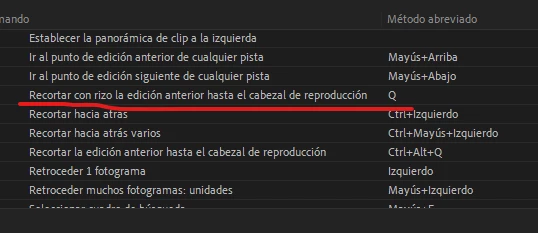
I am sharing with you an image of the actual configuration of Q shortcut. It seems OK, but when i press Q in editing, nothing happens.

I need help with tis please.
 

This topic has been closed for replies.

3 replies

Ali JaberCommunity ExpertCorrect answer
Community Expert
November 13, 2020
Participant
September 26, 2021

This problem is not "solved." Pointing out that it's related to a bug that isn't fixed doesn't mean it's solved. I am still having this problem and reading through months of other people's posts who are having the same problem hasn't fixed it. When will this problem actually get fixed?

MyerPj
Community Expert
Community Expert
January 26, 2022

Sorry.  I should have said I'm on a Mac (BigSur 11.4).


So there's not a Win folder but a Mac folder and no .kys files for Premier.


I did open up Premier again and saved the Default keyboard commands to "Steve_keybaord_shorts" - then closed Premier and reopened.  The shortcuts still dont' work but now I do see a Steve_keyboard_shorts.kys in the Mac folder.  But unfortunately the shortcuts still don't work.


Copy in the default file from the installation folder. You'll have to translate the folder name from:

C:\Program Files\Adobe\Adobe Premiere Pro 2022\Keyboard Shortcuts\en


I'm a total PC guy...

Known Participant
November 13, 2020


Also were are the selectors (V and A sliders at the left of this picture from internet). They disapeared, and i suspect it's part of the problem since  now i cannot use the clip selection shortcut "d" in my timeline... What's going on, Adobe ?

Known Participant
November 13, 2020

I have shortcuts not working either, beside some drag and drop not working anymore. Sometimes if i change the workspace and go back to my favorite workspace, they work again. SOMETIMES. This is really messed up, it just happened with the last strange update they forced.

Participant
July 12, 2023

I was about to change to Resolve now but this comment just delayed the move for another month.
Thank you Jonathan!