Participant
August 12, 2018
Answered

Keyframing HELP

  • August 12, 2018
  • 3 replies
  • 2302 views

Hello, every time I try to toggle animation I get the message "This action will delete existing keyframes. Do you want to continue?" What do I do???  I can not do any effects with this problem!

This topic has been closed for replies.
Correct answer Meg The Dog

Why are you toggling the Animation on and off? You only need to do this once, to turn on keyframe animation. Once it is toggled on, you add additional keyframes via the Add/Remove Keyframe button:
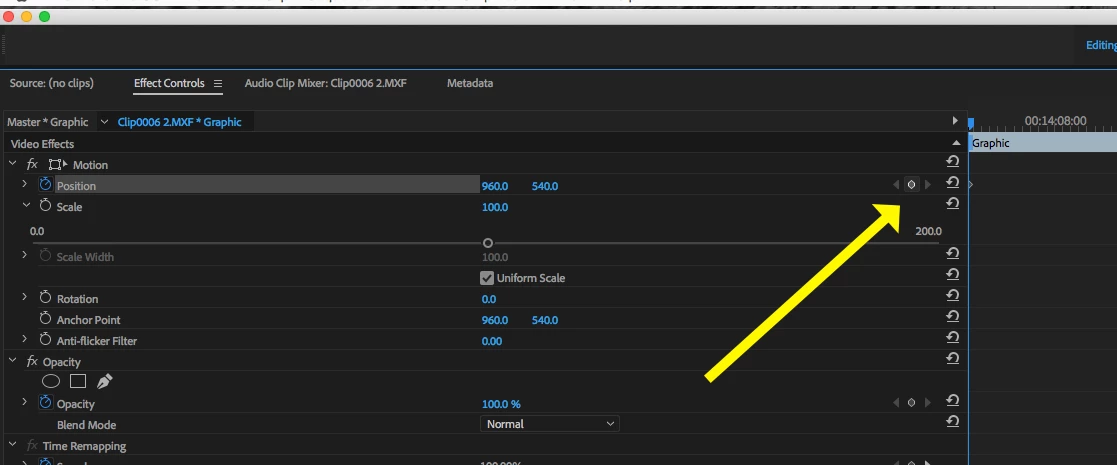
Once you have keyframes for the animation, clicking on the Animation toggle will potentially remove any keyframes you have for that parameter - which is why you get the warning.

MtD

3 replies

Participant
February 11, 2022

We understand.
Still looking for a way to turn this warning off as it's disruptive when amending long-form with previous animated camera moves!  Turning this warning off (like in AE) would save a few hours over a year.

Community Expert
August 12, 2018

To add to what MTD said, you only have to toggle the animation for a certain property once,

then when you move in the timeline (both the effects control timeline or the actual timeline),

and change the value for that property you toggled the animation for, this will automatically

create a new keyframe with the new value. Your animation will play between those 2 keyframes.

Meg The DogCorrect answer
Inspiring
August 12, 2018

Why are you toggling the Animation on and off? You only need to do this once, to turn on keyframe animation. Once it is toggled on, you add additional keyframes via the Add/Remove Keyframe button:

Once you have keyframes for the animation, clicking on the Animation toggle will potentially remove any keyframes you have for that parameter - which is why you get the warning.

MtD

Legend
August 12, 2018

I think what you want to do is

1) adjust keyframe to make it do what you want

or

2) delete keyframe ..which will throw off the others in terms of the 'curves' already created...but you can then add another one and try to fix your problem.

It's hard to do... to make the timing and motion and opacity or whatever the keyframe is doing to behave properly but with patience and choices ( ease in, ease out, Bezier, etc. ) it can be done.

good luck !