
Exit
  • Global community
    • Language:
      • Deutsch
      • English
      • Español
      • Français
      • Português
  • 日本語コミュニティ
  • 한국 커뮤니티
8

Language pack download for transcription

Community Beginner ,
Mar 20, 2023 Mar 20, 2023

Hello, I am trying to transcribe a sequence in Russian, I need to download the language pack and when I do, it just doesn't download even if I leave it for many many hours, the bar just doesn't move, any idea of what can I do or an alternative way?


Thank you
TOPICS
Error or problem
11.2K
Translate
Report
Community guidelines
Be kind and respectful, give credit to the original source of content, and search for duplicates before posting. Learn more
community guidelines

correct answers 1 Correct answer

Adobe Employee , Mar 21, 2023 Mar 21, 2023

Hey Jose,

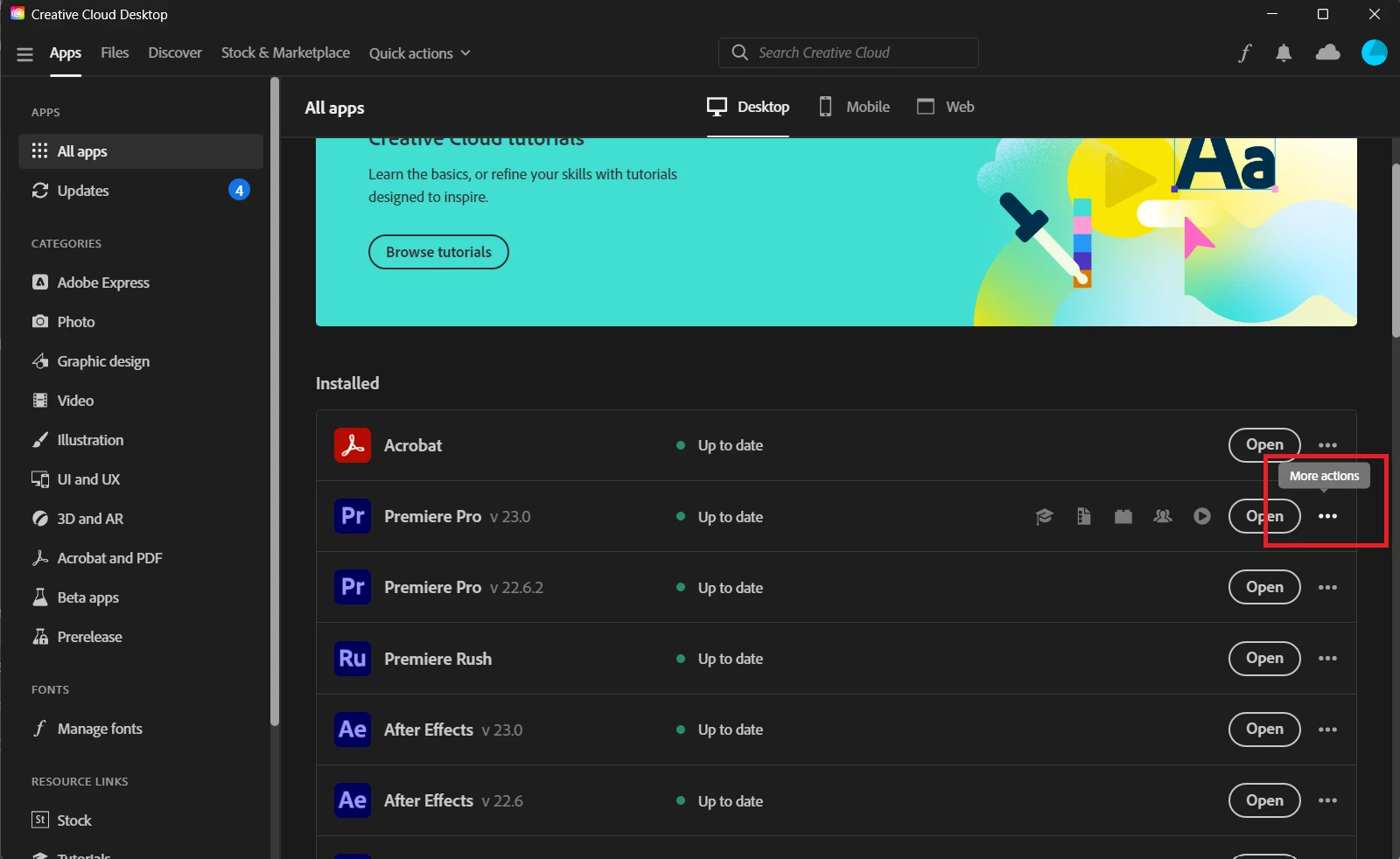
Welcome to the community. I'm sorry to hear about this. Could you go to the Creative Cloud Desktop App > All Apps > click on the three dots next to Premiere Pro > Add-ons and click on the Add button next to the Russian language pack?


CCDA more actions.png


If that does not work, please check if the Creative Cloud Desktop App is up to date. You can do so by opening the hamburger menu in the upper left corner and clicking Help > Check for Updates. Let us know how it goes.


Thanks,

Ishan


Translate
Adobe Employee ,
Mar 21, 2023 Mar 21, 2023

Hey Jose,

Welcome to the community. I'm sorry to hear about this. Could you go to the Creative Cloud Desktop App > All Apps > click on the three dots next to Premiere Pro > Add-ons and click on the Add button next to the Russian language pack?


CCDA more actions.png


If that does not work, please check if the Creative Cloud Desktop App is up to date. You can do so by opening the hamburger menu in the upper left corner and clicking Help > Check for Updates. Let us know how it goes.


Thanks,

Ishan


Translate
Report
Community guidelines
Be kind and respectful, give credit to the original source of content, and search for duplicates before posting. Learn more
community guidelines
Community Beginner ,
Mar 22, 2023 Mar 22, 2023

Perfect, seems to work, thank you very much

Translate
Report
Community guidelines
Be kind and respectful, give credit to the original source of content, and search for duplicates before posting. Learn more
community guidelines
Adobe Employee ,
Mar 22, 2023 Mar 22, 2023

Happy to help! Feel free to reach out if there's anything else we can help you with.

Translate
Report
Community guidelines
Be kind and respectful, give credit to the original source of content, and search for duplicates before posting. Learn more
community guidelines
New Here ,
Jun 20, 2025 Jun 20, 2025

its not working for me


Translate
Report
Community guidelines
Be kind and respectful, give credit to the original source of content, and search for duplicates before posting. Learn more
community guidelines
Adobe Employee ,
Jun 24, 2025 Jun 24, 2025
LATEST

Please create a new post in the Premiere Pro community. Screenshots and a description of the issue will help us suggest a solution for you.

Translate
Report
Community guidelines
Be kind and respectful, give credit to the original source of content, and search for duplicates before posting. Learn more
community guidelines