

Nick Lear
Inspiring
September 2, 2021
Question

Large number of Captions locking up Premiere

  • September 2, 2021
  • 5 replies
  • 5628 views

I am working with some long interview where I've got an SRT caption file for them so I can cut line by line. I drag the srt onto the timeline and create captions. There are about 800-900 captions usually. Lots of languages, but it doesn't affect it.

I am finding it grinds Premiere to a halt. Not literally, but makes it run at about 10%. So for example moving files around in the Project Panel or anything I want to do. Click on something, 4 seconds later it takes. Hit in point, 4s later it appears.

In Task Manager, nothing is maxing out. I do have a lot of Adobe CEP MTML Engines.
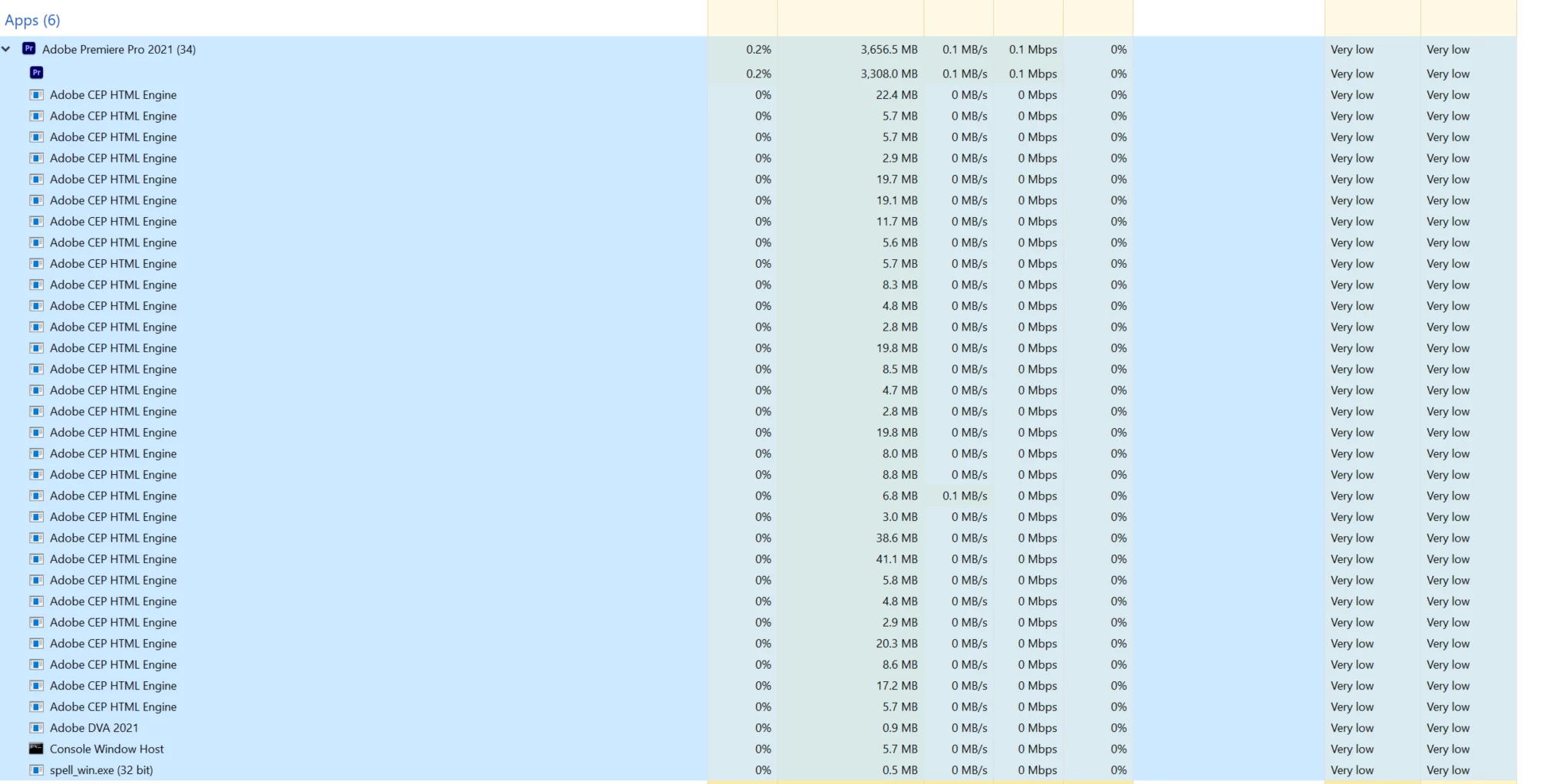
 

If I delete the caption track, Premiere goes back to normal. If I close the sequence, Pr goes back to normal. If I cut it down to say 200 captions, the problem remains. In a quick test I found cutting it down to 35 captions cut the delay to minimal. Cutting the captions to 15 took the problem away completely. The test sequence was with Chinese captions. Similar with English captions. The delay got less as the number of captions went down.

Windows 10, TR 3960X, 128GB RAM, 2060S 8GB VRAM. Pr 15.4.1 (Build 6)


This topic has been closed for replies.

5 replies

Participant
December 8, 2021

Thanks for drawing attention to this. 

- I created a short-cut for "HIDE ALL CAPTIONS" and this workaround is great.

- I was wondering in the new captions window, is it possible to bring in a .txt with the time-code sound bites or another file type besides .SRT? I wonder if you just create captions within Premier it will run smoother without a .SRT file in the captions track? 

Nick Lear
Nick LearAuthor
Inspiring
October 17, 2022

In case anyone finds this thread, I want to add another possible workaround which is to turn off "Show Duplicate Frame Markers" via the spanner in the timeline. That is an alternate to hiding the caption track.

I am still seeing this issue on and off as far as 22.5 with a large number of captions so I hope it gets fixed in v23

Stan Jones
Community Expert
Community Expert
October 17, 2022

Thanks, Nick.


Did you try 22.6.2?


Yes, here's hoping for improvement in V23 for those who still suffer from this slowness!


Stan


Nick Lear
Nick LearAuthor
Inspiring
October 27, 2021

Quick bit of testing on v22 and it seems to not have been fixed which I'm a bit sad about, though I know everyone has their own thing and you can't do everything. I posted a uservoice for what it's worth. https://adobe-video.uservoice.com/forums/911233-premiere-pro/suggestions/44359467-large-number-of-captions-slows-down-the-whole-appl

There's a chance that it'll be different starting a project in 2022 rather than opening a 2021 project, I'll be able to see in time.

Participant
October 14, 2021

"Hide all caption tracks" under the CC button.  You can't slide the captions around but you can still edit them.  Elimated all the lag for me 

Nick Lear
Nick LearAuthor
Inspiring
October 20, 2021

Just came here to post the same workaround that someone posted on the main Facebook group. Works like a charm - obviously not great when you need to edit them, but for a captioned foreign language interview it's great to have.

Nick Lear
Nick LearAuthor
Inspiring
October 20, 2021

* edit the timing I mean - it does still work to edit the actual text in either the Text panel or the program monitor.

Stan Jones
Community Expert
Community Expert
September 2, 2021

Thanks for reporting what you have tried and the results. Can anyone tell us what all these CEP instances are? Might that be an issue in these caption performance issues? @Trent Happel @Kevin-Monahan 


Are you already editing in the Program Monitor? Here's a thread from a user where the delay was in viewing the Text Panel. The Text Panel tends to be "on" by default, but you can close it.

https://community.adobe.com/t5/premiere-pro-discussions/captions-reverting-to-empty-quot-new-caption-quot-when-editing-another-caption/m-p/12358251#M365698


Also, some users report it helps to zoom in on the timeline so fewer captions are visible. 


Let us know.


Stan


Participating Frequently
September 3, 2021

I think the Caption performance issue and the CEP HTML Engine instances may be separate issues (as I see reports of other CEP HTML issues in other Adobe products). By any chance does the suggestions in the following Help doc help out with CEP HTML Engine? - https://helpx.adobe.com/lu_en/x-productkb/global/high_cpu_usage_cephtmlengine.html


For the Caption performance issues, would it be possible to send us your Project that exhibits this issue? We shouldn't need any media, as the Project contains the Caption data.


Thank you.

Nick Lear
Nick LearAuthor
Inspiring
September 2, 2021

If I nest the whole sequence with 900 captions into another sequence, the problem goes away, so that's my workaround for now. But it means I can't see the captions in the text panel.