
Known Participant
July 11, 2021
Answered

Left and right audio the same level

  • July 11, 2021
  • 2 replies
  • 17964 views

Hi all,

My audio is not equal, the left sound is much louder than the right sound.
I looked on YouTube and it says to use the audio effect Fill left with right or Fill Right with left.
I do this but nothing changes in my audio!

Anyone experience with this problem? is there a setting in Adobe Premiere wrong?
By the way, I'm using Adobe Premiere Pro 2020
This topic has been closed for replies.
Correct answer Byron Cortez

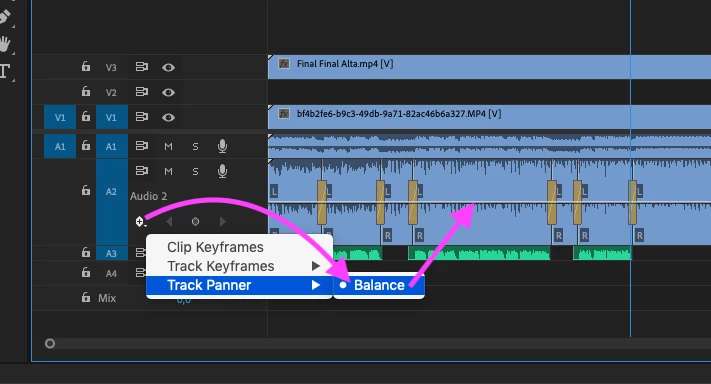
Option 1: If the audio of each channel is different, you could use the Panner of the track to try to level the volume of both and then raise the decibels so that it is not so low.  


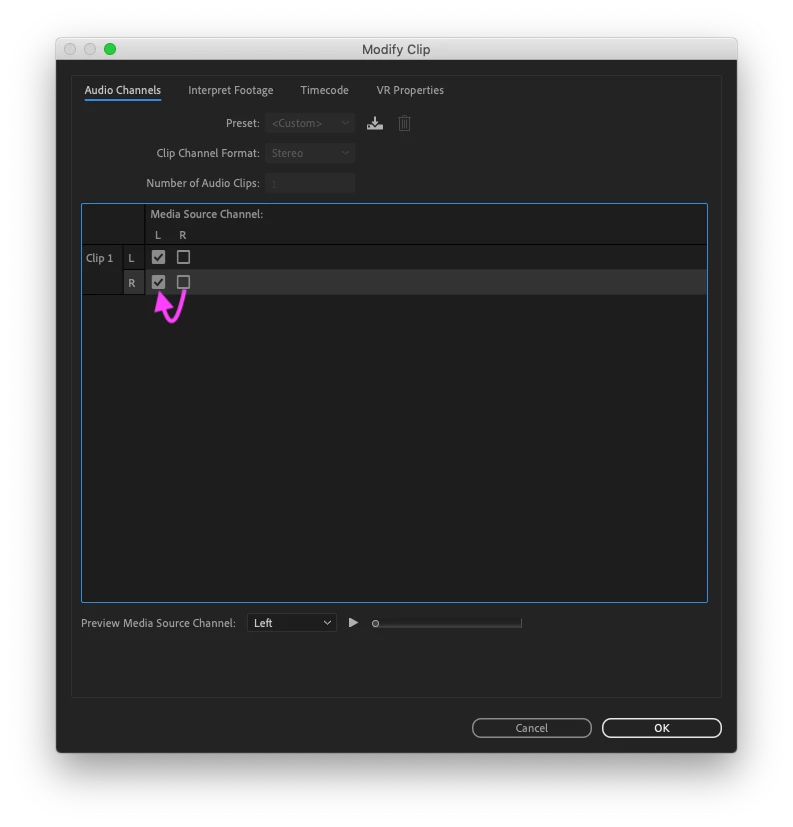
Option 2: If the audio on both channels is exactly the same, you can right-click the clip in the Timeline / Audio Channels and set the channel that is good on both channels.

I hope this helps.


2 replies

Byron CortezCommunity ExpertCorrect answer
Community Expert
July 11, 2021

Option 1: If the audio of each channel is different, you could use the Panner of the track to try to level the volume of both and then raise the decibels so that it is not so low.  


Option 2: If the audio on both channels is exactly the same, you can right-click the clip in the Timeline / Audio Channels and set the channel that is good on both channels.

I hope this helps.


Byron.
MikeJoowAuthor
Known Participant
July 11, 2021

Yes it works, there are something not good in the audio options.

Thanks everyone 

Community Expert
July 11, 2021

You're welcome! 

Byron.
Community Expert
July 11, 2021

Could you post a screen shot of your track mixer.