
Participant
August 21, 2023
Answered

Legenda premiere pro não aparece a opção "preferencias de transcrição"

  • August 21, 2023
  • 1 reply
  • 4804 views

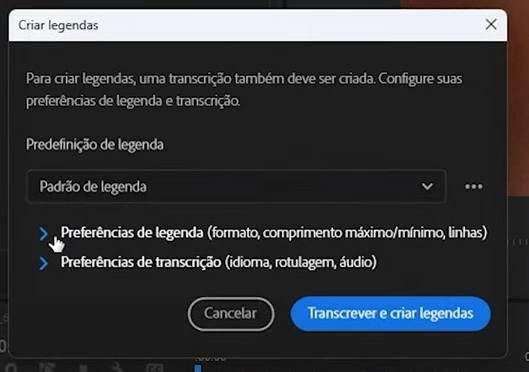
Legenda premiere pro não aparece a opção preferencias de transcrição, com isso utilizo o premiere pro em inglês a legenda sai em inglês não sendo possível alterar o idioma para portugues brasil. Algumas versões atrás era possível , mas na atual 23.6 não é
This topic has been closed for replies.
Correct answer Stan Jones

Your first screenshot is the Create Transcript dialogue. It has the language option.


Your second screenshot is Create Captions dialogue. It does not have a language option. It uses the transcript, in the language used to transcribe.


In the newer versions of PR (23.4 and newer), the auto-transcription does not show the transcribe dialogue. You must set the language ahead of time in the Transcription preferences.


To re-transcribe, right-click the source media in the Project Panel and pick "re-transcribe."


Stan


1 reply

Stan Jones
Community Expert
Stan JonesCommunity ExpertCorrect answer
Community Expert
August 22, 2023

Your first screenshot is the Create Transcript dialogue. It has the language option.


Your second screenshot is Create Captions dialogue. It does not have a language option. It uses the transcript, in the language used to transcribe.


In the newer versions of PR (23.4 and newer), the auto-transcription does not show the transcribe dialogue. You must set the language ahead of time in the Transcription preferences.


To re-transcribe, right-click the source media in the Project Panel and pick "re-transcribe."


Stan


Participant
February 21, 2024

Isso não funciona. mesmo selecionando o idioma nas preferências a transcrição continua com problemas!! inclusive a opção retranscrever não fica ativa.

Stan Jones
Community Expert
Community Expert
February 22, 2024

Rick,


Please post a screenshot.


Stan