Participating Frequently
January 31, 2018
Answered

logiooptions panel pops up

  • January 31, 2018
  • 17 replies
  • 97171 views

In premiere cc (v 12.0.0) a small panel keeps poping up. Any Ideas how to permanently remove it?
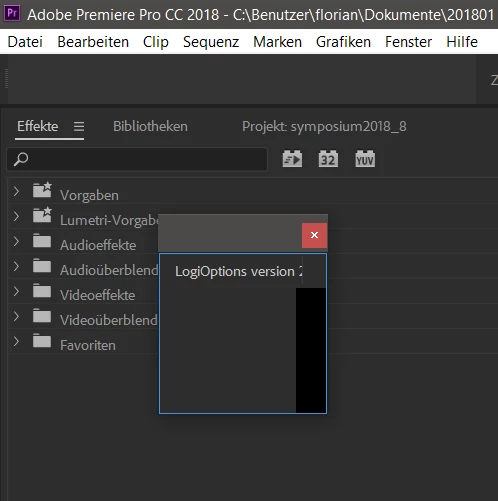
Thanks for you help with this!

Florian

This topic has been closed for replies.
Correct answer Dan McSweeney

Thanks Dan! I'm sure that when you figure out the fix it will work with the entire Logitech line that utilizes LogiOptions Software.  As I do not own a Craft Keyboard (Yet....Lol), But I do own the MX Ergo Trackball.  If you need anything from my end (i.e. Log Files, etc.), Let me know.


Update after speaking with Logitech, and testing with a Logitech Craft Keyboard:


Summary: Close the logitech panel, close Premiere Pro, relaunch Premiere Pro, the panel will remain hidden - but still function.


Details: Logitech Options, or LogiOptions, is software that gets installed with your Logitech device.

If you have one of these 3 devices, though, Craft Keyboard, MX Master 3 (mouse) and MX Anywhere 3 (mouse) then Logitech will prompt you to install a CEP panel (Common Extensibility Protocol - meaning that a Logitech developer has written a panel extension, aka plugin, to create additional usibility with specific Adobe applications, like Premiere Pro)


That panel is designed to run hidden in the background. Right now, for example, the scroll wheel on my Logitech Craft keyboard allows me to jog through my sequence in the timeline - and I do not see the panel. HOWEVER - if I went to Window> Extensions> LogiOptions > v8.xxx,  that tiny panel will appear. And closing it will cause my Craft keyboard to stop its special functions within Premiere Pro. The solution is to not relaunch the panel, but to close Premiere Pro with the panel closed, and then reopen Premiere Pro. The panel will remain hidden, but the Logitech keyboard will continue to provide its special Premiere Pro functions.


If you do not have one the 3 Logitech devices listed above, @suginuma 's suggestion of removing the CEP panel is also valid. For example, @CrosstownAlliance-KMiller you write that you have an MX Ergo Trackball - there is no additional functionality for your device provided by the CEP panel; hide or remove the panel.

Thanks for you patience on this, and stay safe,

-Dan


17 replies

4tay
Participant
April 16, 2020

Just uninstall Logitech - hub software. I use Logitech mouse and I never had any issues until I installed Logitech-hub, I uninstalled it and everything went back to normal.

Known Participant
July 22, 2019

This came back in my 2019 version of Premiere. Anyone know any idea why? Also if I delete or rename the folder will my Logi options shortcuts still work?

Ann Bens
Community Expert
Community Expert
July 23, 2019

JDI!

Parksite Karl
Inspiring
September 5, 2018

This just started happening to me just today.

I used suginuma suggestion and it appeared to work.

However, I am also having an issue downloading a motion graphic from Adobe Stock.  It appears that these are somehow connected.  When I tried to redownload the graphic from the Essential graphics panel, the media never downloads and the LogiOptions panel is back, even after being removed from the directory.

Any help would be great.

marcelock
Participating Frequently
December 22, 2018

Same thing here, the problem started when I imported a graphic motion preset.

I was using Logitech Options before, but the error only started after installing the preset.

Extra info:

Logitech Options version 7.10.3 (latest version on 12/22/18)

Premiere Pro CC 2019 version 13.0.1 (Build 13)

Error window text: LogiOptions version 7.00.5.0

Eric Dumas
Community Expert
Community Expert
May 8, 2020

I have the same issue in Illustrator. I don't mind it, I just would like to know what benefits does it bring?

Participant
July 27, 2018

LogiOptions extension exists in the following path.

C:\Program Files\Common Files\Adobe\CEP\extensions\LogiOptionsAdobe

You can move the LogiOptionAdobe folder from this folder to another folder.

Then, the LogiOptions panel has disappeared from Adobe application in my case.

You need not uninstall.

Participant
July 30, 2018

I think this actually worked!!!

Participant
April 6, 2018

Hi

got the same, closed Adobe Premiere Pro CC and Creative Cloud. Then opened Logitech options and Restored defaults. Opened Creative Cloud then Premiere Pro CC --> no more Panel

Le_oN

kulpreet singh
Inspiring
January 31, 2018

Hi Florian,

I haven't seen this error before.

Do you have an external Logitech keyboard or mouse connected to your machine?

Thanks,

Kulpreet Singh

fgeierstAuthor
Participating Frequently
January 31, 2018

Yes, I have both Logitech keboard and mouse connected and also installed a software called "Logitech Options" in version 6.72

Strangely the panel that opens in Premiere CC is labeled "LogiOptions version 2.20.80"

Florian

Ann Bens
Community Expert
Community Expert
February 2, 2018

I have the same issue and it's really annoying.

I have the latest CC 2018 version installed.  Can't uninstall the Logitech Options software because we need that to use the mouse.


I had an issue with the logitec mouse.

Reinstall the mouse software.

Ann Bens
Community Expert
Community Expert
January 31, 2018

MIght want to update to 2018.0.1.