Inspiring
August 21, 2017
Answered

lose saturation upon export

  • August 21, 2017
  • 2 replies
  • 5959 views

lose saturation upon export

Also I'm not familiar with lumetri and I cannot

figure out how to desaturate red only where it

is so simple in photoshop.

prpo 2017.1.2
    This topic has been closed for replies.
    Correct answer Steve Zeeeee

    I doubt that you're running a properly calibrated monitor ... do you have something like the i1 Pro Xrite or the Spyder system available?

    One of the ​biggest​ problems with broadcast TV, satellite, and web video is that very few 'screens' are actually calibrated decently. Colorists deal with this all the time ... they have to deliver programs that can pass the automated QC systems, one pixel over/under either saturation or black/white levels, the whole program is rejected. But once it goes out over the b-cast system, whether to tv's or "devices" or computer screens, no one has control. And most amateur-use gear and players are designed to "enhance" the viewing experience ... over-saturated in one or more color, gamma either to bright or dark ... black & white levels rarely set close to proper.

    To deliver something that will look at least ​appropriate​ on any given viewer's screen, given how that screen shows other material, the job of someone producing content is to get as close to down the middle straight standards as possible. Then your material will look the same on any screen as other professionally prepared material.

    If you don't have a setup to control your own viewing to somewhere close to standard, there is no way on the planet you can deliver material that will somewhat match the other material seen by the viewer. Therefore, yours ... is wrong.

    Set the monitor for sRGB, calibrating with puck & software for Rec. 709. Typically a screen brightness of 120cd/m2.

    Set the gamma to 2.2 or 2.4 depending on your viewing condition ... if you're in a fairly bright room and/or all your material is going to the web, probably 2.2; if you're in a light-controlled moderately dim room, and/or doing anything for tv use (b-cast or DVD/BluRay) then probably set the gamma to 2.4.

    It's best if the wall behind the monitor is neither particularly bright nor has any color ... neutral gray is good. A very low saturated but low-lit fairly neutral tone may be ok.

    With it all set up right, there will be a full range of black to white in the output ... this is what all tv shows are produced in ... and most DVD/BluRay content also. You get full range data there, right? If your monitor doesn't show that in PrPro, then you're not set up correctly.

    And what happens later if you look at video material produced under proper conditions with improperly set up gear? Then your material will look exactly like all other professionally produced material on that gear.

    But from you comment as to "euwww" and suddenly low contrast, you clearly don't even have that rig set up close to correct.

    Neil


    ok yes i am properly calibrated, but I have 2 ways to access

    sRGB monitor viewing.  The easy way I did was a SIMULATION,

    unknown to me = WRONG. Actually engaging sRGB puts me on

    board with all your suggestions.

    Thanks ~!

    2 replies

    Kristian Gabriel
    Participating Frequently
    August 22, 2017

    Losing saturation on export can also be attributed to the file format and settings you are using. Highly compressed file formats can remove quite a bit of color--sometimes targeting specific colors more. Here are some possible issues causing your problem:

    • When exporting--go to your Video Settings and uncheck "Render Maximum Depth". This enables greater than 8-bit color depth. While this sounds great--it can screw up color in exports--especially when exporting for web or highly compressed formats.

    • You can use the Lumetri Panel to over-saturate your media and maybe it will "settle" to an acceptable saturation

    • Check your that your video card is up to date and calibrated correctly. Color can vary across applications and your open OS depending on video card settings and various version updates.
    Inspiring
    August 22, 2017

    • When exporting--go to your Video Settings and uncheck "Render Maximum Depth". This enables greater than 8-bit color depth. While this sounds great--it can screw up color in exports--especially when exporting for web or highly compressed formats.

    • You can use the Lumetri Panel to over-saturate your media and maybe it will "settle" to an acceptable saturation

    • Check your that your video card is up to date and calibrated correctly. Color can vary across applications and your open OS depending on video card settings and various version updates.

    ok, did all this, No Go. 
    Thank you for this advice.
    Got more?

    top is exported, bottom is PPro original

    R Neil Haugen
    Legend
    August 23, 2017

    ugh, how can I just force the saturation into the project?

    never before...

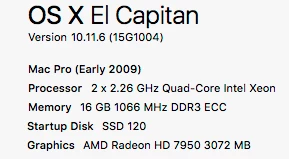
    where would the control panel be and what do we do there?

    Chipset Model: AMD Radeon HD 7950

      Type: GPU

      Bus: PCIe

      Slot: Slot-1

      PCIe Lane Width: x16

      VRAM (Total): 3072 MB

      Vendor: ATI (0x1002)

      Device ID: 0x679a

      Revision ID: 0x0000

      ROM Revision: 113-E2080C-101

      EFI Driver Version: 01.00.624


    As Chris has noted, the problem is two-fold:

    1) Using the wrong monitor color space. "Pro" video is mostly in the Rec.709 standard, which is designed around using the sRGB color space. If your monitor is run using an Adobe RGB profile, that's going to cause issues right there. You need to have that monitor in sRGB for video work. Currently. Unfortunately, as you can't change PrPro's color space, anything you color-correct or even set darks/lights in PrPro with the monitor set for Adobe RGB will not be correct ... on about anything.

    2) QuickTime player uses a partial adoption of Rec.709, from the very early stages of adoption of that standard, where it was assumed that unless a video file included tags saying that it was in 0-255 and with the "standard" gamma of Rec709, it was holdover media from video tape days, 16-235 and with a slightly different gamma.

    So playing a standard Rec709 file in QuickTime will be played by that player as a 16-235 (or occasionally 16-255) file with a raised gamma ... meaning your blacks are now up to a moderately dark-ish gray, your midtones brighter, and color looking very desaturated.

    Exactly what you're getting here.

    So ... get the monitor set for sRGB, calibrated by some sort of external puck & software, then you can start doing tonality/color corrections with some confidence that they'll be fine out of PrPro. Re-import into PrPro on export (there's a little check-box in the Export dialog box to do this automatically) and you can verify the quality of your export.

    And ... for viewing files out of PrPro, Potplayer or VLC are often recommended among the basic video players.

    Chris nailed the problems, you see.

    Neil

    Everyone's mileage always varies ...
    Warren Heaton
    Community Expert
    Community Expert
    August 22, 2017

    Photoshop has PR beat hands down on his one, but you can do it.

    Locate the Hue Saturation Curve color wheel under Curves.  To reduce the reds, click the red circle swatch just below the color wheel. This adds three points along the path in the color week at the reds (you can also place these manually).  Then, click and drag the middle point down to reduce the reds.  You can reset the Hue Saturation Curve in the Effect Controls panel.

    -Warren

    Inspiring
    August 22, 2017

    https://forums.adobe.com/people/Warren+Heaton  wrote

    Photoshop has PR beat hands down on his one, but you can do it.

    Locate the Hue Saturation Curve color wheel under Curves.  To reduce the reds, click the red circle swatch just below the color wheel.

    yeah that's the ticket, altho export loses saturation still.