
brianw6721740
Participant
February 21, 2019
Question

lost frame of audio after rendering

  • February 21, 2019
  • 2 replies
  • 1113 views

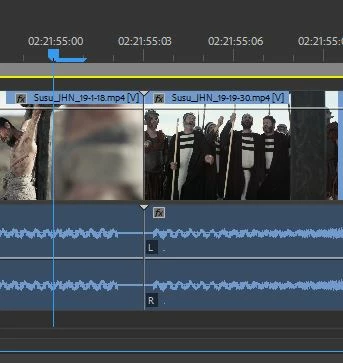
It seems that after I render a series of sequences to MP4's and then put the rendered files together in a new timeline, where the files butt up against each other there is a frame of audio missing. There is no frame of video is missing, just the audio has dropped out.  What makes this very annoying is that where the files connect the audio needs to carry through (as in music or natural sound).   The image below shows the audio dropout.   If you have any idea way causes this I would sure love to here from you.  Brian White
   

This topic has been closed for replies.

2 replies

Legend
February 21, 2019

I would not recommend using MP4 for continued editing.

Instead, choose QuickTime as the Format and Cineform YUV 10 bit as the Preset.  These will work better for continued editing.

brianw6721740
Participant
February 22, 2019

Why would I want to export using QuickTime when Adobe and Apple will no longer be supporting that platform?

Legend
February 23, 2019

That's a good question.  I'm not a fan of QuickTime myself and I always recommend one avoid it whenever possible.

But I am a huge fan of Cineform, and at the moment, it's not available from PP as AVI or MXF files.  So we're stuck with QuickTime.

The reason you want Cineform is that it's a significantly better editing codec over H.264.

Inspiring
February 21, 2019

brianw6721740  wrote

It seems that after I render a series of sequences to MP4's and then put the rendered files together in a new timeline, where the files butt up against each other there is a frame of audio missing.

Return to the sequences that you used to "render" the new clips from and verify that the audio extends the same duration as the video.

If not, fix and re-export.

MtD

brianw6721740
Participant
February 21, 2019

Thank you but have done that numerous times.  Pre-rendered sequence is perfect.  This is something that seems to happen in the rendering process.