
December 19, 2023
Answered

Loudness Meter in Multitrack for Broadcast

  • December 19, 2023
  • 1 reply
  • 3832 views

I need to work in a Multitrack Sequence to Output eight channels for broadcast and be able to do track routing. Now I like to work with the Loudness Meter effect as well. But I am afraid the Loudness Meter measures Loudness of all eight tracks. Can I set the effect to use only the first stereo pair of my eight tracks? Or do I need to create a submix and apply the effect there?

At the bottom of the window of the loudness effect I can see "In: L, R, C, LFE, LS, LR..." So its definitely monitoring ALL Channels.
This topic has been closed for replies.
Correct answer Richard M Knight

Thanks a lot Richard!! 🙂

I can even set the channel layout of the master to two channels during the edit and so the effect is fine and switch back for export. 🙂 

I loved the radar effect some years ago - its a pity that it had been replaced by the loudness meter.

I guess for licesing reasons?

Is there any way to get it back in the latest premiere version? 

Can I reinstall it somewhere?


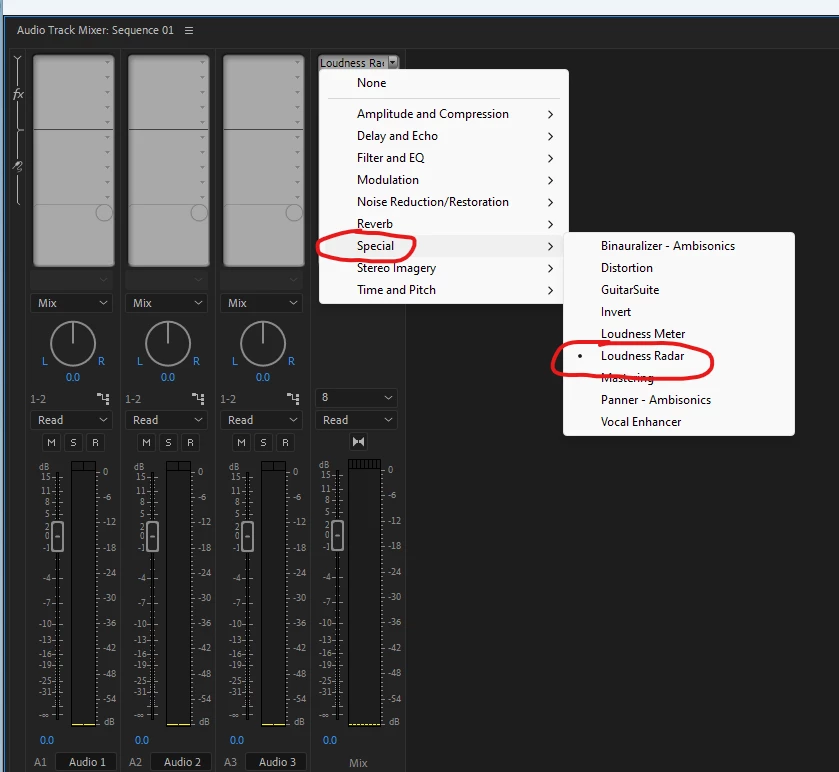
I have Loudness Radar on my Windows system, perhaps it is missing on a Mac

 Prmeiere Version 24.2.0 Beta


1 reply

December 22, 2023

Could someone frome adobe clarify how loudness is measured on a multichannel master track and if its possible to measure only the first two tracks as a stereo pair? Thanks for your help!

Community Expert
December 22, 2023

The channel map editor in the radar effect might give you what you want:


December 22, 2023

Thanks a lot Richard!! 🙂

I can even set the channel layout of the master to two channels during the edit and so the effect is fine and switch back for export. 🙂 

I loved the radar effect some years ago - its a pity that it had been replaced by the loudness meter.

I guess for licesing reasons?

Is there any way to get it back in the latest premiere version? 

Can I reinstall it somewhere?