
Participant
July 14, 2019
Question

low quality video after importing and exporting

  • July 14, 2019
  • 2 replies
  • 6659 views

When I import my 4k video into Premiere Pro the quality is very pixelated. Its pixelated when I view it at 100% and after exporting but I know the raw video itself is much higher quality. I am making sure that the size of the video is the same as the size of the frame size. I'm completely at a loss as to why this is all of a sudden happening.
This topic has been closed for replies.

2 replies

Ann Bens
Community Expert
Community Expert
July 14, 2019

You are not suppose to judge image quality at 100%, should look fuzzy but not pixalated.

Post screenshot of clip in mediainfo in treeview

Better yet upload a short clip to test.

Inspiring
July 14, 2019

ilysek96458876  wrote

I know the raw video itself is much higher quality.

How do you know this?

ilysek96458876  wrote

its pixelated when I view it at 100% and after exporting

Are you doing any rendering in the timeline? Are you exporting using Match Sequence Settings?

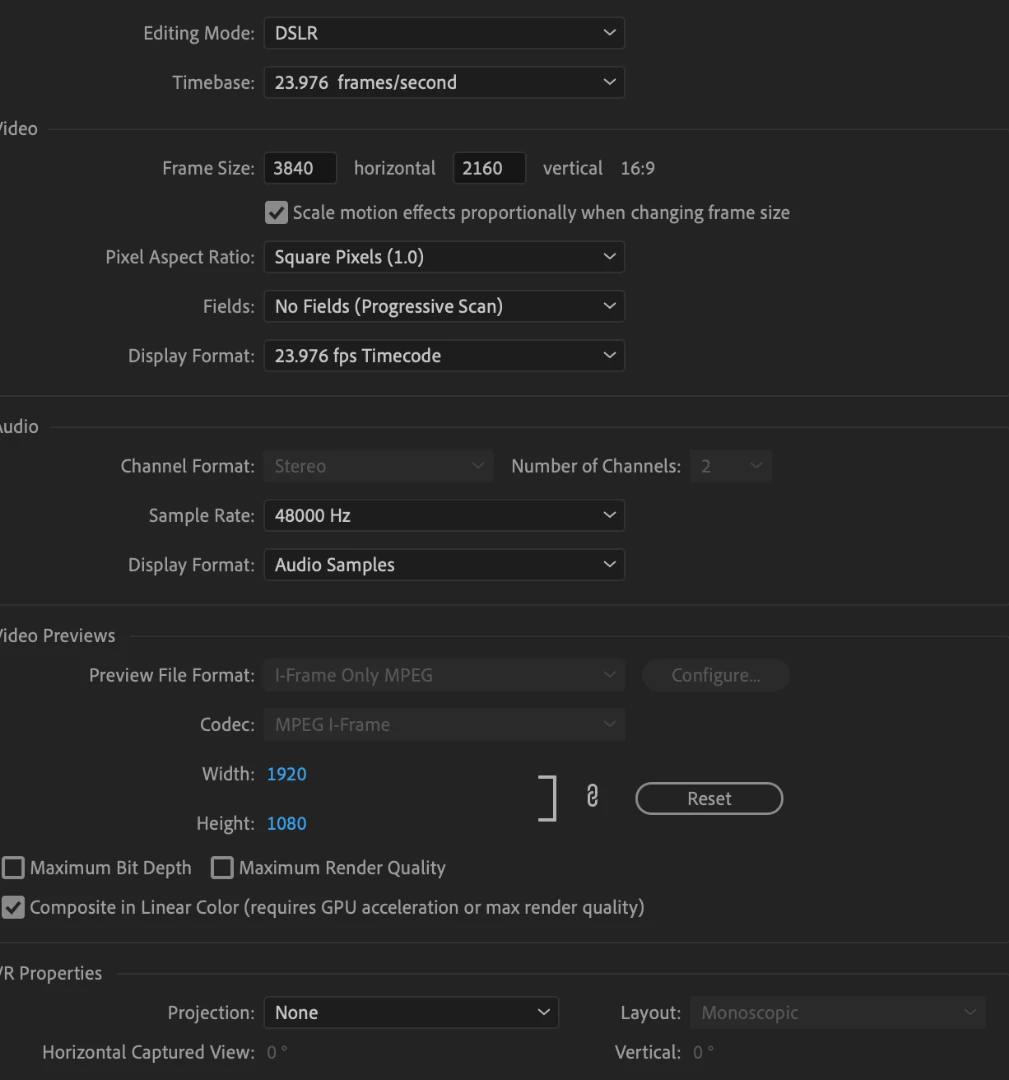
You are using a sequence that will generate render files and export using Match Sequence Settings at 1920x1080:

MtD

Participant
July 16, 2019

Everytime I try to change the video preview size it goes back to 1920 x 1080, any idea how to stop that?

Inspiring
July 16, 2019

In the Sequence Settings, change the editing mode (at the very top) to “Custom“.

You may have to scroll the drop down menu up to find it.

MtD