
Katrina NEI
Participant
June 13, 2024
Answered

Lumetri color (rendered)

  • June 13, 2024
  • 7 replies
  • 699 views

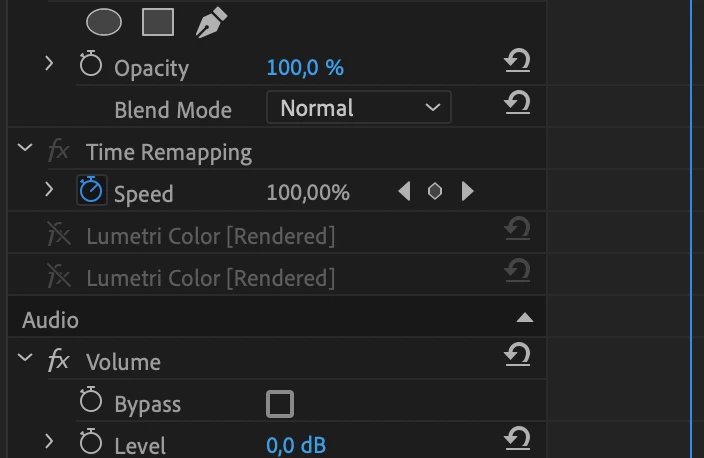
I have Lumetri color (rendered) and can't do anything with clip Lumetri effects, why?

This topic has been closed for replies.
Correct answer Ann Bens

The reason you cannot access the effect is that it's a Render and Replace clip.


Right click on clip : restore unrendered.

7 replies

Ann Bens
Community Expert
Ann BensCommunity ExpertCorrect answer
Community Expert
June 14, 2024

The reason you cannot access the effect is that it's a Render and Replace clip.


Right click on clip : restore unrendered.

Katrina NEI
Participant
June 14, 2024

Thank you so much!

Ann Bens
Community Expert
Community Expert
June 14, 2024

Please look under Help > About Premiere for exact version and build.


Looks like its not beta.

Sorry for the confusion: back to regular forum

Katrina NEI
Participant
June 14, 2024

Premiere Pro 2024

Ann Bens
Community Expert
Community Expert
June 13, 2024

Moved to beta forum


This is something different. fx icon is also grayed out.


@Katrina NEI 

Please next time post the entire UI so we can see what you are doing.

and state excact premiere version and build.

R Neil Haugen
Legend
June 13, 2024

If you go to the Color Workspace so you have the Lumetri panel visible, can you set the toggle icon for on/off there?


As someone who works heavily with Lumetri, the panel is normally far faster and more efficient, plus ... any 'touch' of a clip with the Lumetri panel open applies the effect, so you don't manually apply the effect then change anything. And switching workspaces is easy. I've nine custom spaces.

Everyone's mileage always varies ...
Richard van den Boogaard
Community Expert
Community Expert
June 13, 2024

Do you know what could be the issue here, @Ann Bens?

kglad
Community Expert
Community Expert
June 13, 2024

what app?

Katrina NEI
Participant
June 13, 2024

Premiere Pro 2024

kglad
Community Expert
Community Expert
June 13, 2024

in the future, to find the best place to post your message, use the list here, https://community.adobe.com/

p.s. i don't think the adobe website, and forums in particular, are easy to navigate, so don't spend a lot of time searching that forum list. do your best and we'll move the post (like this one has already been moved) if it helps you get responses.


<"moved from cc desktop">