Participating Frequently
June 22, 2020
Answered

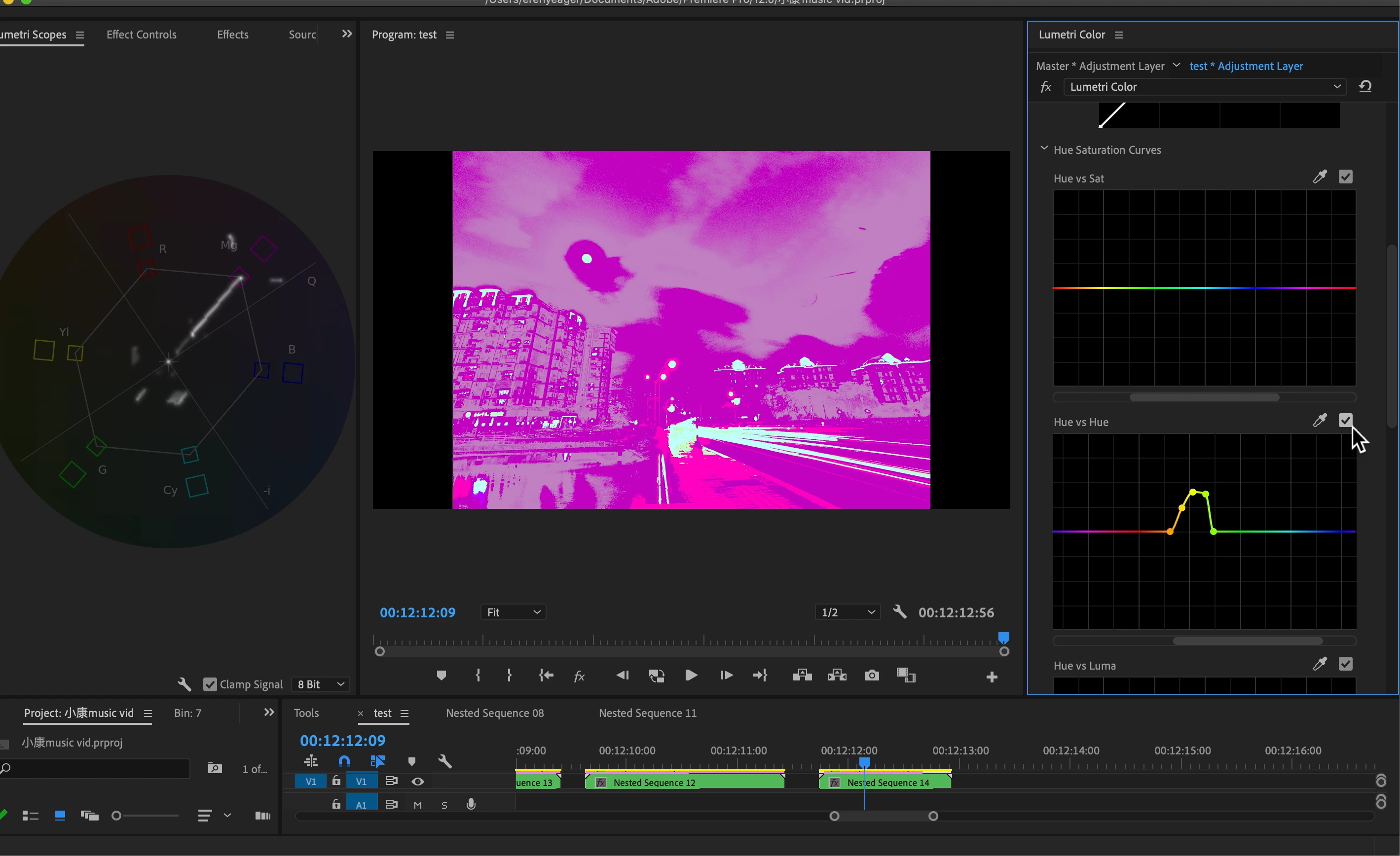
lumetri goes crazy glitches

  • June 22, 2020
  • 3 replies
  • 744 views

so im grading a nested sequence consisting multiple photo timelapses with a adjustment layer. i've put two or three lumetri color effect on it for different HSL secondary and finnally a LUT, some how as i move on with the grading i get these crazy glitches and color shifting and even if i render that it still showed up in the rendered video. using global fx mute will temporarily disappear the glitch but it will show up again in very short time

here is the video:https://youtu.be/W06f1TRn6r4

This topic has been closed for replies.
Correct answer R Neil Haugen

As I pretty much expected ... you're applying bigger and bigger hammers to a rather fragile nail, then shocked .... SHOCKED!!! ... when the nail bends or breaks.


And using a LUT after you've bent the crud out of the pixels of the image is gonna go nuclear, no way around it.


I work with colorists, I teach colorists ... and one of the more common colorist sayings is "LUTs are the dumbest math out there". They are simply a data table saying "take all x:y:z to p2:q:a43 ... take all ... ". Most LUTs have a point at which they break the media involved. Even manufacturer supplied LUTs. So colorists test the heck out of them with tech images and funky color bars and such to find out when they can use them and how.


Your media is not pure plastic that can be molded anywhere you want. Changing pixels is possible, but ... too much or done the wrong way, it breaks rather than bends. You get harsh shifts, induced chroma artifacting and macro-blocking. Banding.


So ... this has been a learning exercise. Great! Now learn, and see what you can do ... and what you can't ...


Neil

3 replies

R Neil Haugen
R Neil HaugenCorrect answer
Legend
June 23, 2020

As I pretty much expected ... you're applying bigger and bigger hammers to a rather fragile nail, then shocked .... SHOCKED!!! ... when the nail bends or breaks.


And using a LUT after you've bent the crud out of the pixels of the image is gonna go nuclear, no way around it.


I work with colorists, I teach colorists ... and one of the more common colorist sayings is "LUTs are the dumbest math out there". They are simply a data table saying "take all x:y:z to p2:q:a43 ... take all ... ". Most LUTs have a point at which they break the media involved. Even manufacturer supplied LUTs. So colorists test the heck out of them with tech images and funky color bars and such to find out when they can use them and how.


Your media is not pure plastic that can be molded anywhere you want. Changing pixels is possible, but ... too much or done the wrong way, it breaks rather than bends. You get harsh shifts, induced chroma artifacting and macro-blocking. Banding.


So ... this has been a learning exercise. Great! Now learn, and see what you can do ... and what you can't ...


Neil
Everyone's mileage always varies ...
Richard van den Boogaard
Community Expert
Community Expert
June 23, 2020

Like Neil suggested, please go through the steps and try to render out each step. My bet is that the problem arises when you add the final LUT. You cannot blame PPro for giving errors on faulty software applied from an external source.

R Neil Haugen
Legend
June 22, 2020

The way you're using those effects, I'm not surprised you're "breaking" your footage. I was watching as you were applying really a massive change in the Hue/Hue panel with a clip that already has you say a LUT, several HSL corrections, and an adjustment layer.


Those HSL curves like you're working there are very fast-acting, and that is a steep and major change you're making there. You've got a nested sequence with a bunch of other things applied. I think you need to step back and figure out where you want to get to, and find a slightly different way of getting there.


I could give some advice if say you showed the starting point, said what you wanted to get to, and listed all your steps in detail.


Neil

Everyone's mileage always varies ...
Participating Frequently
June 23, 2020

alright, take another nightlapse clips as example, it's also a nested sequence of multiple photos, in each step i describe below i'll put a photo of what has been applied to the original clip. here's what the original looks like


First is a lumetri on the nested sequence itself and adjustments in basic correctionand then adjusements in the RGB curves blue channal

 then the HSL secondary to make the sky look more purple


then on the first lumetri of the adjusement LAYER above, only HSL secondary is applied to shift the color of the trees a bit, this very Bright kinda Green is not what I wanted but I know its gonna look Different after I put on A LUT.


then Finally a LUT

I don't have a specific Look in my mind of where i wanted to get to . All these are simply practices and experiment of the things I learnt Online.

here's a video of the process so you can see when the clip goes CRAZY GLITCHES:https://www.youtube.com/watch?v=8Y-n38XEr58

Thank you for the time.